Home/Posts/Tag: Sidekick Hero Blog
29 Dec 2023

Meet A Sidekick Hero: Jim Purtle


By |2023-12-29T08:21:01-08:00December 29th, 2023|Sidekick Hero Blog|1 Comment

From Doug:

Jim has been a loyal friend of DYM for years! He’s got a pastoral heart that comes alongside DYM for our events and also has editing chops and helps us with our DYM pipeline. He’s continually voted as one of the DYM-staff-favorites (although we don’t really vote). He is the Youth Pastor at El Dorado Springs Church of God (Holiness) in El Dorado Springs, MO, where he has served for 21 years (dang, that’s hero status). He and his wonderful wife Cindy have 4 children and their hands full.

(click image to enlarge)

Jim Purtle here, I’ve loved the new Sidekick Live Voting feature, but realized it would be even more fun with a big audience. For our little church, one of the biggest crowds of the year is at our Christmas Eve service (which is attended by around 500 people), so at this year’s Christmas Eve service, we used Sidekick to help with the pre-show before the service started. It was so much fun!

Here’s the setup:
We had a gingerbread-house-decorating contest on the stage, with four pre-selected couples competing for the top prize. We bought the gingerbread houses premade with no decorations, and then we put all the decorating stuff on a table off the stage. The contestants had to run to the table, grab the decorations, and decorate their house the best they could in under three minutes (It was hilarious!)

(click image to enlarge)

We put cheap colored plastic tablecloths on the four tables and matched them to Sidekick’s first four default voting colors: blue, green, red, and purple. (It was handy that those default colors were pretty Christmas-compatible!) Then we put another matching tablecloth under each table as a drop cloth for easy cleanup of any mess at the end of the game.

Note From Doug:
JIM YOU ARE AN ABSOLUTE GENIUS! I LOVE THIS CREATIVITY!

My wife Cindy was hosting the game with Ryan, a guy who graduated from our youth ministry last year. Ryan always hosted games when he was a high school student, so we drafted him when he came home from college to host our pre-show. As always, the hosts and their interaction with the contestants is so important!

We were running a game timer countdown just on a laptop sitting on a table where they could all see, and then we used up our big screens in the room for other stuff! (I used DYM’s Candy Cane Snowflakes countdown, starting at 3:00, because the numbers were huge enough to make up for the small screen we were playing it on.)

On that note, here’s how we did screens and voting:

We have a screen setup that seems to be pretty common to a lot of churches: three large front screens, with separate content on the two side screens vs. the center screen.

So we did…

  • Live camera shots of the teams decorating their gingerbread houses on the two side screens, and…
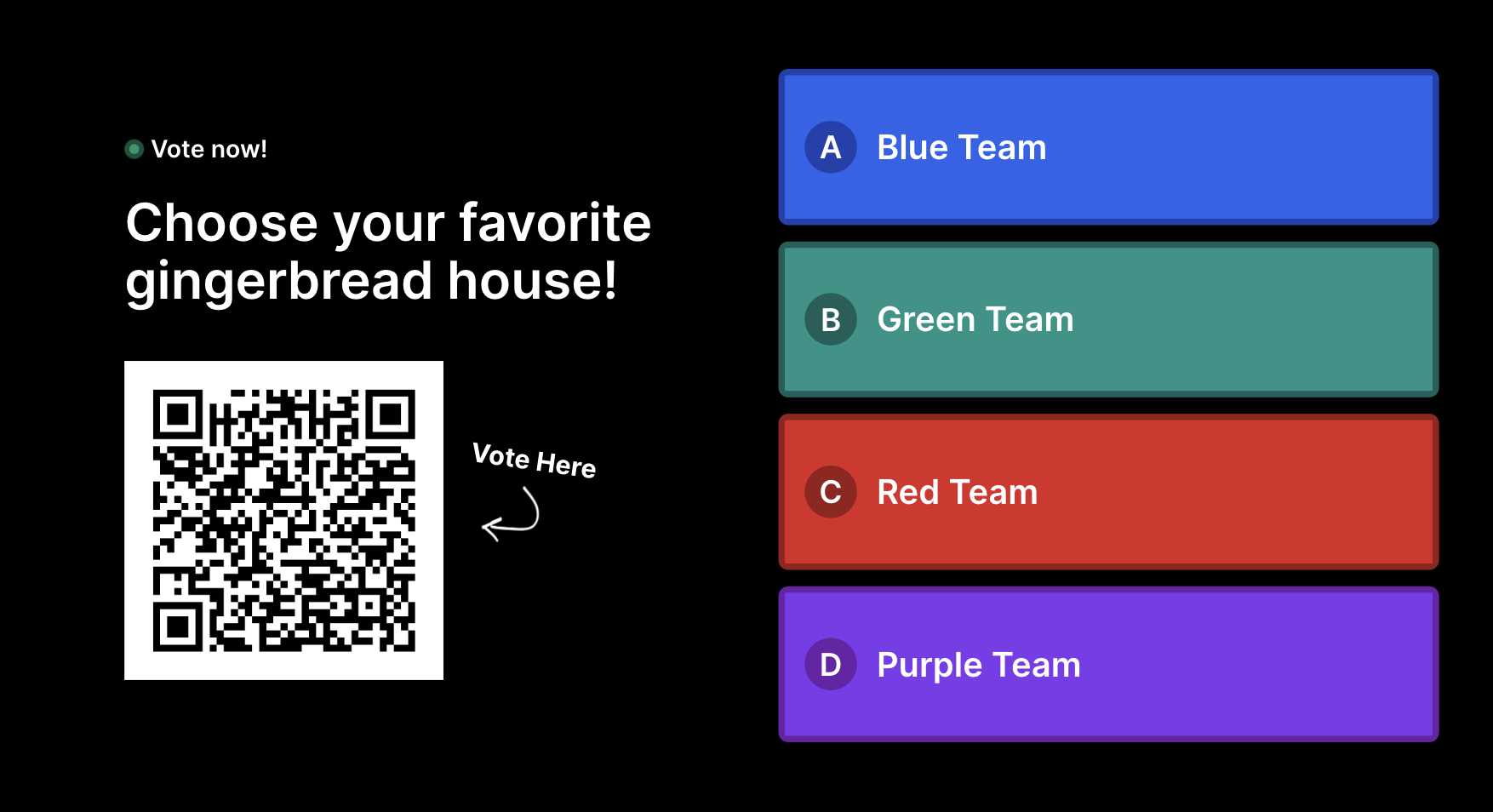
  • The Sidekick Live Voting graphic on the main center screen.
(click image to enlarge)

Since our church is primarily senior-citizens, when the hosts introduced Sidekick’s QR code and the concept of Live Voting, I ran up, pulled out my phone, and showed people exactly how to do it.

Here’s what I actually said (while demonstrating):

“Open your camera, and zoom in on that black and white symbol thingy. DON’T take a photo. Instead, wait until a little link pops up on the screen by the QR code, and tap that. If you’re having trouble, ask a teenager to help you.”

And our hosts made sure to emphasize:

“You only get to vote once, so make sure you’re happy with your vote before you send it!”

We counted down, kicked off the chaos, and took votes. It was so much fun! I can’t wait to find other creative uses for Sidekick in 2024!

Here Are A Few Quick Notes That Might Help Someone Else Who Wants to Do Something Similar:

  • Even with our elderly crowd, we had a strong voting response, and people LOVED seeing their vote tally before their eyes!
  • The option to show the QR code full-screen was very useful for the larger room.
  • If I had it to do again, I’d make sure the color-coded tables were in the same order as the vote graphic (rookie mistake 🤷‍♂️).
  • I got the new DYM Platinum Membership the week before Christmas. It gave me all the live voting capacity I needed on Sidekick, plus literally everything I need for my program budget, volunteer training, and parent seminars for the entire year. They aren’t paying me to say this, but I highly recommend it.

Happy New Year! If you haven’t poked around on this blog yet, I recommend that too–so much to learn from other youth workers!

Blessings,

Jim

If you’re using Sidekick and you run into any issues, or if you just have a question, please feel free to reach out to our support team at: [email protected]. Or you can check out other helpful articles and walkthroughs at the Sidekick Help Desk by visiting https://help.sidekick.tv.

Finally, if you choose to use the new Sidekick… let us know how you do it and what types of polls you do because we want to highlight you. Our goal is to highlight a youth worker every week with different ways they’ve used Sidekick to help their students engage. If you’re interested in being recognized as a Sidekick Hero, just click the big red button below:


If you’re using Sidekick and you run into any issues, or if you just have a question, please feel free to reach out to our support team at: [email protected]. Or you can check out other helpful articles and walkthroughs at the Sidekick Help Desk by visiting https://help.sidekick.tv.

Finally, if you choose to use the new Sidekick… let us know how you do it and what types of polls you do because we want to highlight you. Our goal is to highlight a youth worker every week with different ways they’ve used Sidekick to help their students engage. If you’re interested in being recognized as a Sidekick Hero, just click the big red button below:

27 Dec 2023

How Coleader & Sidekick Work Together

By |2023-12-27T14:42:54-08:00December 27th, 2023|Sidekick Hero Blog|3 Comments

I remember when Coleader first launched almost a year ago. I was immediately blown away by a few features that I considered game-changing at the time:

  • Building a service from scratch (seriously, I still can’t believe how easy this is),
  • Adding call-outs for important notes that I needed our volunteers to see,
  • Moving and reorganizing service elements without any hassle,
  • Choosing which details of the service I wanted to include when I emailed a copy of the service to our small group leaders ahead of time.

In my mind, these features alone made Coleader the obvious choice when it came to planning and building our worship services. But then, this past summer, Coleader launched the Year 1 Roadmap, which included even more incredible features:

  • An annual curriculum that was written, edited, and programmed by youth ministry legends Doug Fields & Josh Griffin and a team of incredibly talented youth ministry veterans,
  • Student Events, Parent Events, and Volunteer Events that somehow manage to think of everything you could possibly need to host a memorable event (I’m looking at you, NEON NIGHT!!),
  • Magic Swap for those moments when the Roadmap Series just doesn’t quite fit the context.

Honestly, at this point, I didn’t think I needed anything else. Coleader was everything I could have hoped for and more.

But then everything changed again with one little button…

Ok, admittedly, the image above isn’t technically “little,” but that’s just because I wanted to make sure everyone understands how incredibly powerful this button is… but first, I want to show you how to find it.

First, you’ll need to be a Coleader Premium or Coleader Premium+ Subscriber. Basically, these subscriptions get you access to a lot of really great features:

  • Coleader Premium:
    • 260 Credits (the equivalent of 26 weeks of programming)
    • 1 Year of Access to Sidekick Essential (includes 5 phone connections for Live Voting)
  • Coleader Premium+:
    • 520 Credits (the equivalent of 52 weeks of programming)
    • 1 Year of Access to Sidekick+Phones (includes 50 phone connections for Live Voting)

Second, once you’re a Coleader Premium or Coleader Premium+ Subscriber, you’ll just need to select a series from the Coleader Year 1 Roadmap and copy it to your account.

And third, open your newly copied series, and then open any session within that series (in the image below, I selected Session 1 from the HABITS Series that released December 1st, 2023). When you do this, you’ll notice a new button that appears that says “Open in Sidekick.”

(click image to enlarge)

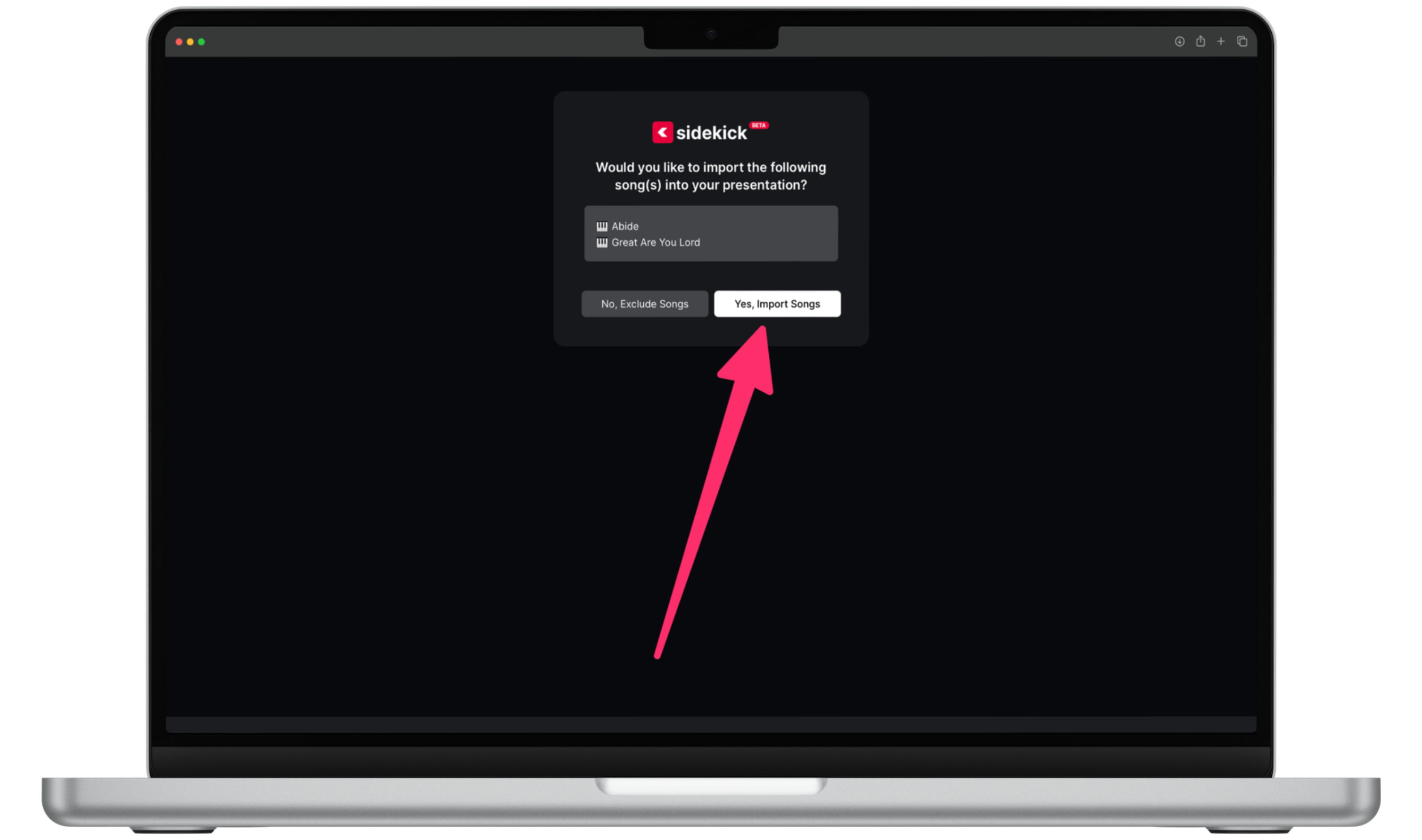
All you have to do is click the “Open in Sidekick” button, and then choose whether or not you want to automatically import the lyrics to the selected songs…

(click image to enlarge)

And before you know it, you’ll be looking at a fully-loaded Sidekick presentation containing EVERYTHING included in your Coleader session! You’ll find countdowns, games, song lyrics, the bumper video, the lesson slides, and even the small group discussion questions! It’s all there, just waiting for you to hit the “present” button!

(click image to enlarge)

…and that’s it!

I know. It feels like there should be more steps or like it should be more complicated, but it just isn’t. Sidekick integration into the Coleader Premium and Coleader Premium+ Subscriptions is just another reason why I’m 100% convinced that Sidekick will be an absolute GAME-CHANGER for you and your ministry.

…Plus, you didn’t hear it from me, but there are a few REALLY BIG Sidekick updates coming out within the next week or so. 🙂 So stay tuned!

If you’re using Sidekick and you run into any issues, or if you just have a question, please feel free to reach out to our support team at: [email protected]. Or you can check out other helpful articles and walkthroughs at the Sidekick Help Desk by visiting https://help.sidekick.tv.

Finally, if you choose to use the new Sidekick… let us know how you do it and what types of polls you do because we want to highlight you. Our goal is to highlight a youth worker every week with different ways they’ve used Sidekick to help their students engage. If you’re interested in being recognized as a Sidekick Hero, just click the big red button below:
If you’re using Sidekick and you run into any issues, or if you just have a question, please feel free to reach out to our support team at: [email protected]. Or you can check out other helpful articles and walkthroughs at the Sidekick Help Desk by visiting https://help.sidekick.tv.

Finally, if you choose to use the new Sidekick… let us know how you do it and what types of polls you do because we want to highlight you. Our goal is to highlight a youth worker every week with different ways they’ve used Sidekick to help their students engage. If you’re interested in being recognized as a Sidekick Hero, just click the big red button below:

26 Dec 2023

15 Great Sidekick Poll Ideas for Your Youth Ministry

By |2023-12-26T11:46:11-08:00December 26th, 2023|Mariners Youth Ministry, Sidekick Hero Blog|4 Comments

It’s Christmas week, so we’re taking a week off for New Year in our youth group, so instead of our weekly “here’s what we did” with Sidekick, here are 15 poll ideas for your next youth ministry gathering. Just copy and paste them into Sidekick, and your students can vote in real-time during your presentation. SO fun!

  • Do you have a New Year’s resolution?
  • Do you secretly judge other people’s New Year’s resolutions?
  • What are you most excited about at Winter Retreat?
  • Did you get what you wanted for Christmas?
  • Are you playing a sport this season?
  • Are you ready for finals?
  • What are your average grades this semester?
  • Do you have a phone?
  • What kind of phone do you have?
  • Do your parents limit your “screen time”?
  • Do you complete video games or just play them to 100%?
  • Do you have summer camp on your family calendar?
  • Which of the following events this Spring are you most excited about?
  • Are you traveling for Spring Break?
  • Give your Christmas break a letter grade!

Josh

If you’re using Sidekick and you run into any issues, or if you just have a question, please feel free to reach out to our support team at: [email protected]. Or you can check out other helpful articles and walkthroughs at the Sidekick Help Desk by visiting https://help.sidekick.tv.

Finally, if you choose to use the new Sidekick… let us know how you do it and what types of polls you do because we want to highlight you. Our goal is to highlight a youth worker every week with different ways they’ve used Sidekick to help their students engage. If you’re interested in being recognized as a Sidekick Hero, just click the big red button below:

If you’re using Sidekick and you run into any issues, or if you just have a question, please feel free to reach out to our support team at: [email protected]. Or you can check out other helpful articles and walkthroughs at the Sidekick Help Desk by visiting https://help.sidekick.tv.

Finally, if you choose to use the new Sidekick… let us know how you do it and what types of polls you do because we want to highlight you. Our goal is to highlight a youth worker every week with different ways they’ve used Sidekick to help their students engage. If you’re interested in being recognized as a Sidekick Hero, just click the big red button below:

22 Dec 2023

Meet A Sidekick Hero: Micah Roddy

By |2023-12-27T14:38:55-08:00December 22nd, 2023|Sidekick Hero Blog|3 Comments

From Doug: A few months I was with a bunch of DYM Members at our DYM100 event, and I wound up sitting next to Micah Roddy. I remember saying, “I don’t know much about you… tell me your story.” In a few short minutes I became a fan. Micah is a caring, veteran youth pastor (of 14 years) who is currently in his 5th year as a youth pastor at First Baptist Church, Corpus Christi. He has a heart for discipleship and loves his family. He has been using/testing Sidekick for us and he’s the next in line to be one of our Sidekick Heroes.

I’m a Fan of Sidekick!

I recently had the privilege of beta testing DYM’s new Sidekick–it’s a game-changer. I was always a huge fan of the OG Sidekick, but I always wanted more. This latest [totally rebuild] Sidekick not only exceeded my expectations but also reshaped how I lead and structure our youth nights, even extending its benefits to leadership training. 

(click image to enlarge)

Here are 5 of the Top Reasons I’m a Fan:

1. Everyone Can Participate without Actually Participating.

Whether they are shy or visiting for the very first time, not everyone wants to be front and center during a game. Enter Live Voting. Now, when we play a trivia game, the audience can cast their vote for what they think the answer is. If they get it right, their phone lights up green, and it lights up red if they get it wrong. Either way, they are playing the game without having to be in front of everyone. Everyone from introverts to extroverts (and yes, even visitors) are all leaning into what we’re doing.

2. The Crowd Becomes Part of the Game.

Remember when Who Wants to Be a Millionaire? changed game shows forever when they introduced the Ask the Audience lifeline? Sidekick absolutely brings that same vibe with Live Voting. The crowd gets to vote on every question, and it keeps them hooked, even if they’re not one of the ones on stage. And then, after you close the voting, you can reveal the answer if they got it right, they stand up, and it feels like they all accomplished something together. And it’s even more fun if the student playing up front gets it wrong! In that case, we actually give the prize to someone in the crowd who got the answer correct, so that way, everyone has a chance to win! And don’t worry, we still give the upfront player something, too 🙂

3. It Resets Their Attention Spans.

We’ve all been there, the “how long is too long to teach?” dilemma. The answer depends on how long you can keep them engaged. Our typical go-to methods are videos, images, or questions to discuss at round tables. We’ve found that every time we do something like this, their attention span resets, and Sidekick just made that process SO MUCH EASIER!

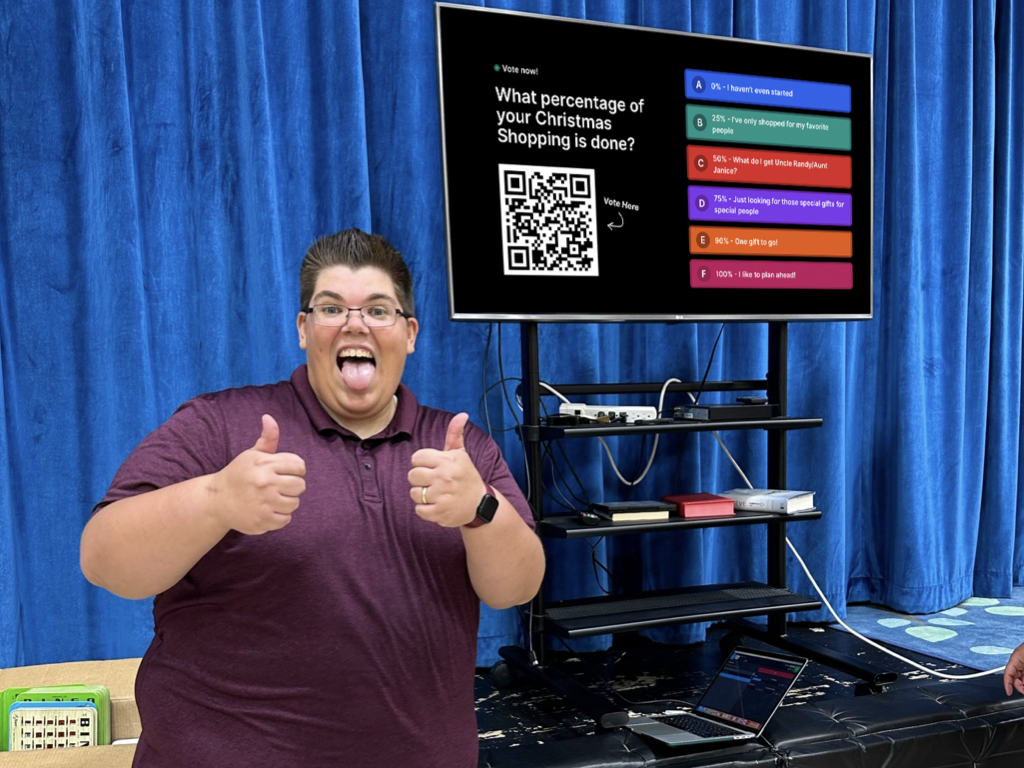
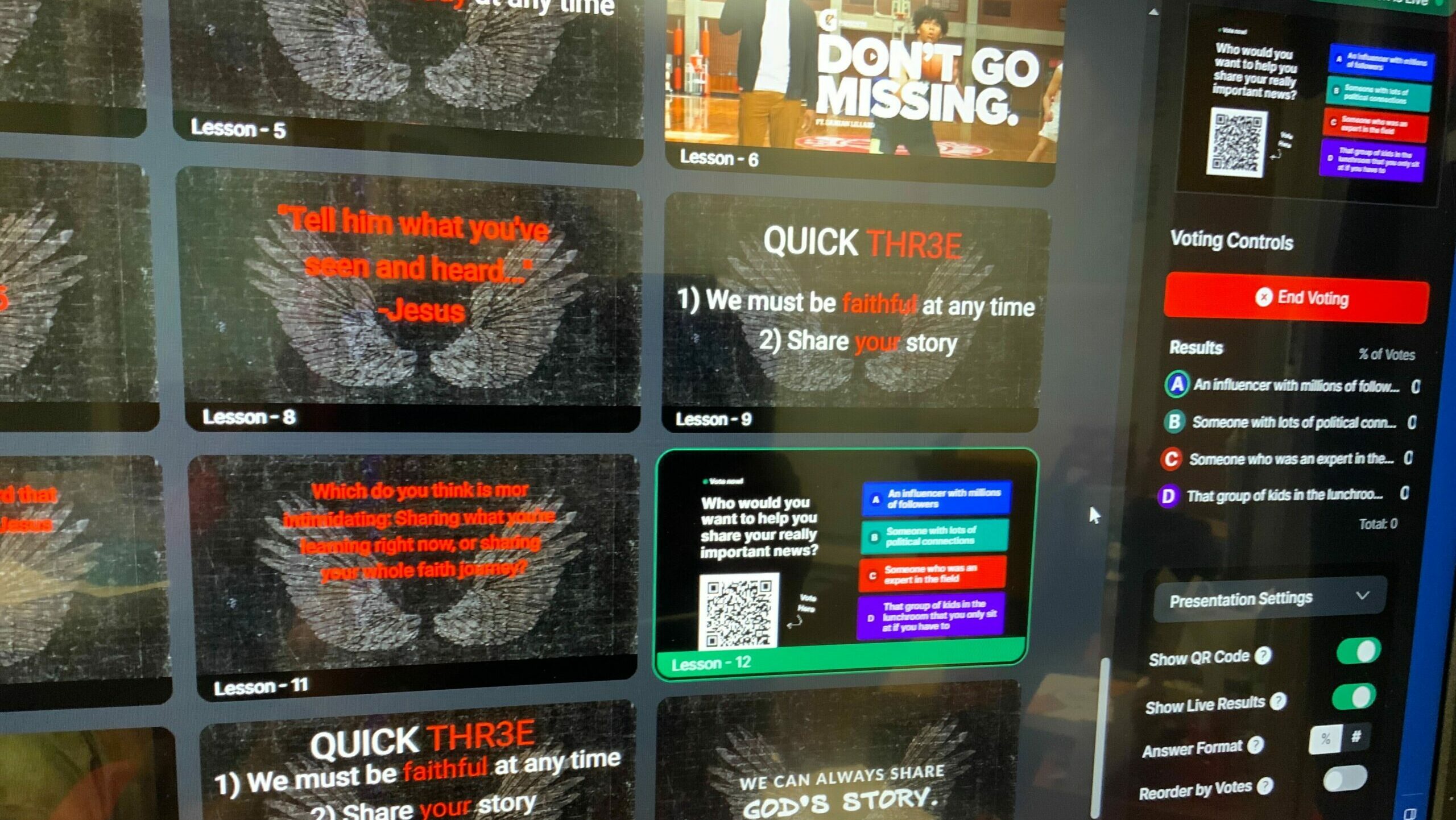
Recently, we wrapped up a series on the Birth Story, and while building up to the angels appearing before the shepherds, I did a Live Voting Poll, where I asked:

(click image to enlarge)

(click image to enlarge)

(click image to enlarge)

About 95% of them voted for either an influencer or an expert. This unintentionally became more than resetting attention spans… it created an ah-ha moment with a biblical story they’ve heard many times.

4. Slide Transitions are No Longer Dependent on Attendance, Behavior, or “Less-than-Reliable” Teenagers

Sidekick came in clutch for me when our student leadership team took a hiatus (meaning my “media team” was gone). But, I didn’t even worry for a second! Since I’m able to control presentations from my iPad or phone, I didn’t have to stress about who was going to run the presentation. Even if someone’s absent or dealing with distractions, I can smoothly navigate through the lesson without needing to rely on that one media kid (we all have that kid, right?) to pay attention. Sidekick has been a lifesaver during those shorthanded moments, especially when training someone new isn’t an immediate option.

5. Our Media Training has Gotten an Upgrade.

Yes, Sidekick has even changed the way I train leaders and students on our presentation computers (and not just because it’s a new/different software). In the past, when I trained someone on how to use our presentation software, I had to schedule them to come to the church early or on a different day, and it became a little bit of a nightmare (both in terms of scheduling and them forgetting what I taught them). But, since Sidekick is web based, I can give my team access to our Sidekick Workspace where they can mess around with a presentation on their own time and essentially learn on their own (because, let’s face it, they are naturally way better at this than any of us are).

And since Sidekick is already so easy to use, my media team is already more confident and comfortable with Sidekick in two weeks than they ever were in over a year with our old software (can you guess which one we were using? It’s the confusing one 😄). Plus, Sidekick is perfect for prepping for our big Christmas Party because I can send out the link ahead of time, they mess with it, and we’re all set!

Check Out This Sidekick Hero In Action:

(click image to enlarge)

(click image to enlarge)

(click image to enlarge)

In a Nutshell, Sidekick Isn’t Just Software… It’s a Youth Ministry Superhero.

It makes things more fun, more inclusive, and way less stressful. If you’re not on the Sidekick train yet, you’re missing out on some serious youth ministry magic!

If you’re using Sidekick and you run into any issues, or if you just have a question, please feel free to reach out to our support team at: [email protected]. Or you can check out other helpful articles and walkthroughs at the Sidekick Help Desk by visiting https://help.sidekick.tv.

Finally, if you choose to use the new Sidekick… let us know how you do it and what types of polls you do because we want to highlight you. Our goal is to highlight a youth worker every week with different ways they’ve used Sidekick to help their students engage. If you’re interested in being recognized as a Sidekick Hero, just click the big red button below:

If you’re using Sidekick and you run into any issues, or if you just have a question, please feel free to reach out to our support team at: [email protected]. Or you can check out other helpful articles and walkthroughs at the Sidekick Help Desk by visiting https://help.sidekick.tv.

Finally, if you choose to use the new Sidekick… let us know how you do it and what types of polls you do because we want to highlight you. Our goal is to highlight a youth worker every week with different ways they’ve used Sidekick to help their students engage. If you’re interested in being recognized as a Sidekick Hero, just click the big red button below:

20 Dec 2023

Adding Speaker Notes In Sidekick

By |2023-12-19T15:00:10-08:00December 20th, 2023|Sidekick Hero Blog|0 Comments

Every youth worker has been there. You just finished teaching, your students start to leave, and you realize… I DIDN’T EVEN SAY THE MOST IMPORTANT THING!! Or maybe you’re telling stories from 1 & 2 Kings, and you’ve been practicing all week to make sure you don’t get Elijah and Elisha mixed up… but then, the moment you open your mouth, you keep saying one when you mean the other, and somehow you’ve even added a third pronunciation into the mix!

Thankfully,   Sidekick includes a super-useful feature called Speaker Notes that will make experiences like these a thing of the past.

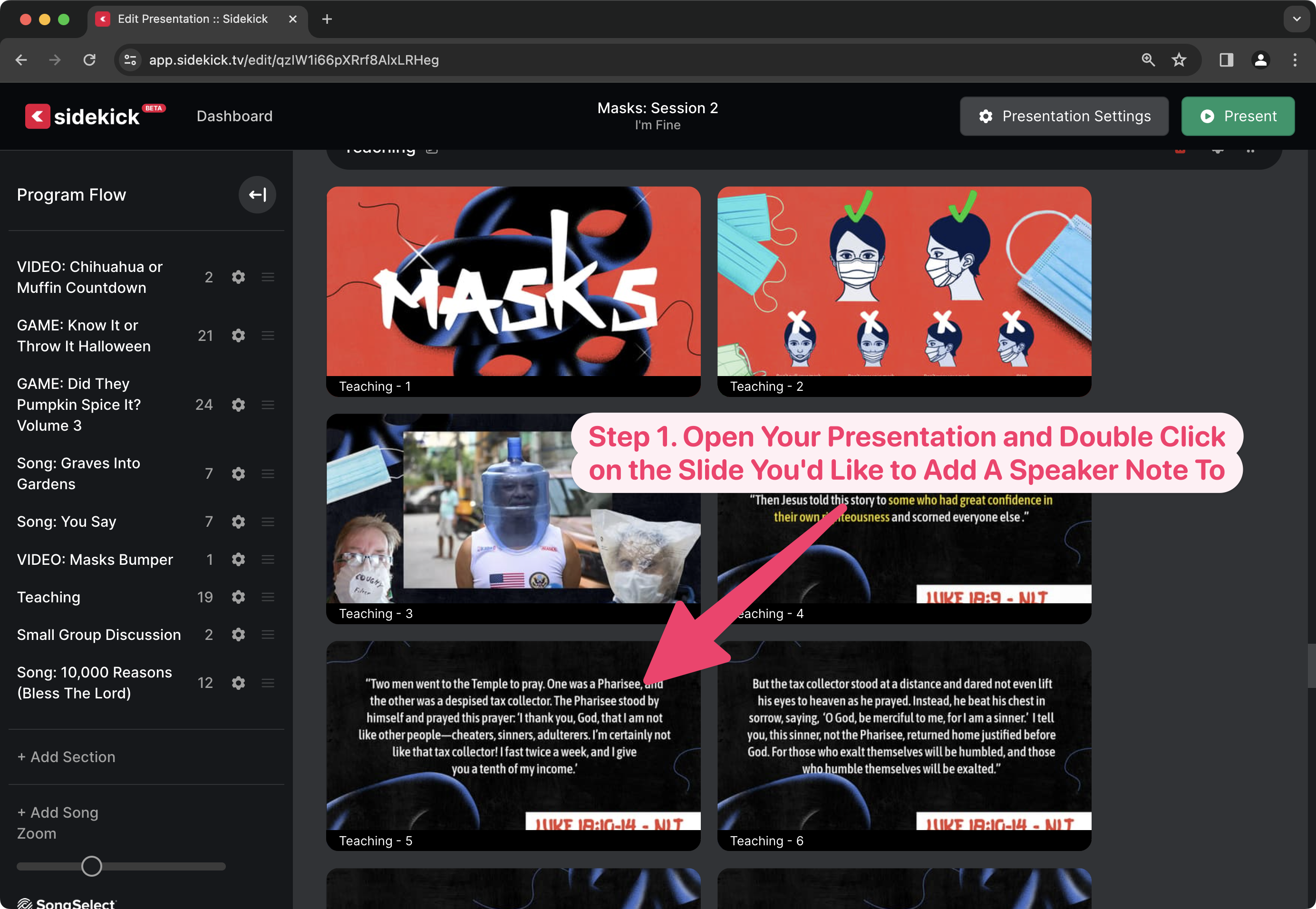
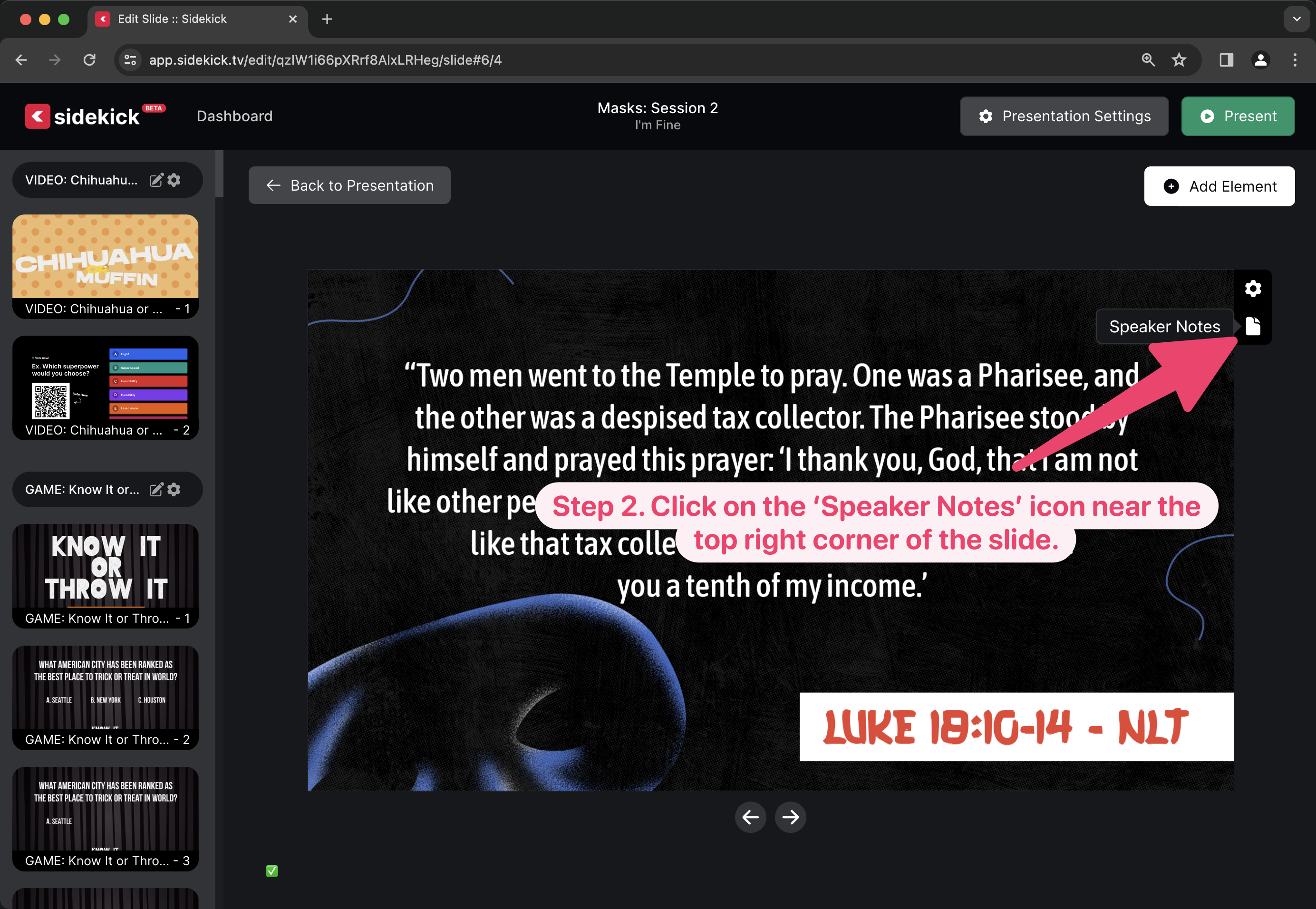
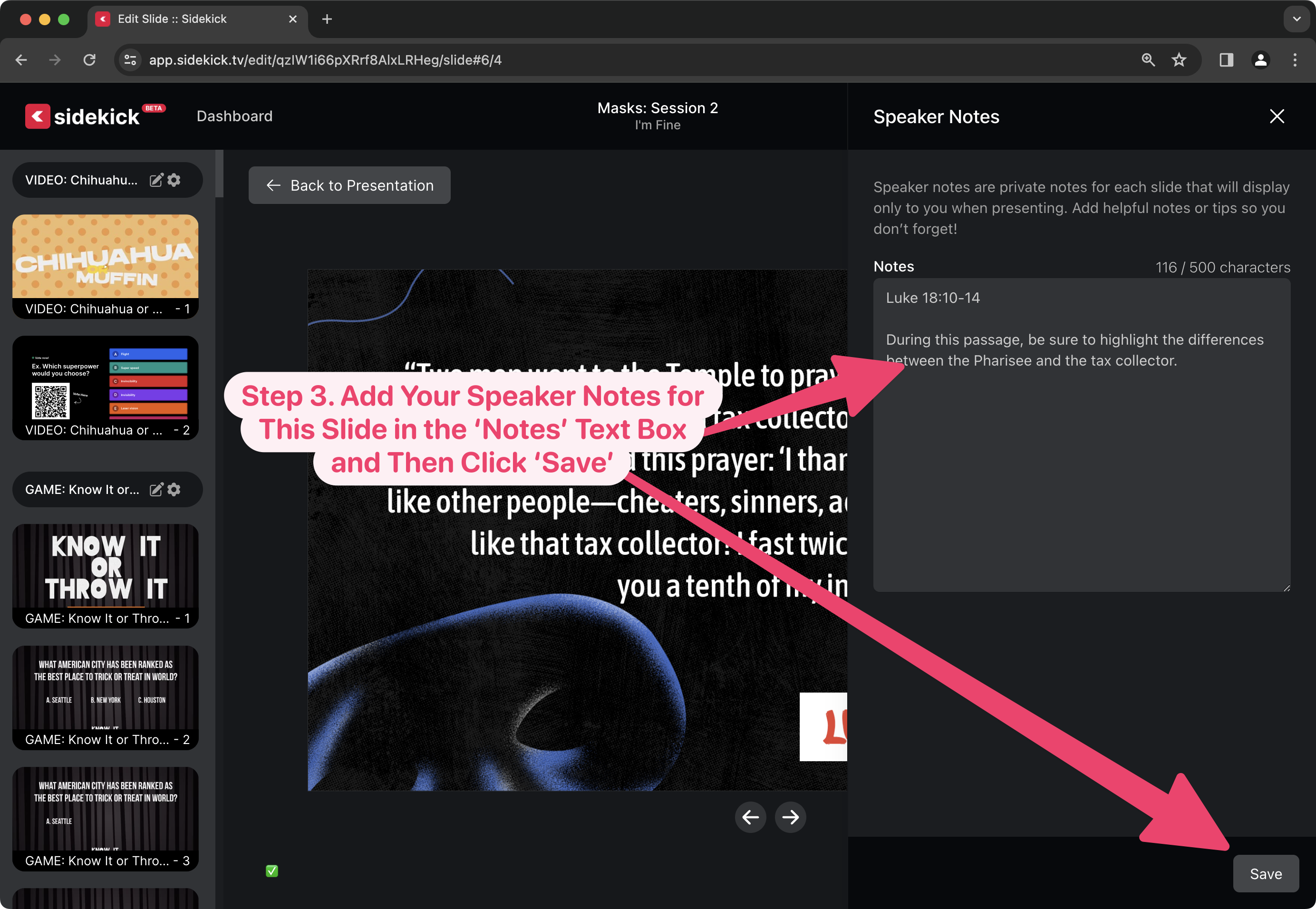
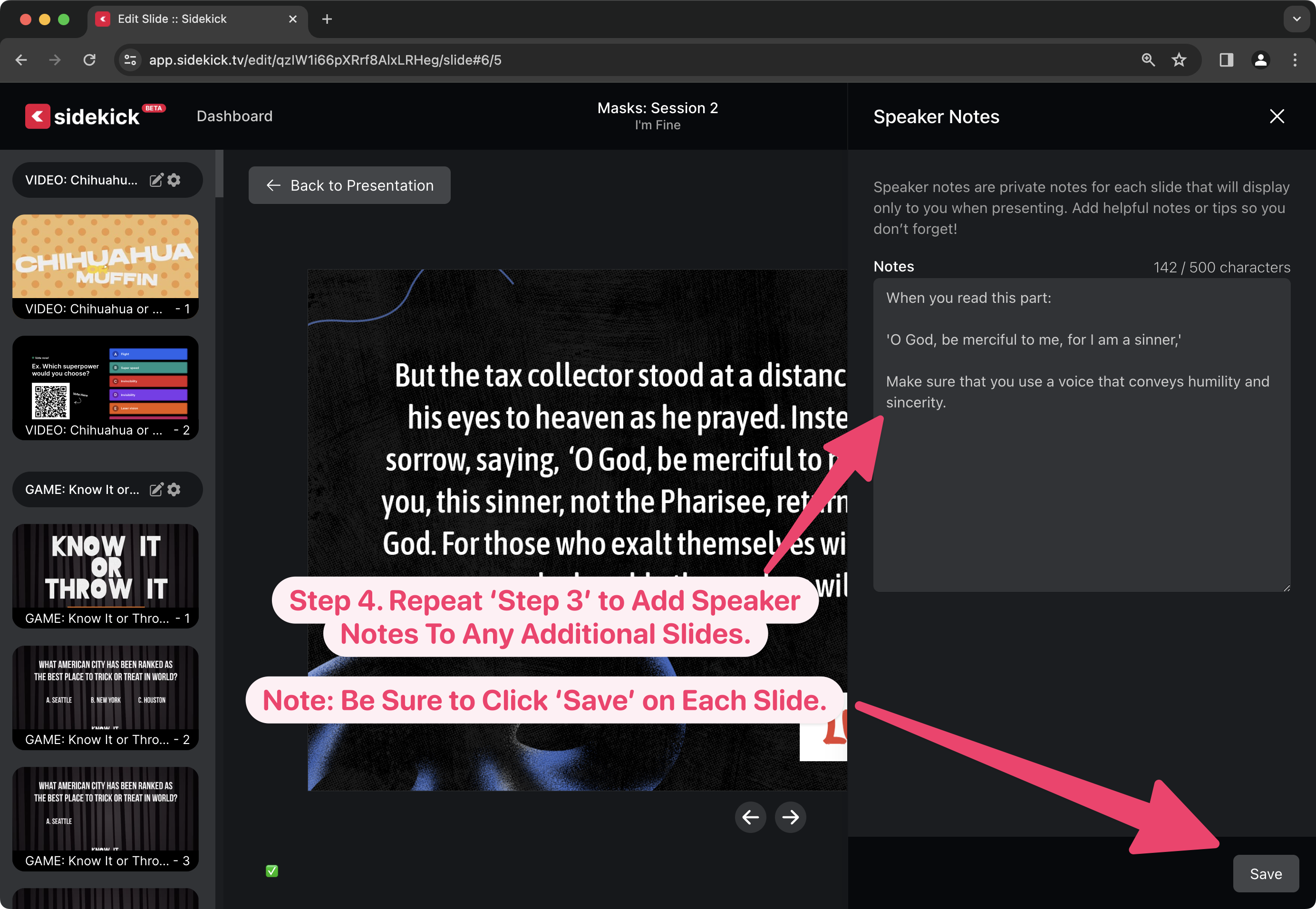
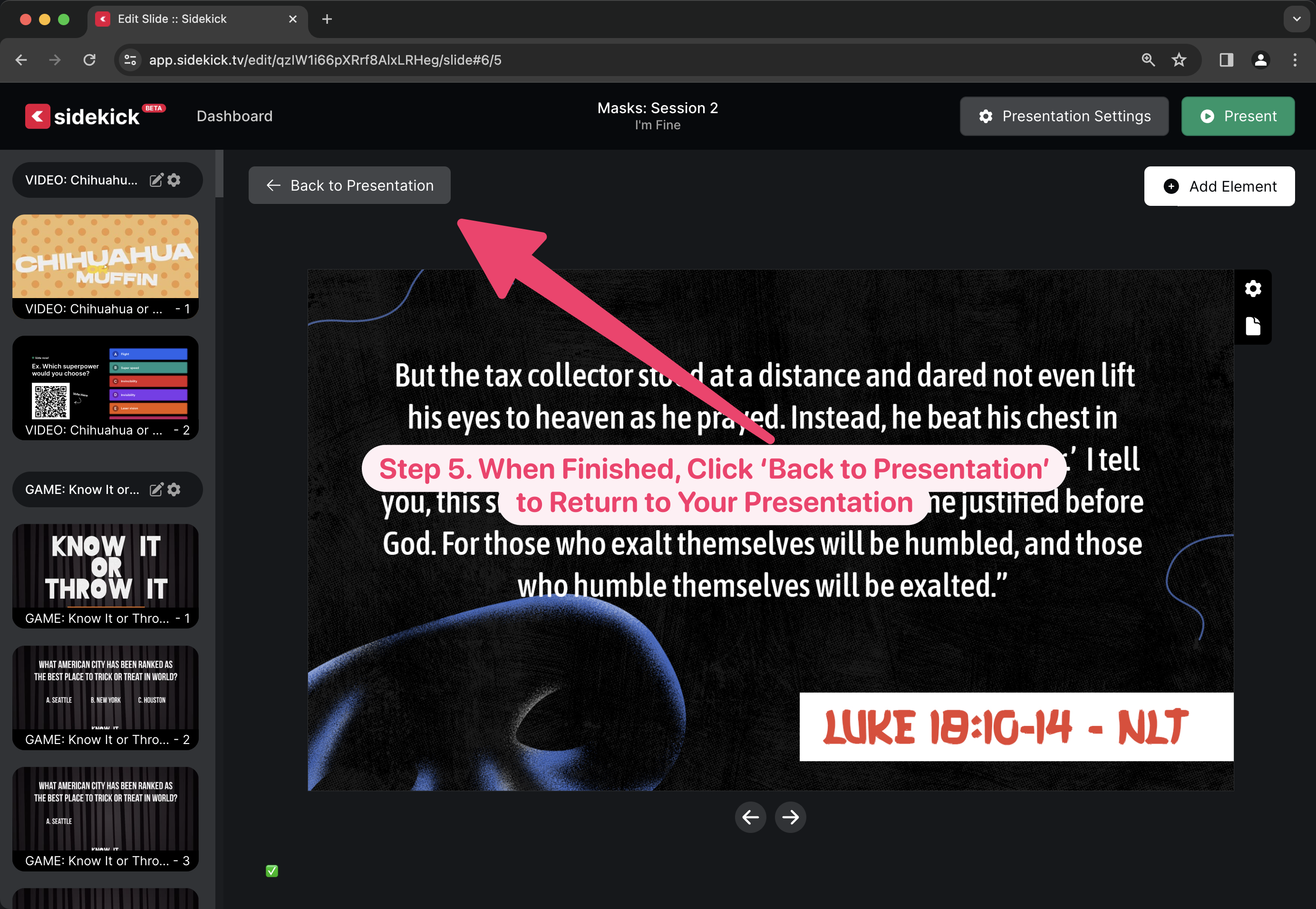
Adding Speaker Notes to a   Sidekick presentation is super simple! To find out how, just watch the video below, or scroll down to see step-by-step instructions.

Adding Speaker Notes to Your Slides

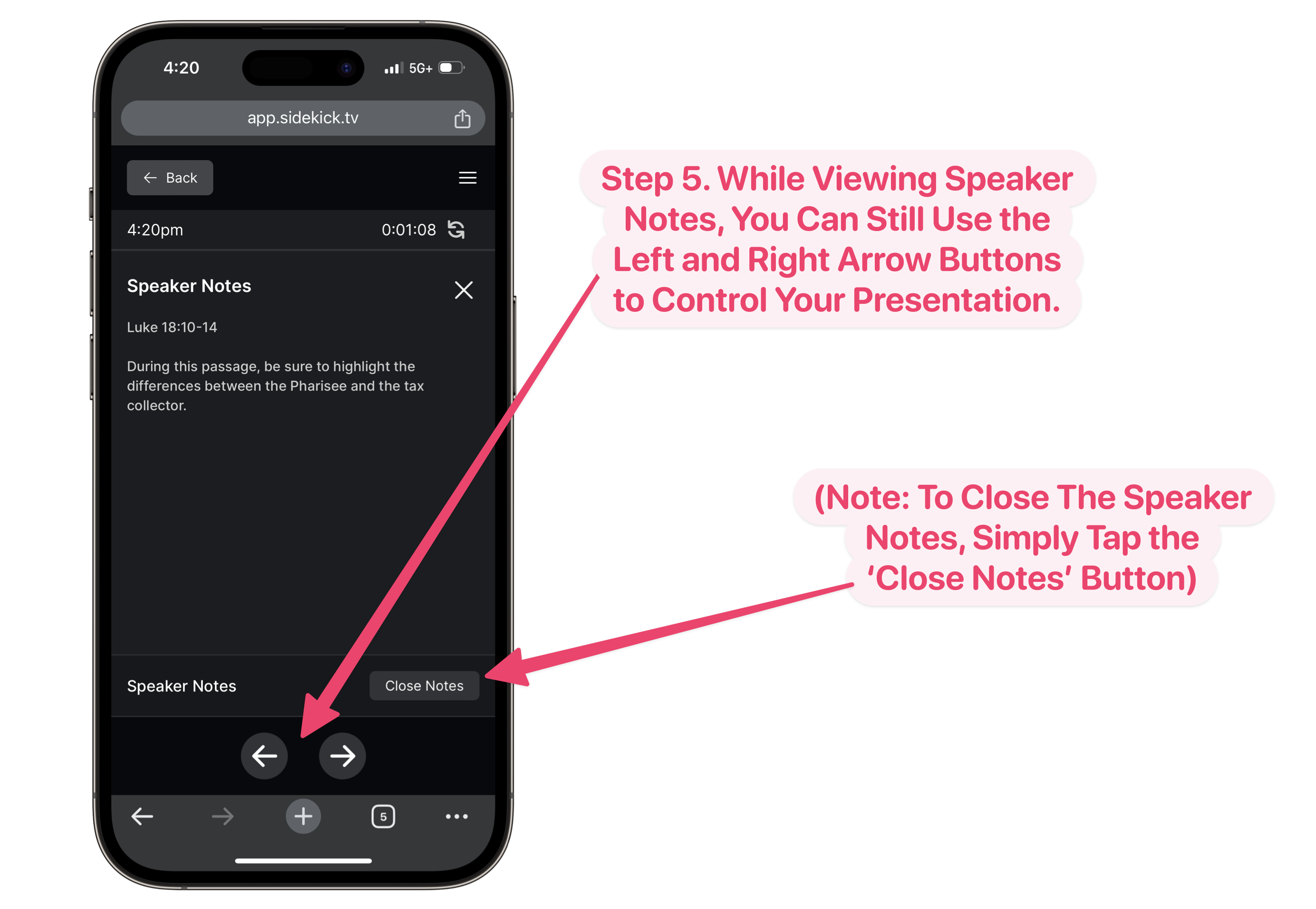
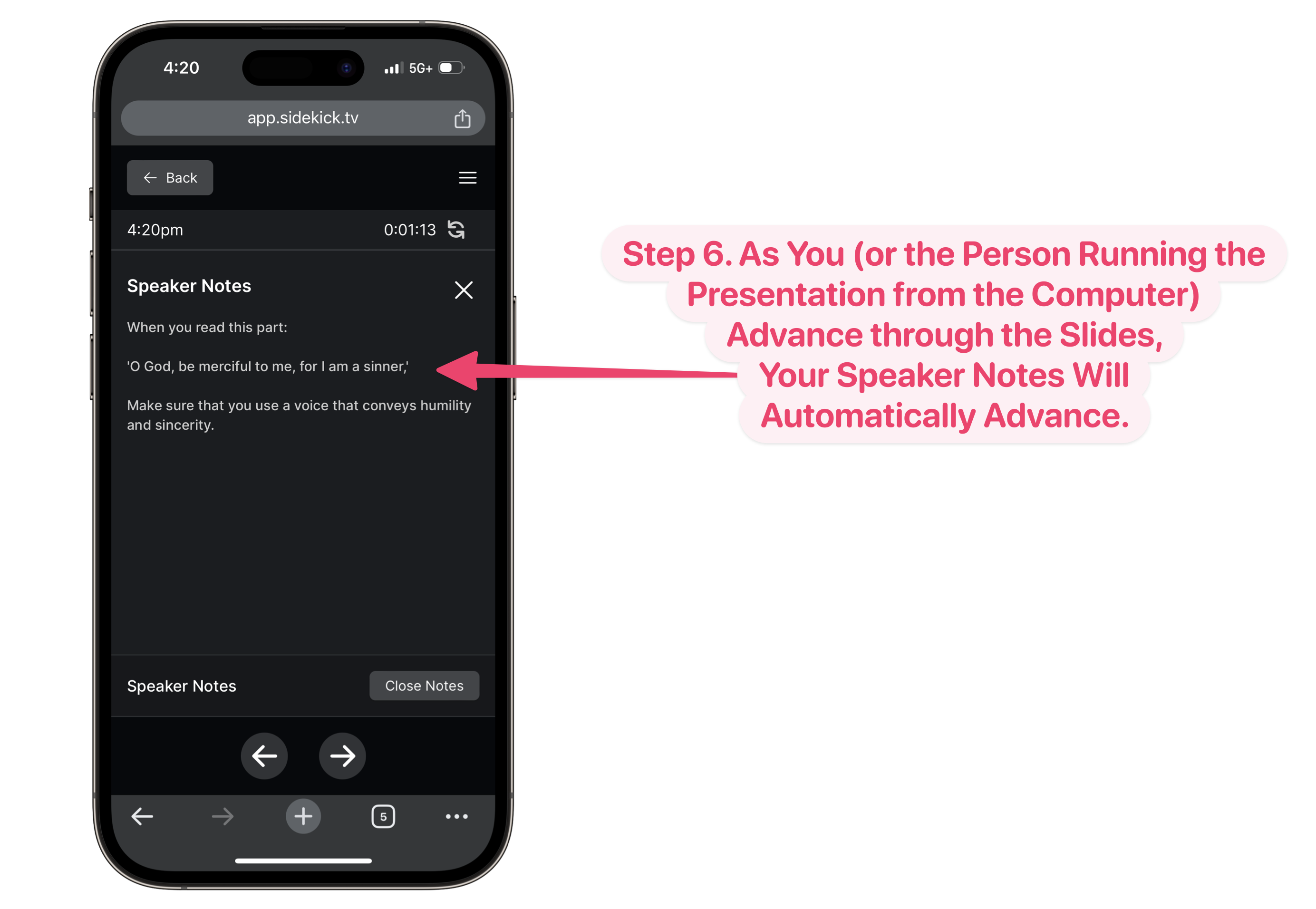
Viewing Speaker Notes During Your Presentation

It’s really that easy! Thanks to  Sidekick, you’ll never have to worry about forgetting to tell that one story, or losing your place in the middle of a message ever again!

Pro Tip:

You can actually add Speaker Notes to ANY SLIDE in a  Sidekick presentation. That means you can add all those important details about Camp to the Speaker Notes for your Camp Announcement Slide. That way, you’ll never forget the registration deadline ever again!

Or, if you have students or volunteers who host your announcements and game, you can add Speaker Notes (like “Don’t forget to smile and introduce yourselves!”) for them as well!

 Sidekick to the rescue!

Be on the lookout for upcoming posts on how to do the following:

  • 🎵 Adding Songs to Sidekick via SongSelect
  • 🔀 Moving Sections and Slides in Sidekick
  • 🖐️ Adding Additional Users to Your Workspace
  • ‼️ And more!

If you’d like to see the other blog posts in the “How Do I…?” series, you can do so here: How Do I…?

If you’re using Sidekick and you run into any issues, or if you just have a question, please feel free to reach out to our support team at: [email protected]. Or you can check out other helpful articles and walkthroughs at the Sidekick Help Desk by visiting https://help.sidekick.tv.

Finally, if you choose to use the new Sidekick… let us know how you do it and what types of polls you do because we want to highlight you. Our goal is to highlight a youth worker every week with different ways they’ve used Sidekick to help their students engage. If you’re interested in being recognized as a Sidekick Hero, just click the big red button below:

If you’re using Sidekick and you run into any issues, or if you just have a question, please feel free to reach out to our support team at: [email protected]. Or you can check out other helpful articles and walkthroughs at the Sidekick Help Desk by visiting https://help.sidekick.tv.

Finally, if you choose to use the new Sidekick… let us know how you do it and what types of polls you do because we want to highlight you. Our goal is to highlight a youth worker every week with different ways they’ve used Sidekick to help their students engage. If you’re interested in being recognized as a Sidekick Hero, just click the big red button below:
19 Dec 2023

And the Winner of the Ugly Christmas Sweater Contest Is … Chosen Using Sidekick, of Course!

By |2023-12-19T08:25:06-08:00December 19th, 2023|Mariners Youth Ministry, Sidekick, Sidekick Hero Blog, Youth Ministry Hacks|0 Comments

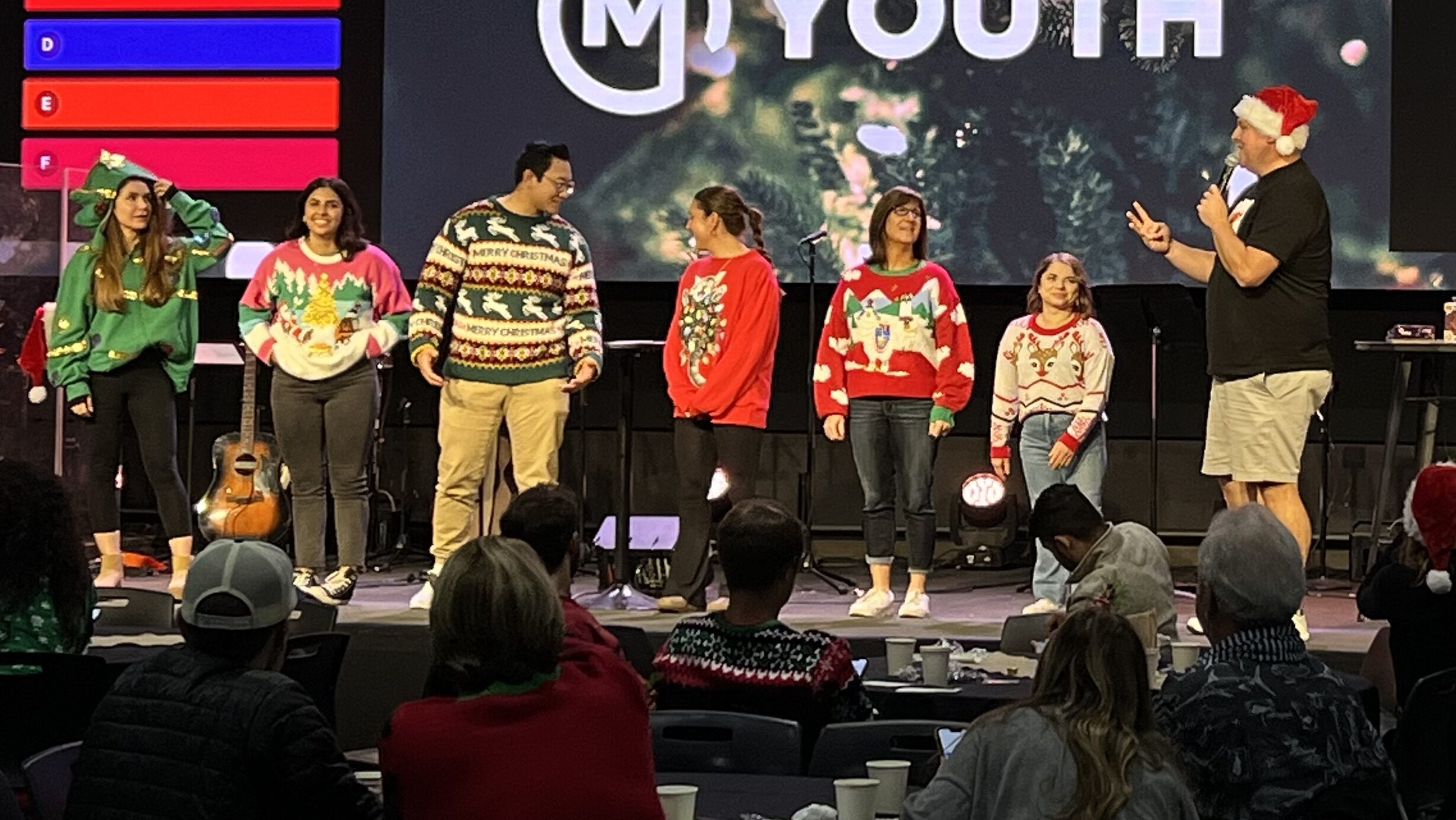
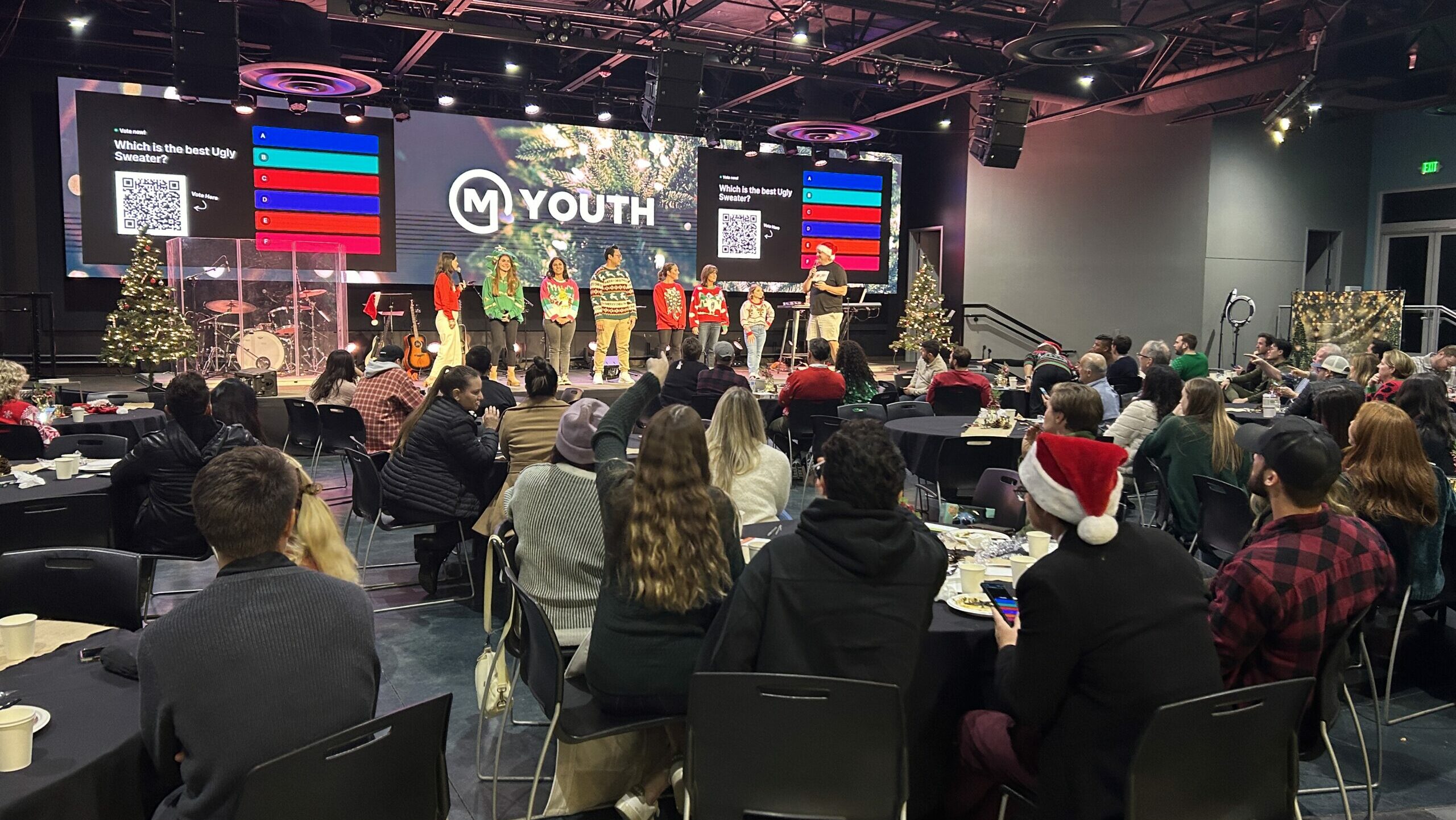
Our Mariners Church Student Ministry Volunteer 🎄Christmas Party🎄 was last night (’tis the season), and the Ugly Christmas Sweater Contest is always SO fun … but choosing a winner has never felt quite right. Sure, there’s the “audience applause” gauge, the crowd favorite, and then there’s me—always biased to the Star Wars-themed holiday gear, naturally.

🤔 If only there were a way to have people cast their ballots so we get an actual popular vote of the people, by the people, and for the people.

Enter: Sidekick.

(click image to enlarge)

(click image to enlarge)

AND IT WORKED LIKE A CHARM!

We picked our 6 finalists and had them hit the stage. Then everyone whipped out their phones for a serious and scientific showdown…

Some of the best parts about Sidekick Live Voting are:

  • You can only vote once (no cheating)
  • Voting is anonymous (no hating on people who voted differently than you)
  • You can choose whether or not to show voting results in real-time (you can build suspense)

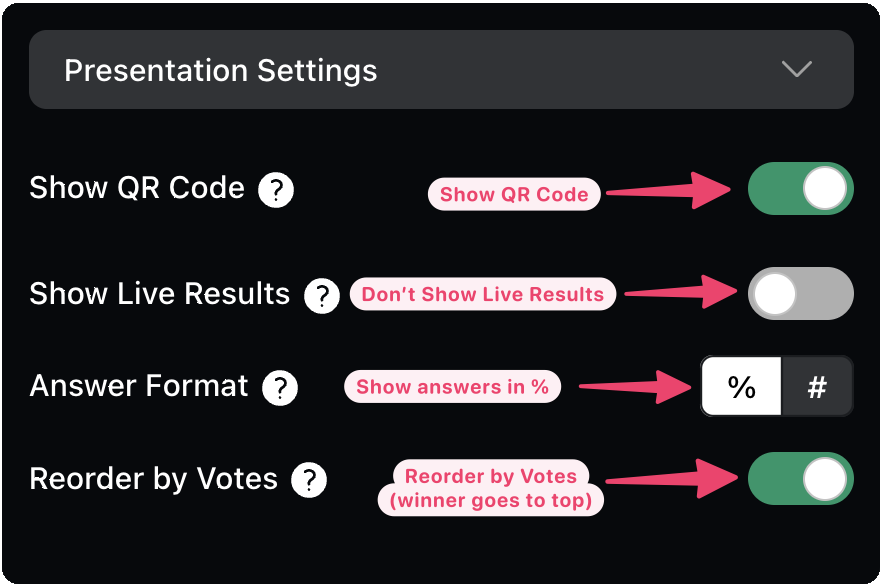
For our event, here’s how we set up our Live Voting Presentation Settings:

We toggled the “Show Live Results” to OFF so we could gather all the votes in secret. And then, only after all the votes were cast did we dramatically reveal the winner.

AND IT WORKED PERFECTLY!

It was close … but we all knew the real winner that night: Sidekick.

Just kidding… well sort of. Sidekick was the tool that helped us easily solve the annual debate of who won the ugly Christmas sweater contest. So in a way, because of Sidekick, we all won. Perfection!

How will you use Sidekick +Phones this week in your ministry?

Josh

If you’re using Sidekick and you run into any issues, or if you just have a question, please feel free to reach out to our support team at: [email protected]. Or you can check out other helpful articles and walkthroughs at the Sidekick Help Desk by visiting https://help.sidekick.tv.

Finally, if you choose to use the new Sidekick… let us know how you do it and what types of polls you do because we want to highlight you. Our goal is to highlight a youth worker every week with different ways they’ve used Sidekick to help their students engage. If you’re interested in being recognized as a Sidekick Hero, just click the big red button below:
If you’re using Sidekick and you run into any issues, or if you just have a question, please feel free to reach out to our support team at: [email protected]. Or you can check out other helpful articles and walkthroughs at the Sidekick Help Desk by visiting https://help.sidekick.tv.

Finally, if you choose to use the new Sidekick… let us know how you do it and what types of polls you do because we want to highlight you. Our goal is to highlight a youth worker every week with different ways they’ve used Sidekick to help their students engage. If you’re interested in being recognized as a Sidekick Hero, just click the big red button below:
18 Dec 2023

Creating a Live Poll with Image-Based Questions

By |2023-12-19T15:04:21-08:00December 18th, 2023|Sidekick Hero Blog|2 Comments

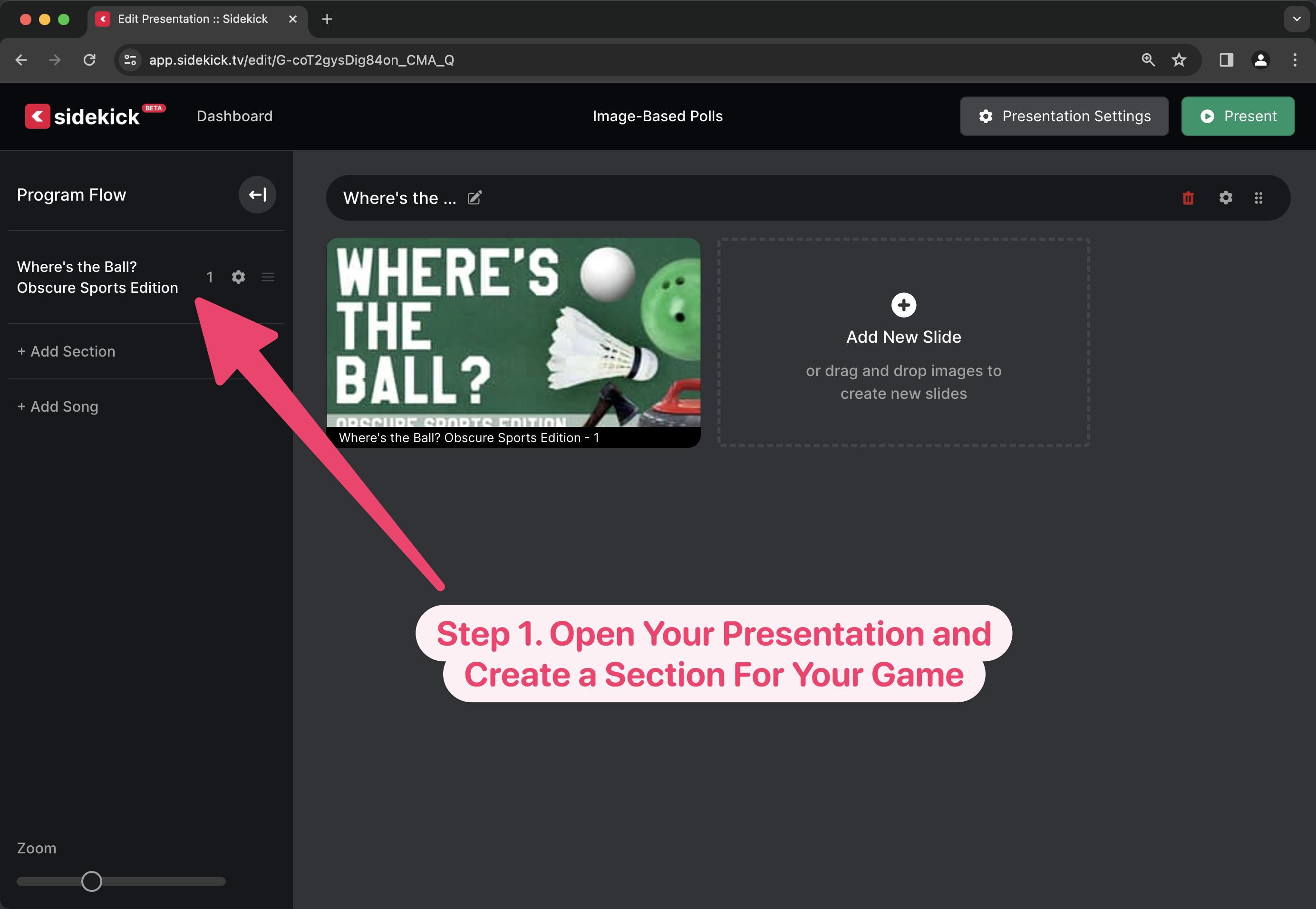
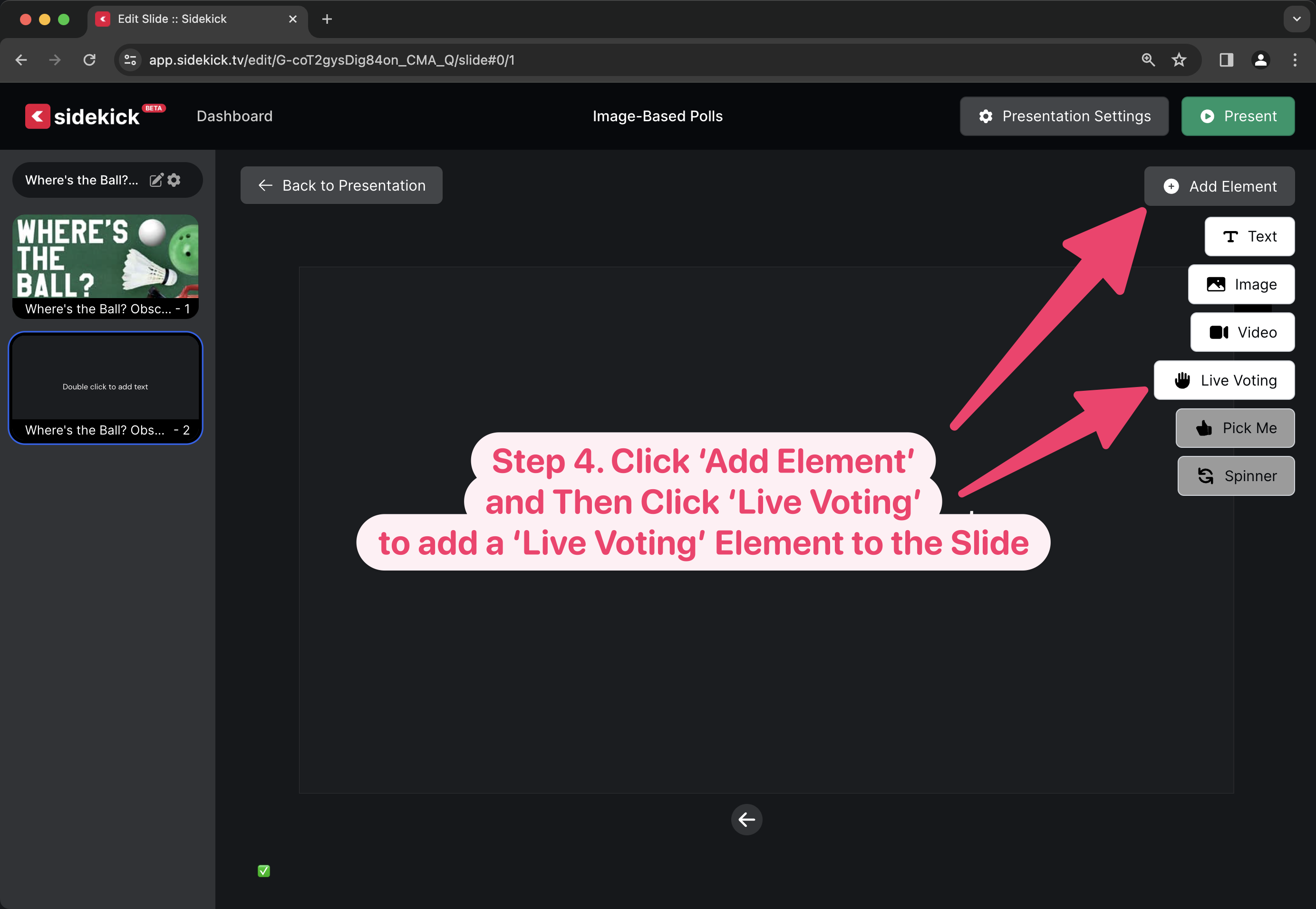
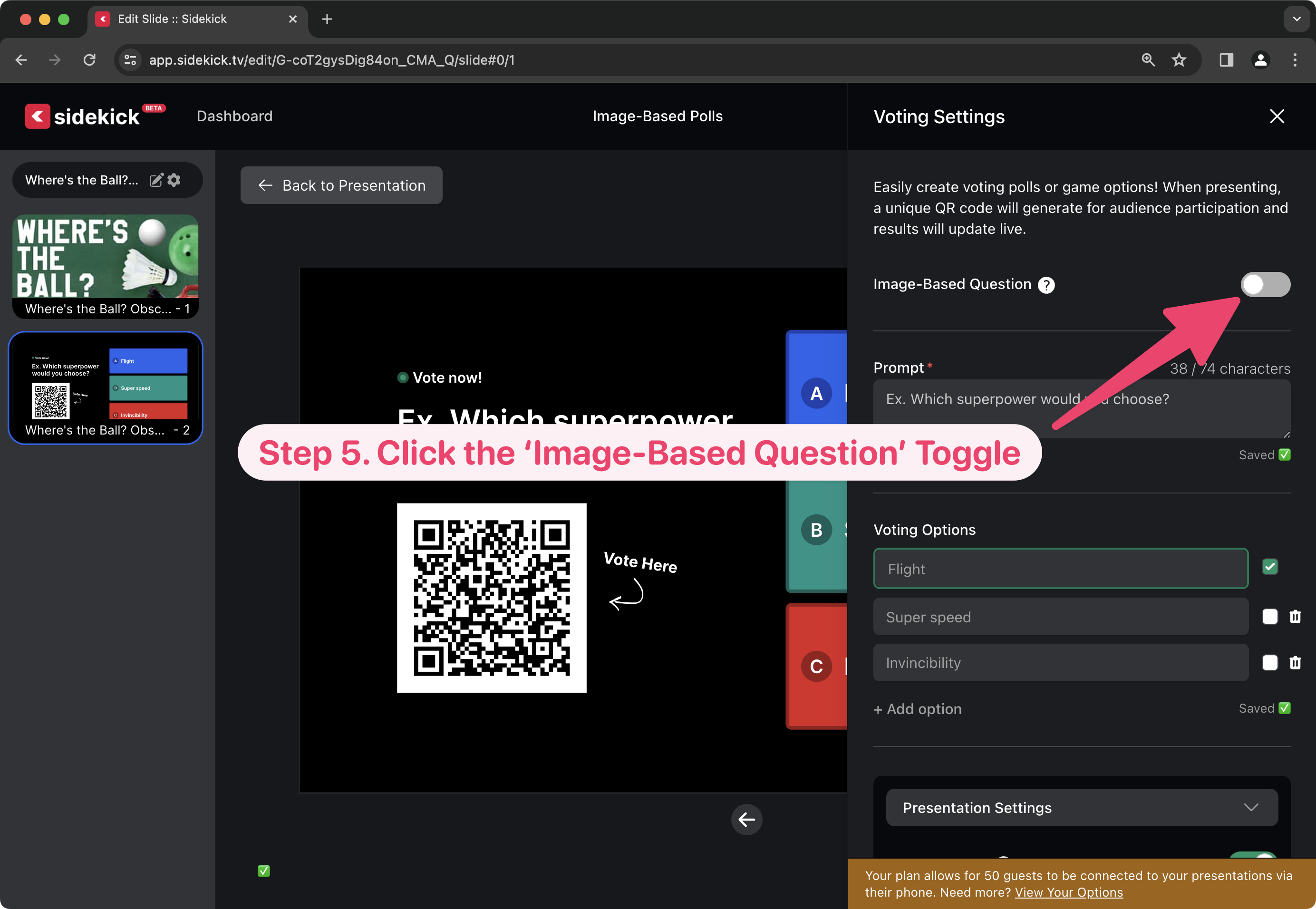
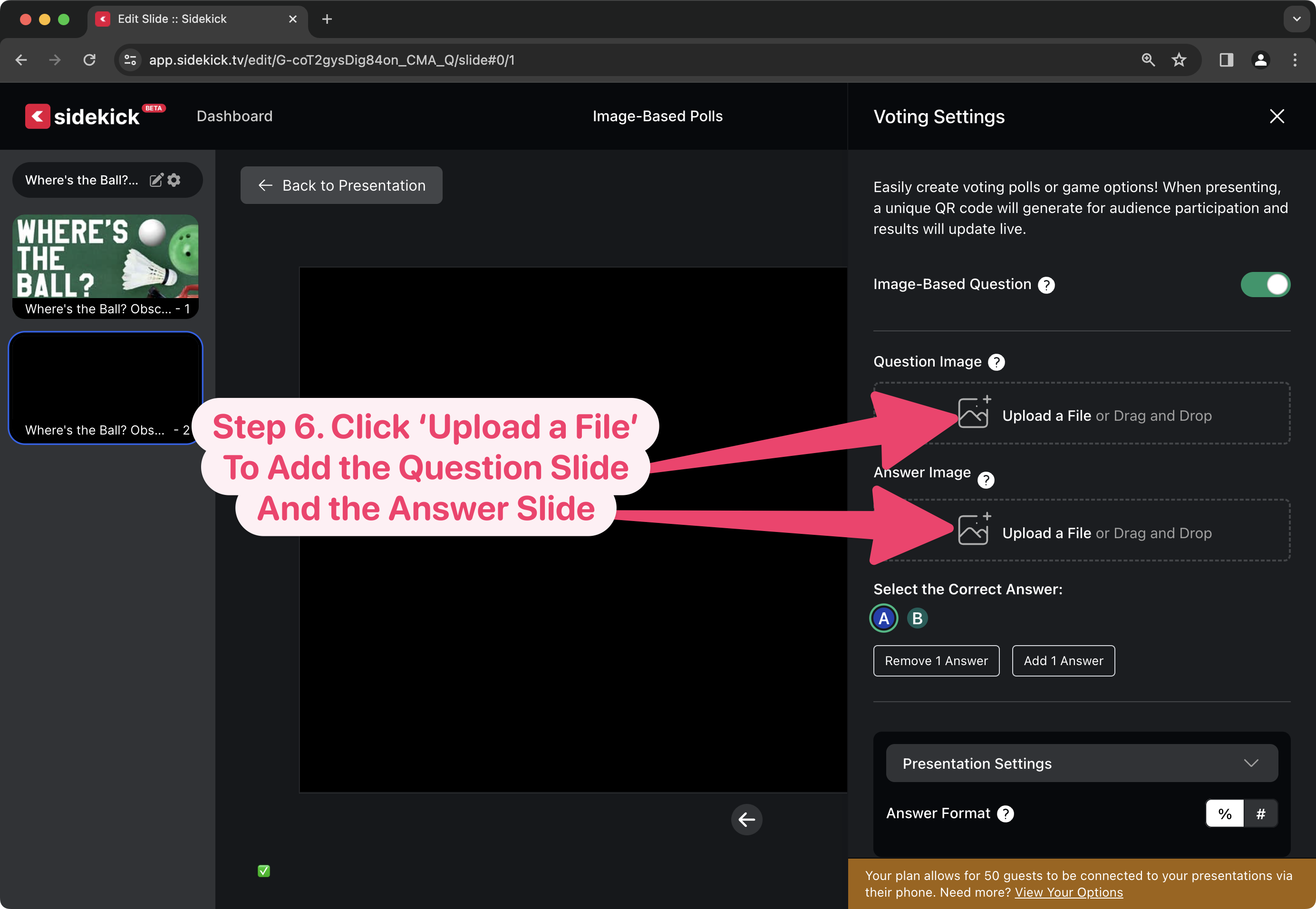
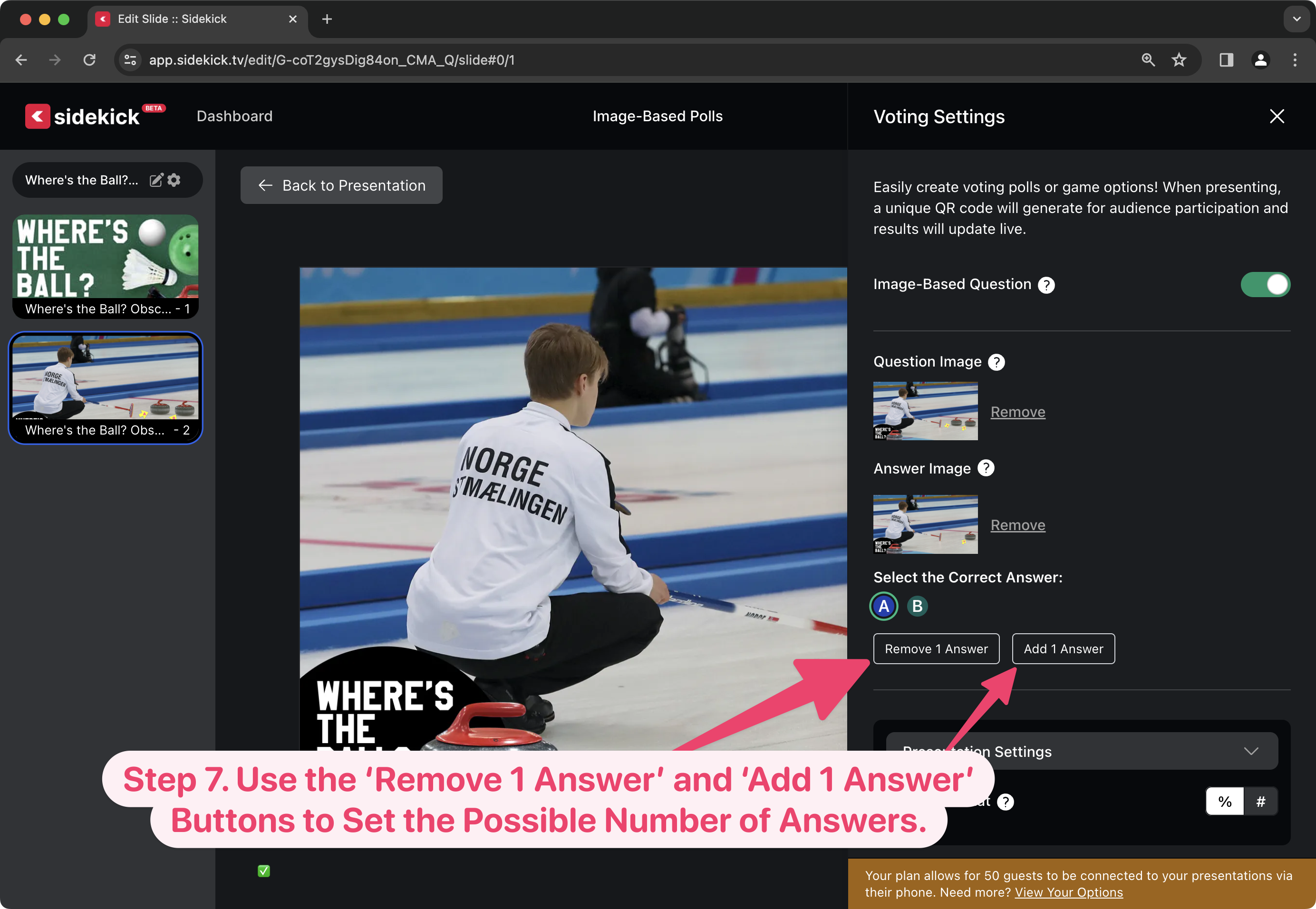
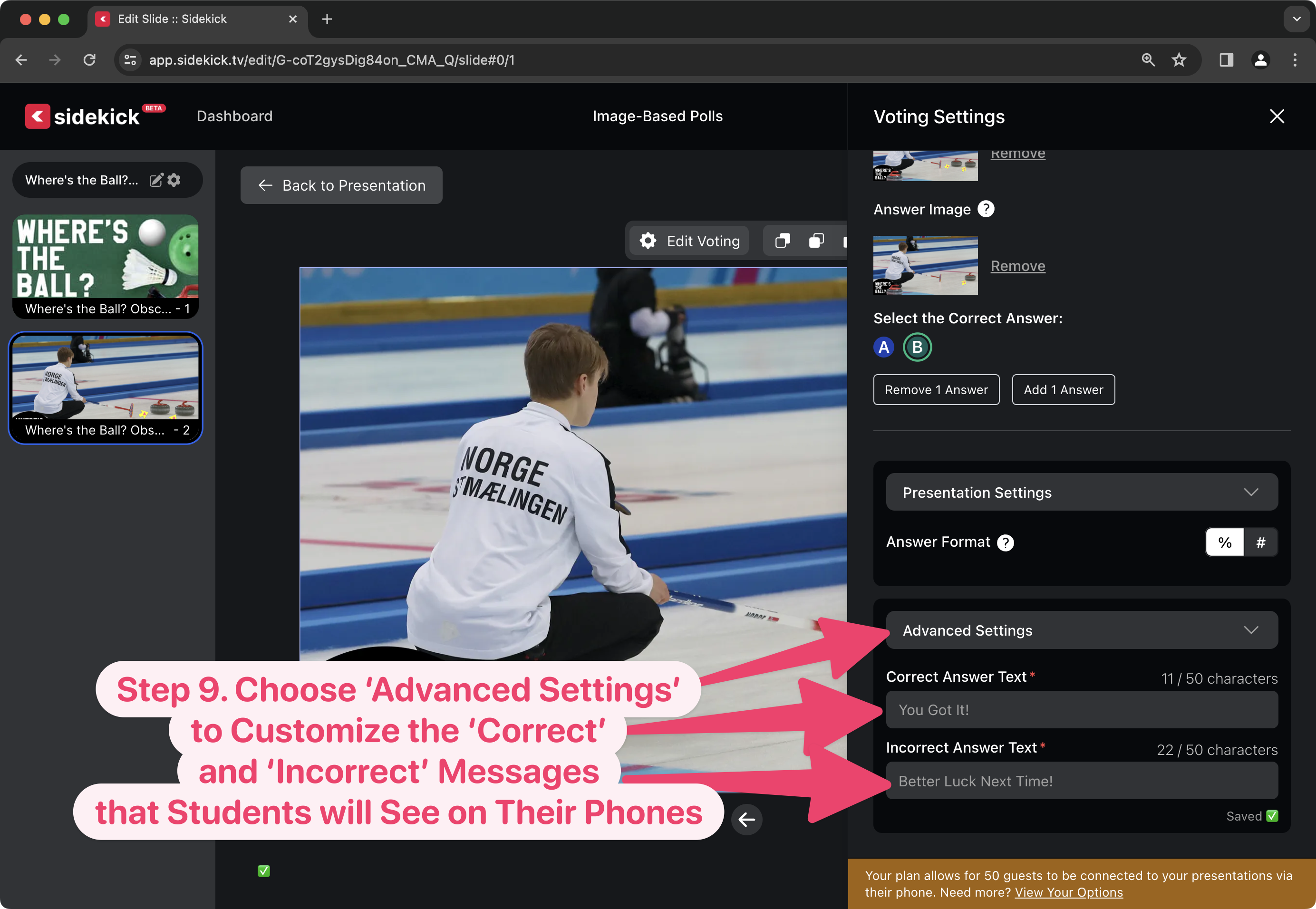
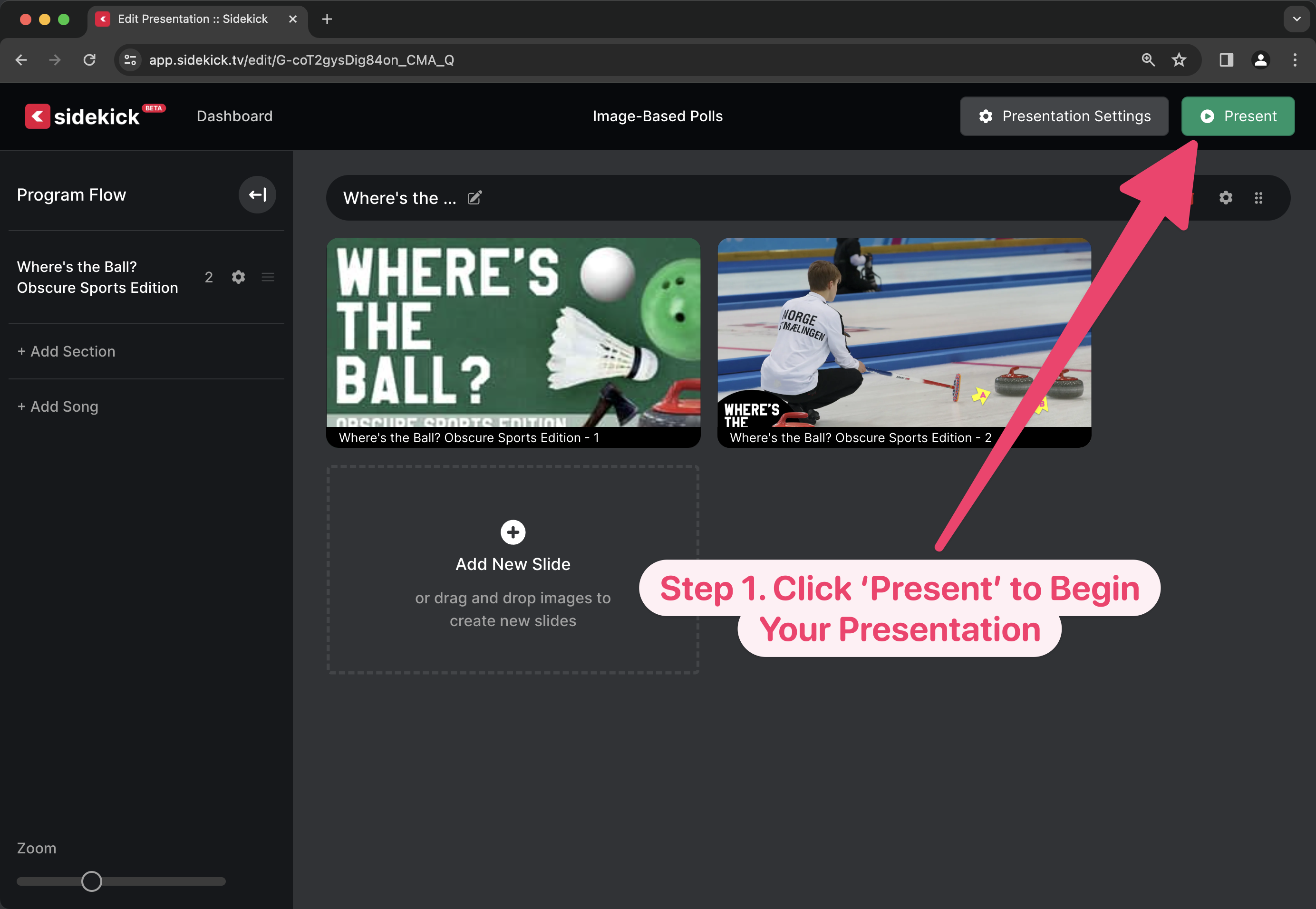
Creating and running a   Sidekick presentation with a Live Poll that uses Image-Based Questions is super simple! Just watch the video below, or scroll down to see step-by-step instructions.

Creating a Live Poll with an Image-Based Question

Presenting a Live Poll with an Image-Based Question

It’s really that easy! And, of course, you can add multiple Live Polls with Image-Based Questions to any presentation in Sidekick. And, what’s even cooler is that because the QR Code is unique to your entire presentation, you don’t have to show the QR code before each question. Just show it once at the beginning, and you should be good to go!

Pro Tip:

Sure, adding Image-Based Questions to a Live Poll is a pretty simple process, but trust me, your students can do this faster than you 🙂

Don’t get me wrong. You could probably make 5 image-based polls in about 15 minutes, but a student could probably do it in 5 minutes, tops. Plus, if they’re building the presentation, they’ll have a sense of ownership that they wouldn’t have if you made it yourself.

Be on the lookout for upcoming posts on how to do the following:

  • 🎵 Adding Songs to Sidekick via SongSelect
  • 🔀 Moving Sections and Slides in Sidekick
  • 📙 Adding Speaker Notes in Sidekick
  • 🖐️ Adding Additional Users to Your Workspace
  • ‼️ And more!

If you’d like to see the other blog posts in the “How Do I…?” series, you can do so here: How Do I…?

If you’re using Sidekick and you run into any issues, or if you just have a question, please feel free to reach out to our support team at: [email protected]. Or you can check out other helpful articles and walkthroughs at the Sidekick Help Desk by visiting https://help.sidekick.tv.

Finally, if you choose to use the new Sidekick… let us know how you do it and what types of polls you do because we want to highlight you. Our goal is to highlight a youth worker every week with different ways they’ve used Sidekick to help their students engage. If you’re interested in being recognized as a Sidekick Hero, just click the big red button below:

If you’re using Sidekick and you run into any issues, or if you just have a question, please feel free to reach out to our support team at: [email protected]. Or you can check out other helpful articles and walkthroughs at the Sidekick Help Desk by visiting https://help.sidekick.tv.

Finally, if you choose to use the new Sidekick… let us know how you do it and what types of polls you do because we want to highlight you. Our goal is to highlight a youth worker every week with different ways they’ve used Sidekick to help their students engage. If you’re interested in being recognized as a Sidekick Hero, just click the big red button below:
15 Dec 2023

New Feature Alert: Duplicating Slides!

By |2023-12-15T11:47:12-08:00December 15th, 2023|Sidekick Hero Blog|2 Comments

We’re super-excited to announce the release of one of our most requested features:

DUPLICATING SLIDES!

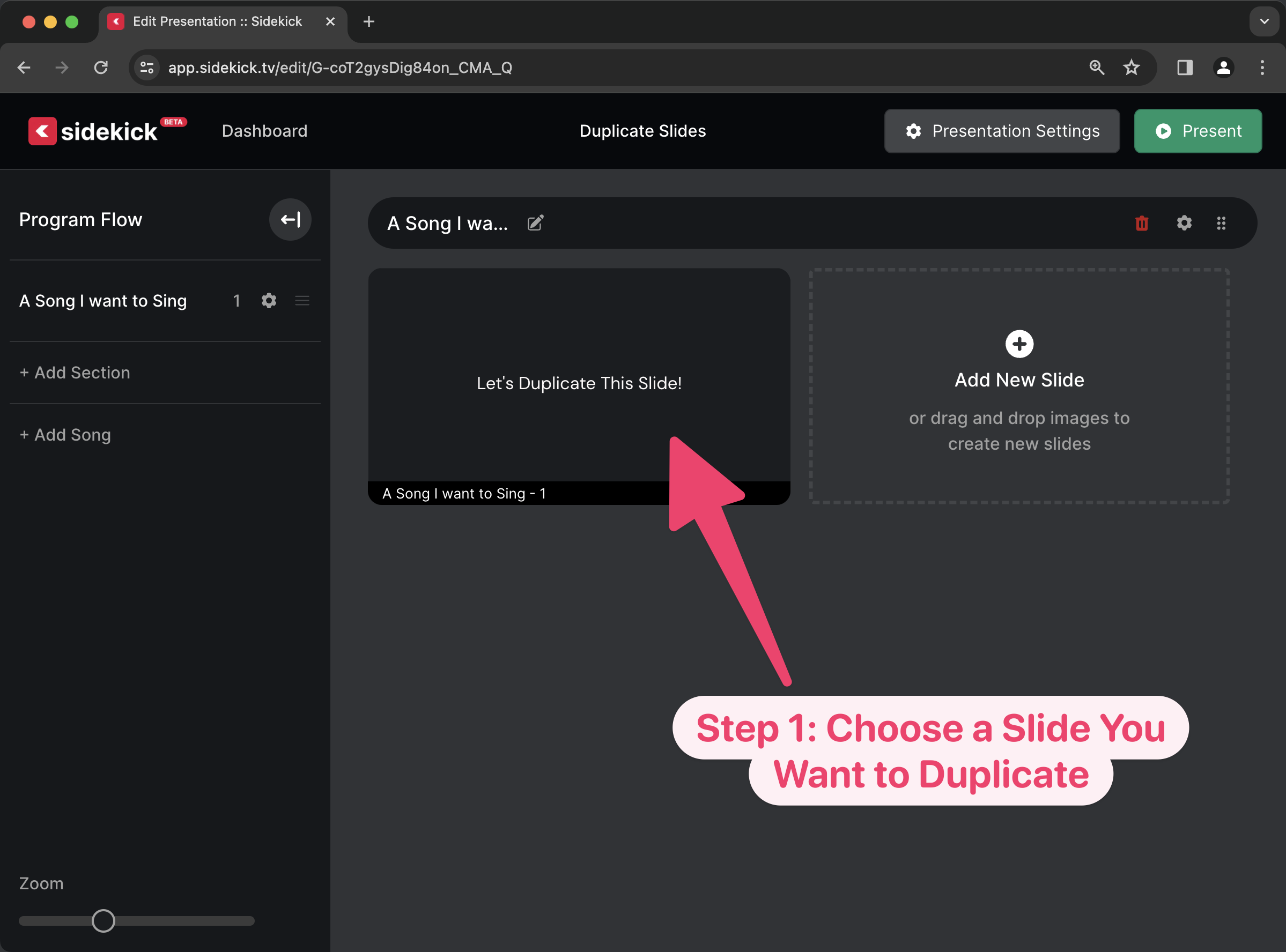
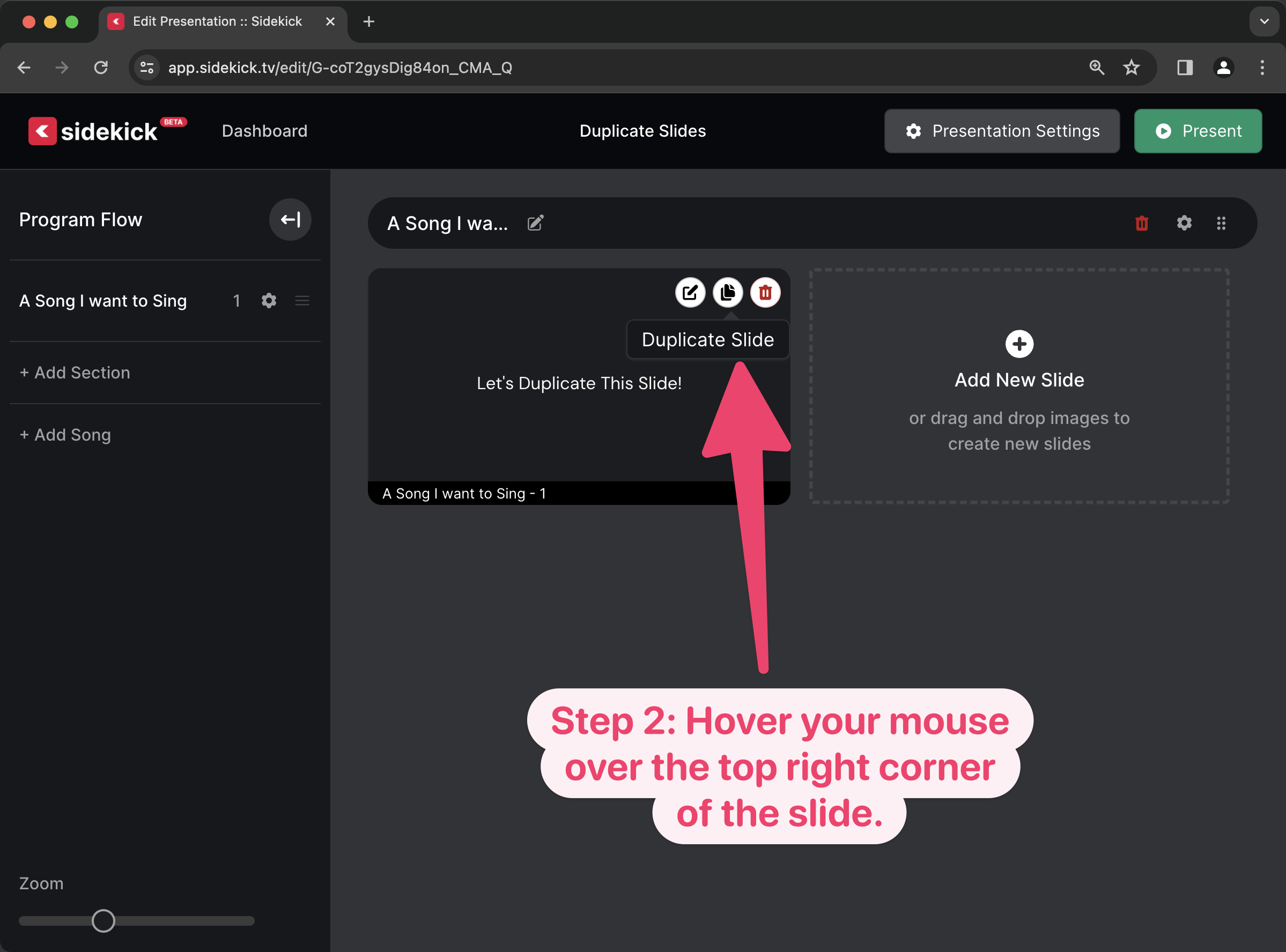
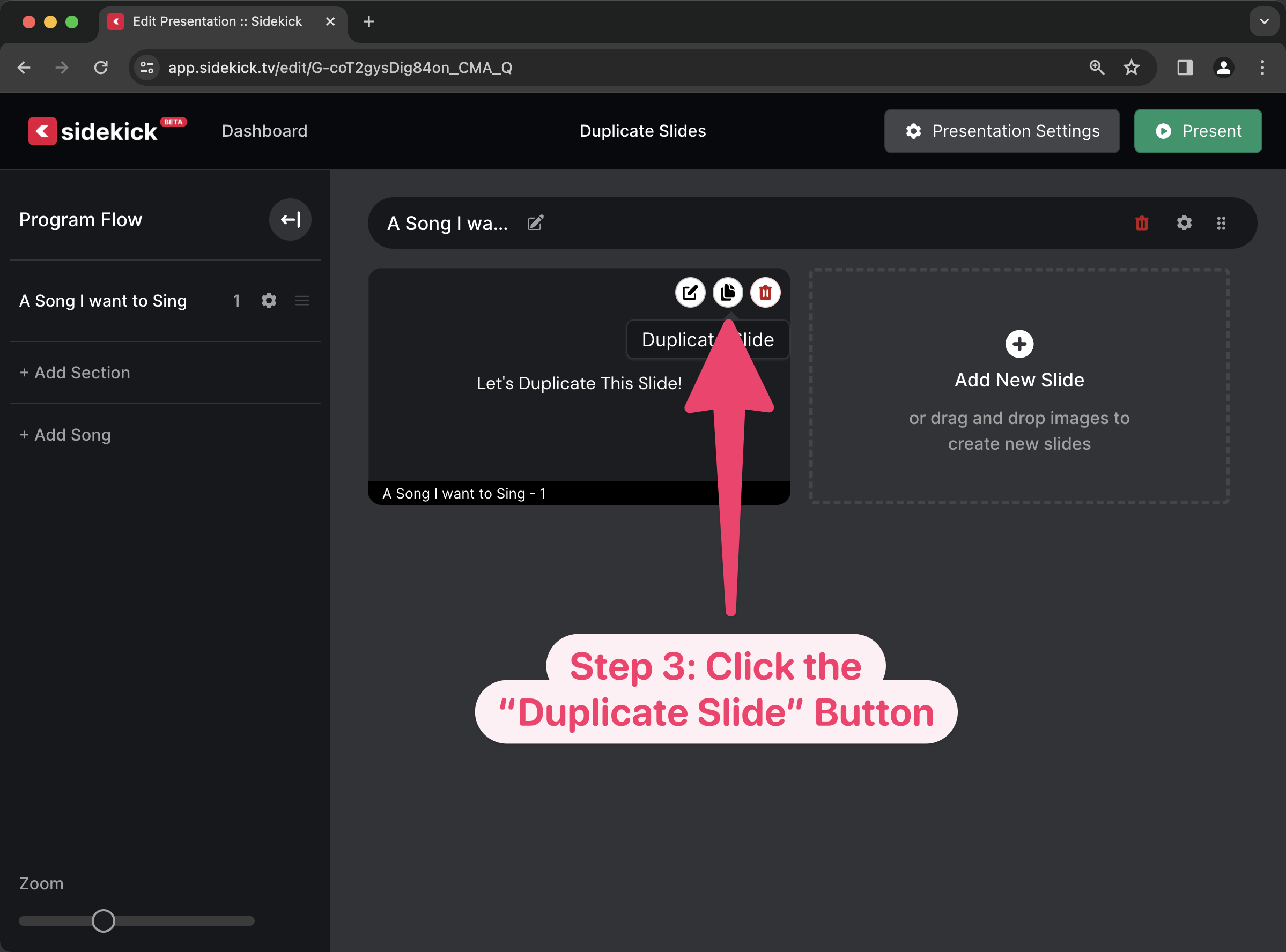
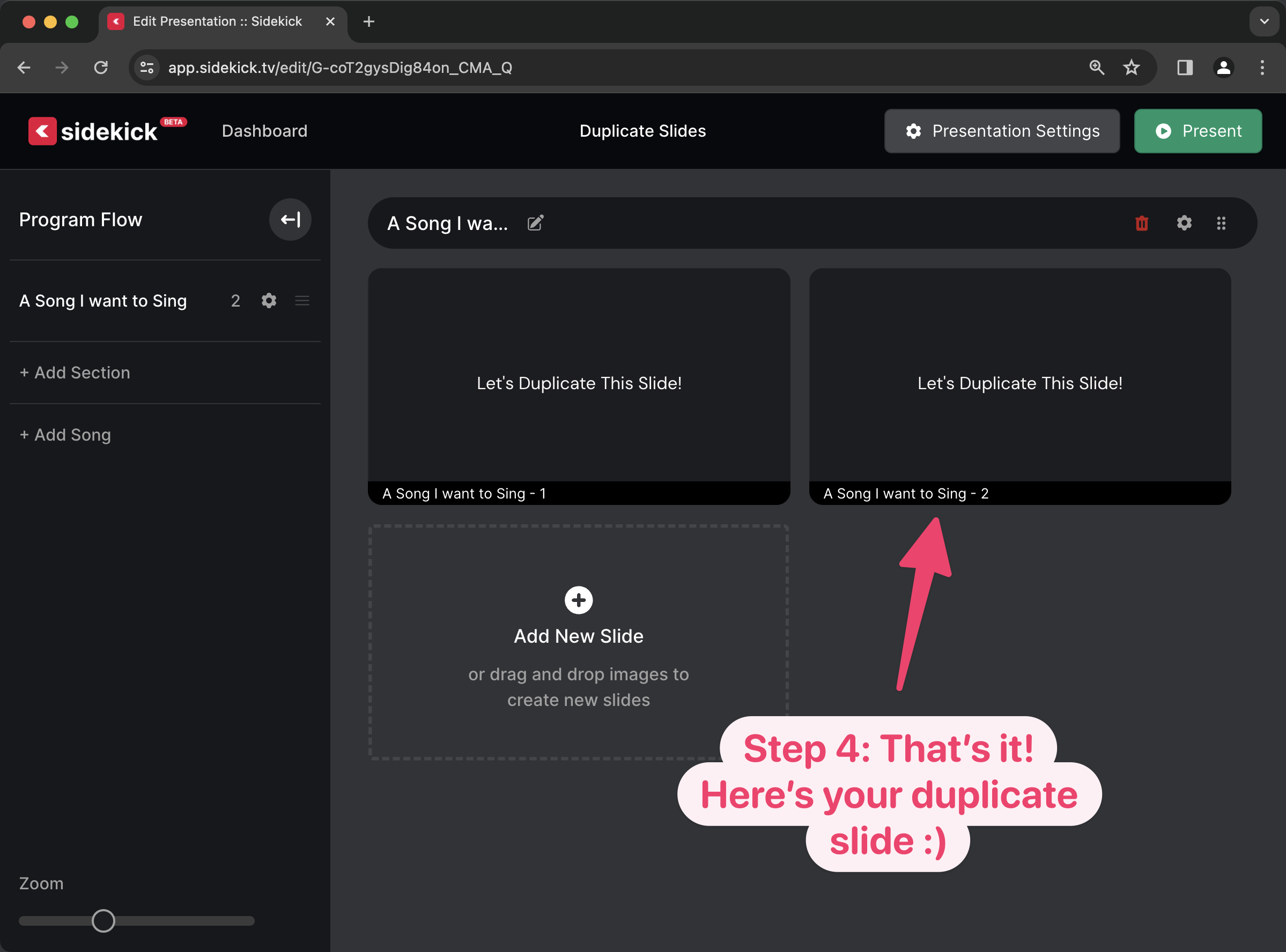
This will be really handy for those times that you import a song from CCLI SongSelect, but then you need to make multiple copies of the chorus slides! And what’s even better is that it’s a really simple process.

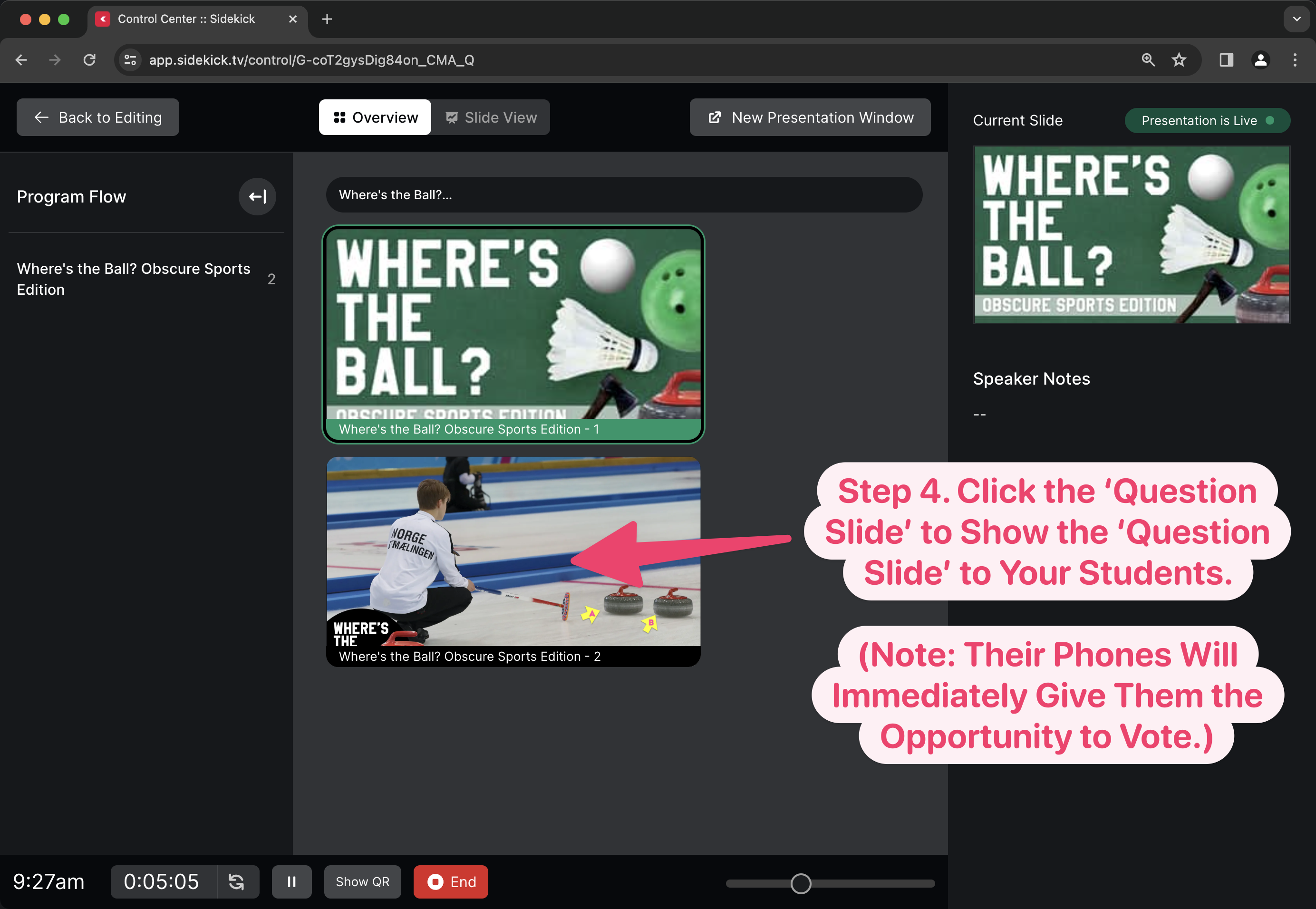
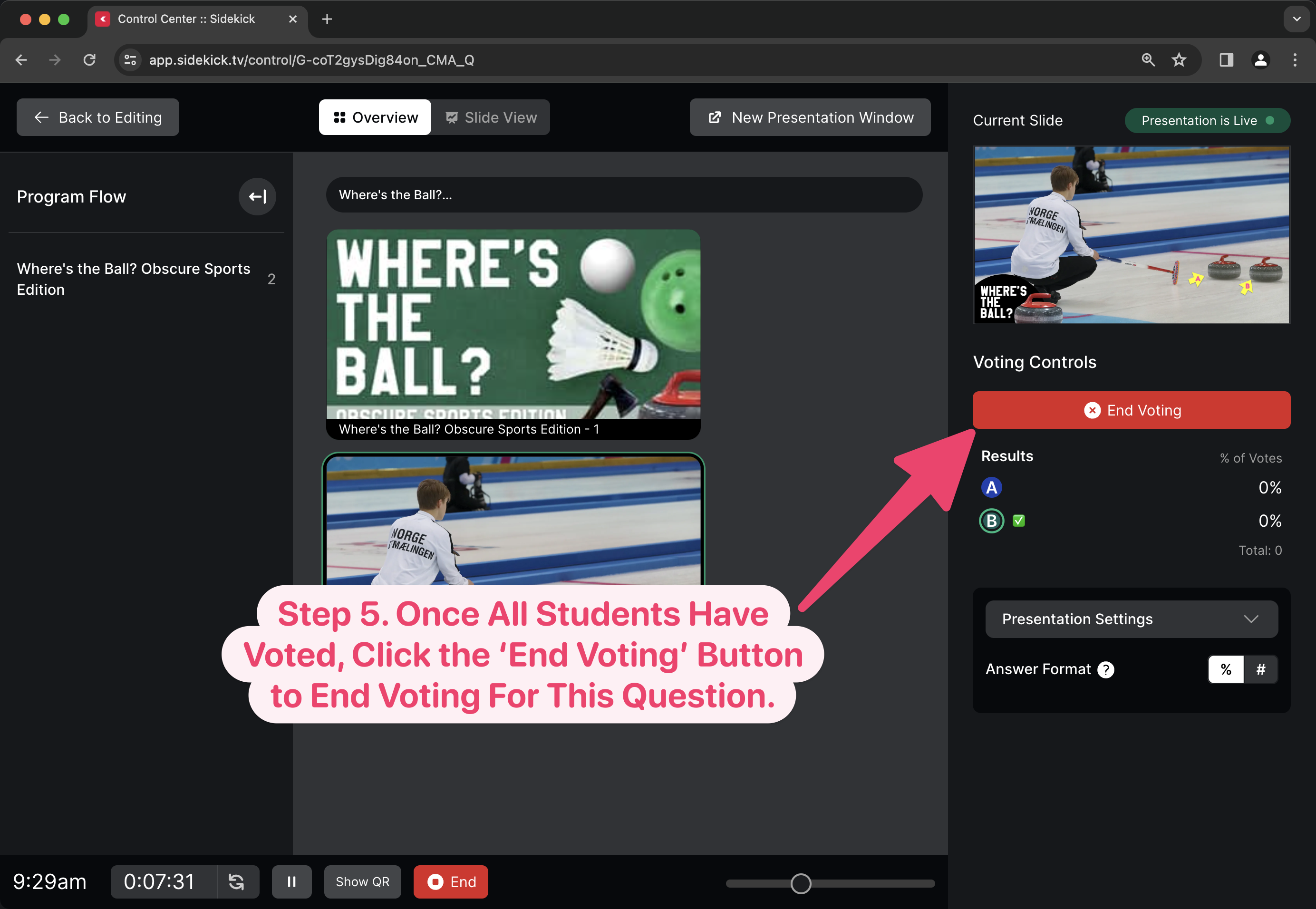
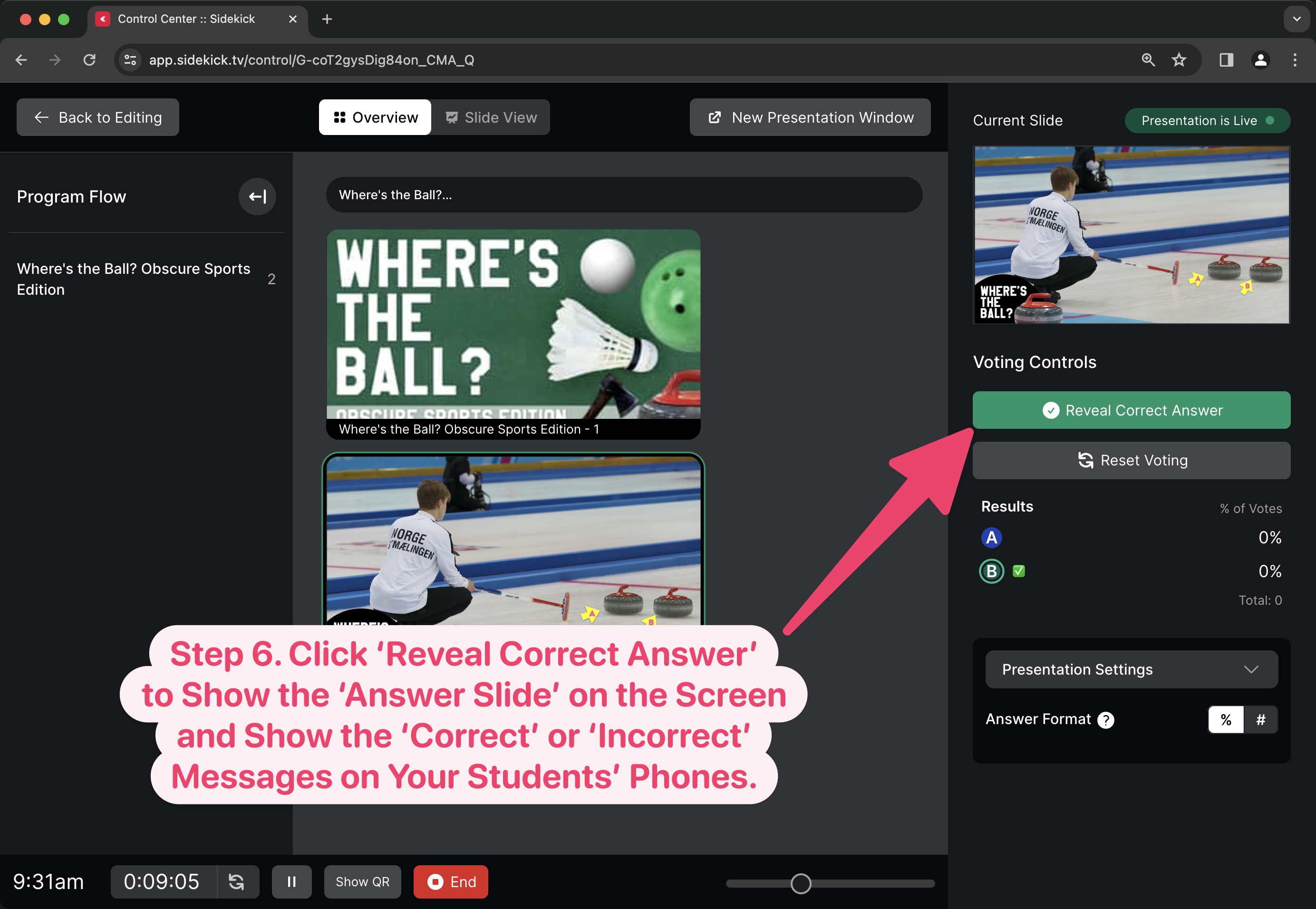
To see step-by-step instructions (along with a screenshot of each step) for duplicating a slide in Sidekick, just click the plus (+) button next to each step below:

If you’re using Sidekick and you run into any issues, or if you just have a question, please feel free to reach out to our support team at: [email protected]. Or you can check out other helpful articles and walkthroughs at the Sidekick Help Desk by visiting https://help.sidekick.tv.

Finally, if you choose to use the new Sidekick… let us know how you do it and what types of polls you do because we want to highlight you. Our goal is to highlight a youth worker every week with different ways they’ve used Sidekick to help their students engage. If you’re interested in being recognized as a Sidekick Hero, just click the big red button below:

If you’re using Sidekick and you run into any issues, or if you just have a question, please feel free to reach out to our support team at: [email protected]. Or you can check out other helpful articles and walkthroughs at the Sidekick Help Desk by visiting https://help.sidekick.tv.

Finally, if you choose to use the new Sidekick… let us know how you do it and what types of polls you do because we want to highlight you. Our goal is to highlight a youth worker every week with different ways they’ve used Sidekick to help their students engage. If you’re interested in being recognized as a Sidekick Hero, just click the big red button below:
15 Dec 2023

Meet A Sidekick Hero: Todd Handell

By |2023-12-14T13:02:39-08:00December 15th, 2023|Sidekick Hero Blog|1 Comment

From Doug: I still remember the day I met Todd Handell at one of our DYM100 conferences several years ago. Great smile. Baby face. The look of fear (“what kind of conference is this and why did my pastor sign me up?” type look), and a heart of gold. Since that conference in 2017, Todd has been to two more DYM100 conference and it’s always great to see him. He’s a longtime DYM Gold Member, he’s been a Sidekick Beta Tester for us, and he’s given us so much great input that I asked him to share why he’s excited for Sidekick in 2024. He’s currently serving at Lexington UMC in South Carolina (where he’s been for 2 years), and he’s in his 10th year of youth ministry. He’s a good brother and our 2nd Sidekick Hero.

5 Ways Sidekick Will Help Me in the New Year!

As a youth worker, who is responsible for presenting his own presentation from the stage, Sidekick has been an absolute game-changer for me. I’m in my 10th year in youth ministry, and I’ve never seen anything like the new Sidekick! I’ve loved the opportunity to play around with Sidekick 2.0 as part of the Beta Test Group and I’m thrilled to now have a new tool at my disposal that will save me time and make me so much more effective.

(click image to enlarge)

Here are 5 ways I believe Sidekick will benefit me and the way I do youth ministry in 2024:

1. It Saves Me TONS of Time!

Until now, I feel like I’ve been stuck in 1990 because I’ve been using PowerPoint as my presentation software. I just wasn’t able to afford anything else. But the truth is that it’s just so difficult to change things on PowerPoint. But now, it is so easy to just drag and drop images into Sidekick! Plus, I love that you can make the presentation ANYWHERE and then log in from somewhere else and the presentation is right there. I used to dread making PowerPoints each week, but now I love making Sidekick presentations–the continual updates that the DYM team is implementing keep making every week a new and fun surprise.

2. No Longer Stuck Behind the Laptop!

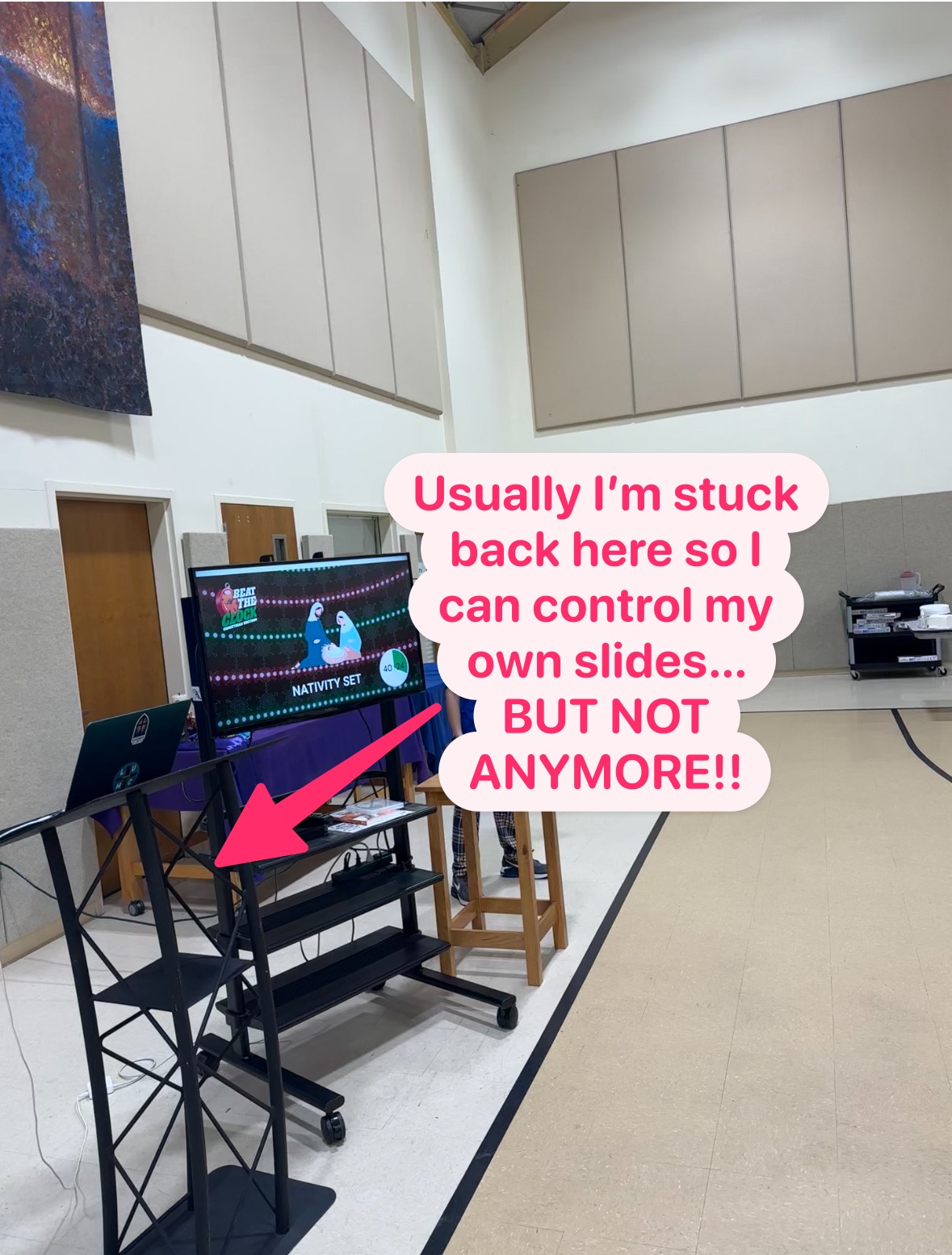
I currently present everything myself from a laptop hooked up directly (via HDMI) to a TV screen on stage with me (see pic). BUT NOT ANYMORE! With the ability to use Sidekick’s remote feature from my phone, I am able to move around freely throughout the crowd and not miss a beat! Plus, I’ve been super impressed by how quickly the screen responds when I click the button on my phone! This allows me to interact with my students more during my message and the games.

(click image to enlarge)

3. From Distraction to Interaction!

I’ve been fighting phone battles with my students for years… but not anymore! With the ability to create LIVE POLLS, students’ phones have just become a very cool engagement tool. Whether it’s used for icebreaker questions as students arrive or trivia questions during a game, they have LOVED the ability to interact with what’s happening on the screen! Even my students who don’t have phones have partnered up with their friends who do, so everyone gets to participate!

Todd prepping a poll for youth group…

(click image to enlarge)

Using Sidekick to run a game for his group…

(click image to enlarge)

4. One-Stop Shop for the “Do-It-All” Youth Pastor

I’ve learned that I can’t do effective youth ministry alone… I need volunteers! But I’ve encountered weeks where volunteers don’t show up, and everything falls on me (I’m hoping at least one youth worker can relate to this). Sidekick makes it so easy to present everything myself. It’s been super easy to integrate games, worship lyrics with the CCLI SongSelect (thank you for including this DYM!!), and slides for my message. In our meeting space (our gym), we don’t have a tech booth, so presenting from the stage is our only option, and Sidekick makes it so much easier. I’m so excited for the upcoming features like “Pick Me” and “Wheel Spinner” to be added in January. Those additions will only make my presentations/programming even more effective.

5. So Easy, My Senior Pastor Can Do It!

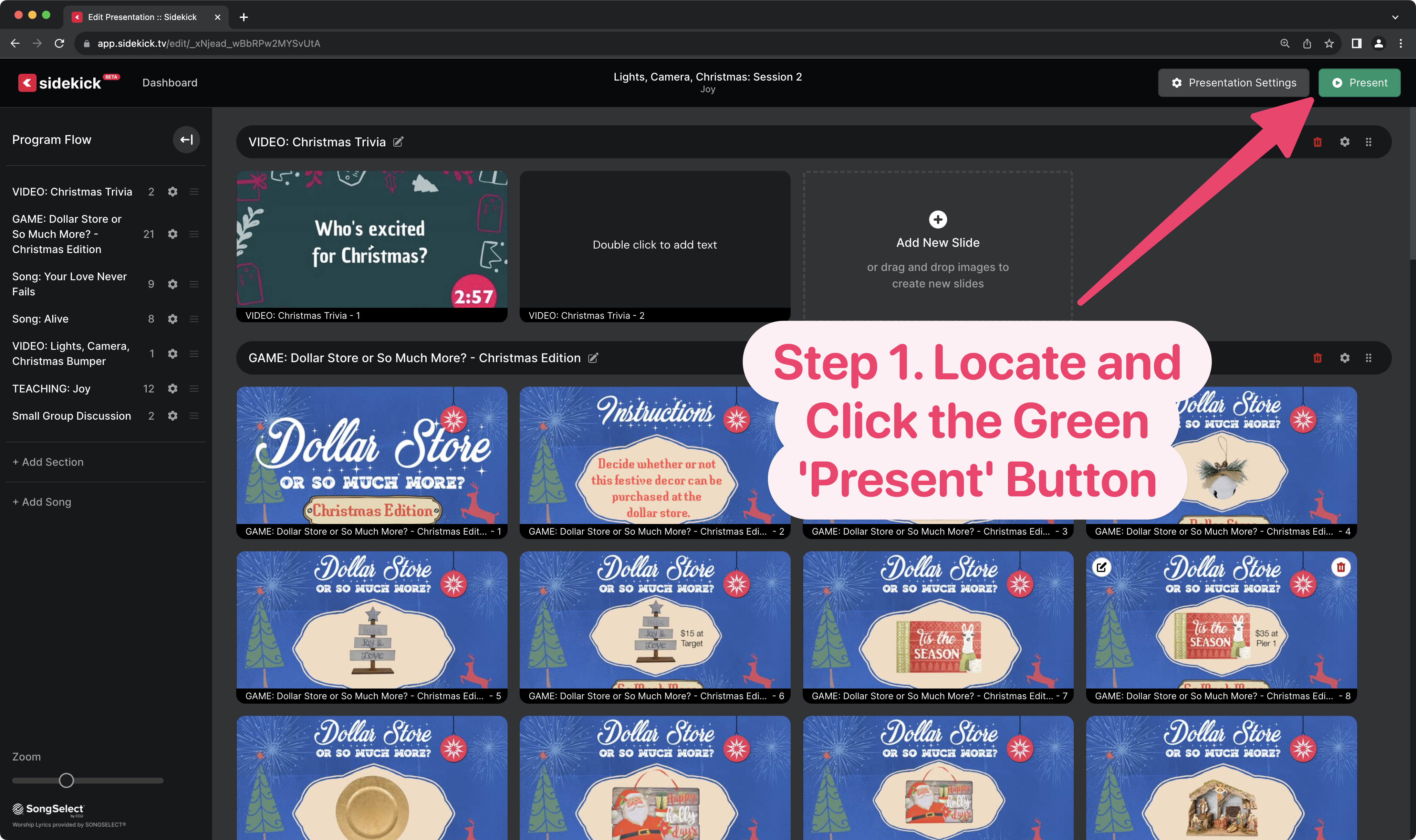
I haven’t asked my senior pastor to present using Sidekick yet, but I’m positive he could–it’s so easy to use. When I first heard about the new Sidekick, I was a little nervous because I thought, “Oh great, another tool/program/software I will need to learn.” But I’ve been super impressed with how easy it was to figure out and implement almost immediately. Plus, I love that it is web-based, so it’s all built into a browser! There’s no software to download and nothing to take up more space on my hard drive. Everything is extremely user-friendly, not to mention all the tools like this blog and the how-to-videos that DYM has created to help youth workers win. Just drag and drop elements into the presentation, hit “present,” and BOOM, it’s live!

In the words of my friend Buddy the Elf, “The best way to spread Christmas Cheer is singing loud for all to hear.” And let me be the first to tell you that Sidekick gives all youth pastors something to cheer about! I’ve been telling all my youth pastor friends about Sidekick 2.0 so they, too, can experience the wonderful gift of this new revolutionary tool for youth ministry. Join the crew, check out the brand new Sidekick, and become a Sidekick Hero like me. You won’t regret it.

If you’re using Sidekick and you run into any issues, or if you just have a question, please feel free to reach out to our support team at: [email protected]. Or you can check out other helpful articles and walkthroughs at the Sidekick Help Desk by visiting https://help.sidekick.tv.

Finally, if you choose to use the new Sidekick… let us know how you do it and what types of polls you do because we want to highlight you. Our goal is to highlight a youth worker every week with different ways they’ve used Sidekick to help their students engage. If you’re interested in being recognized as a Sidekick Hero, just click the big red button below:
If you’re using Sidekick and you run into any issues, or if you just have a question, please feel free to reach out to our support team at: [email protected]. Or you can check out other helpful articles and walkthroughs at the Sidekick Help Desk by visiting https://help.sidekick.tv.

Finally, if you choose to use the new Sidekick… let us know how you do it and what types of polls you do because we want to highlight you. Our goal is to highlight a youth worker every week with different ways they’ve used Sidekick to help their students engage. If you’re interested in being recognized as a Sidekick Hero, just click the big red button below:
14 Dec 2023

Controlling Your Sidekick Presentation from Your Phone

By |2023-12-14T09:41:36-08:00December 14th, 2023|Sidekick Hero Blog|0 Comments

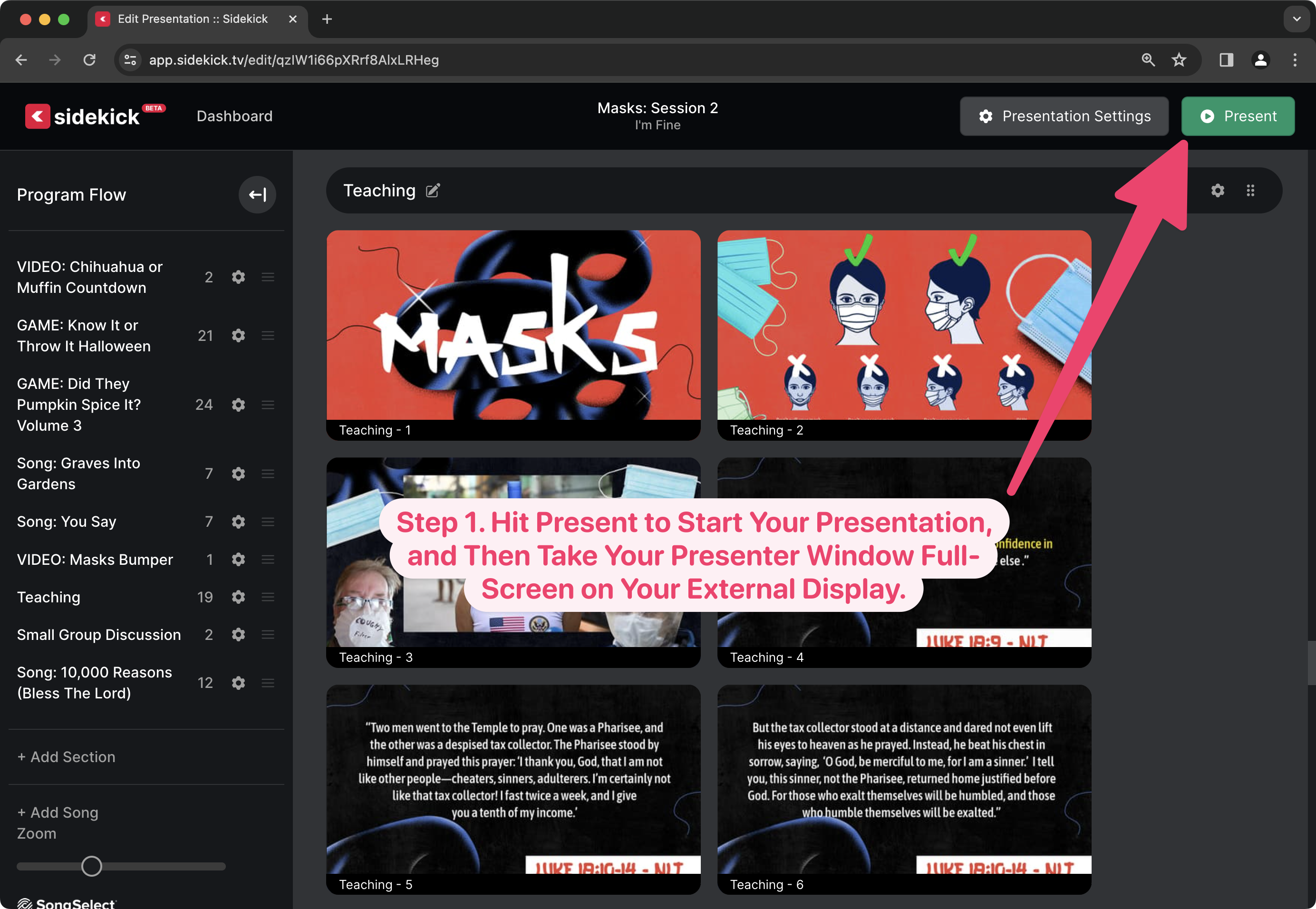
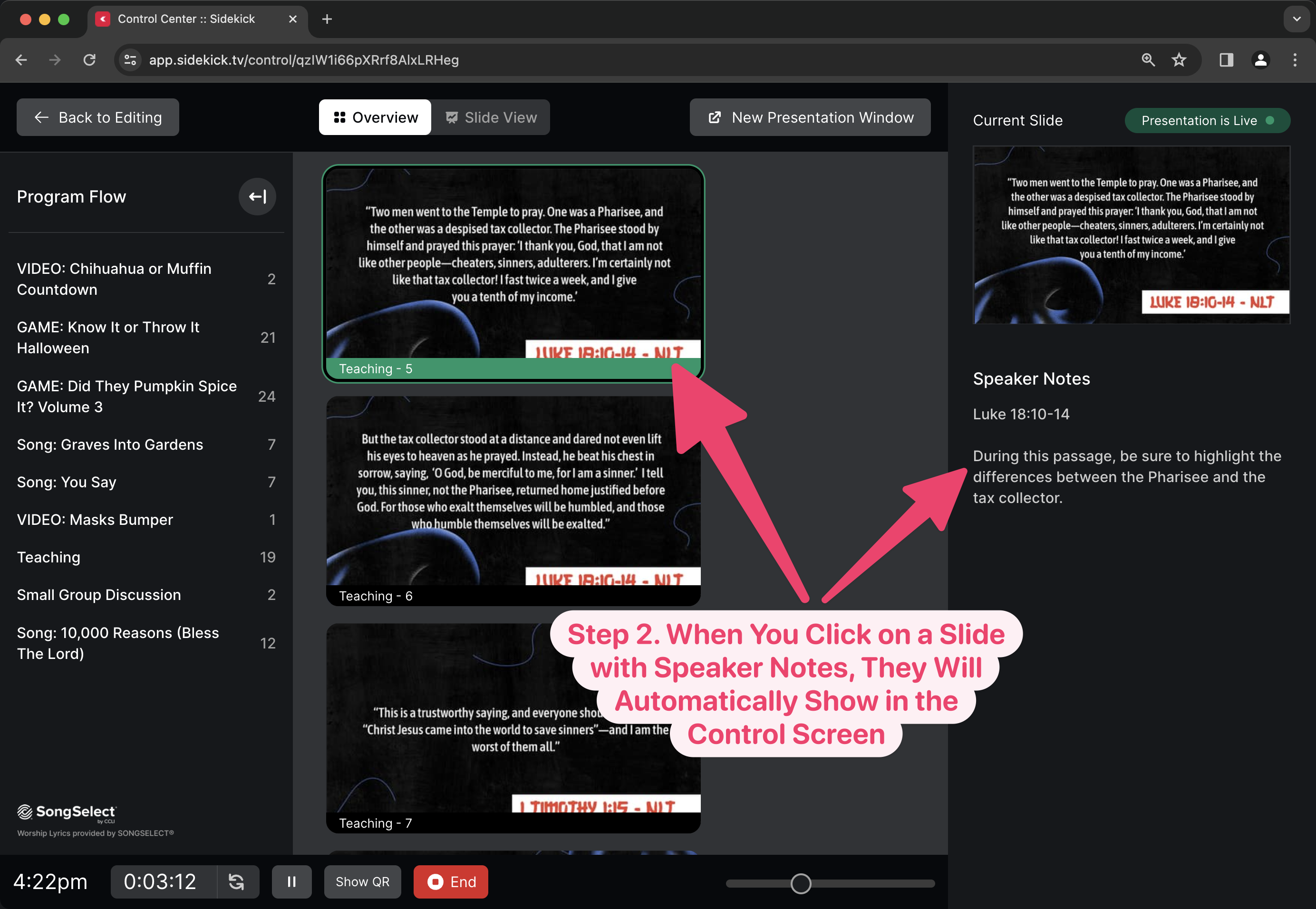
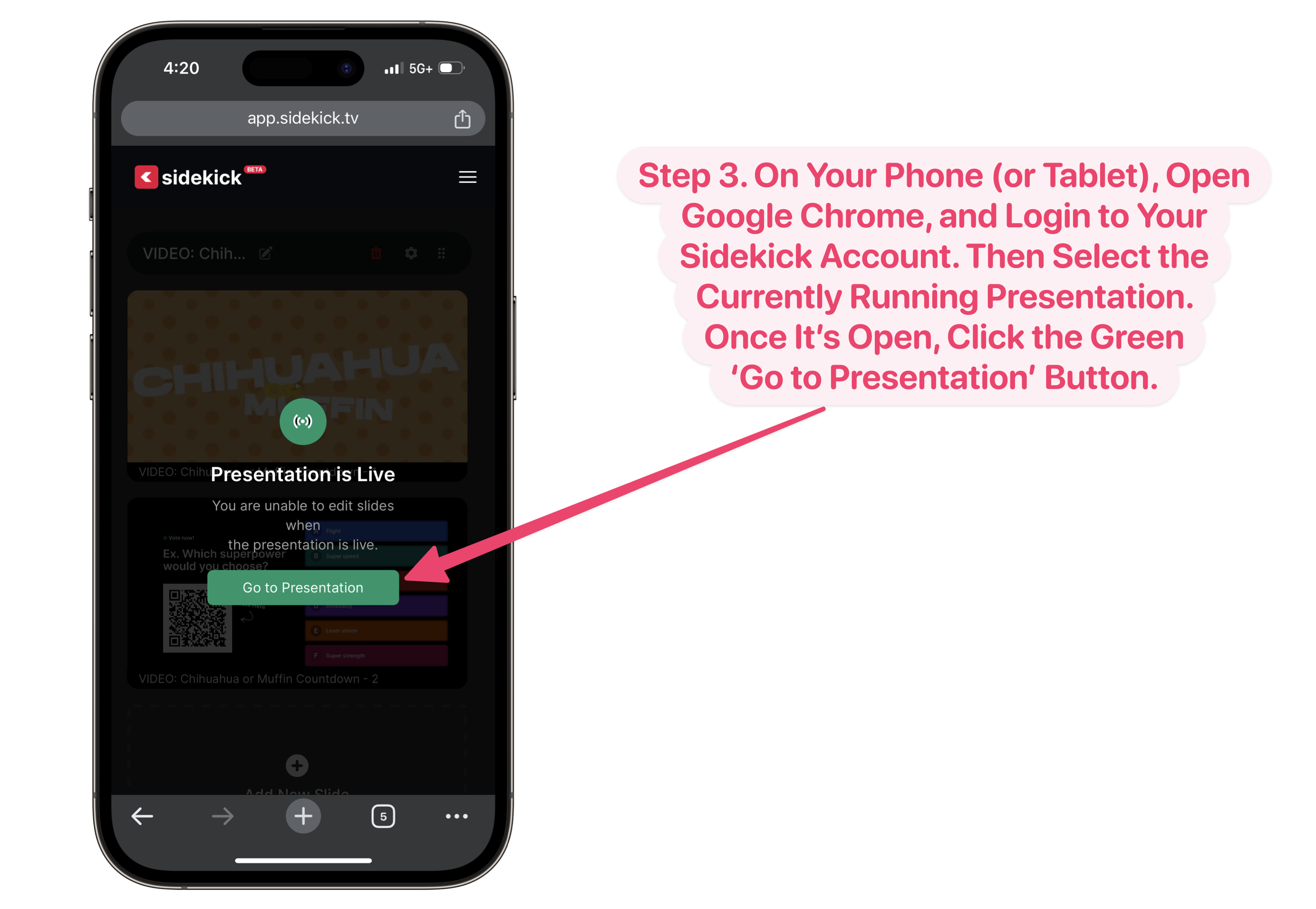
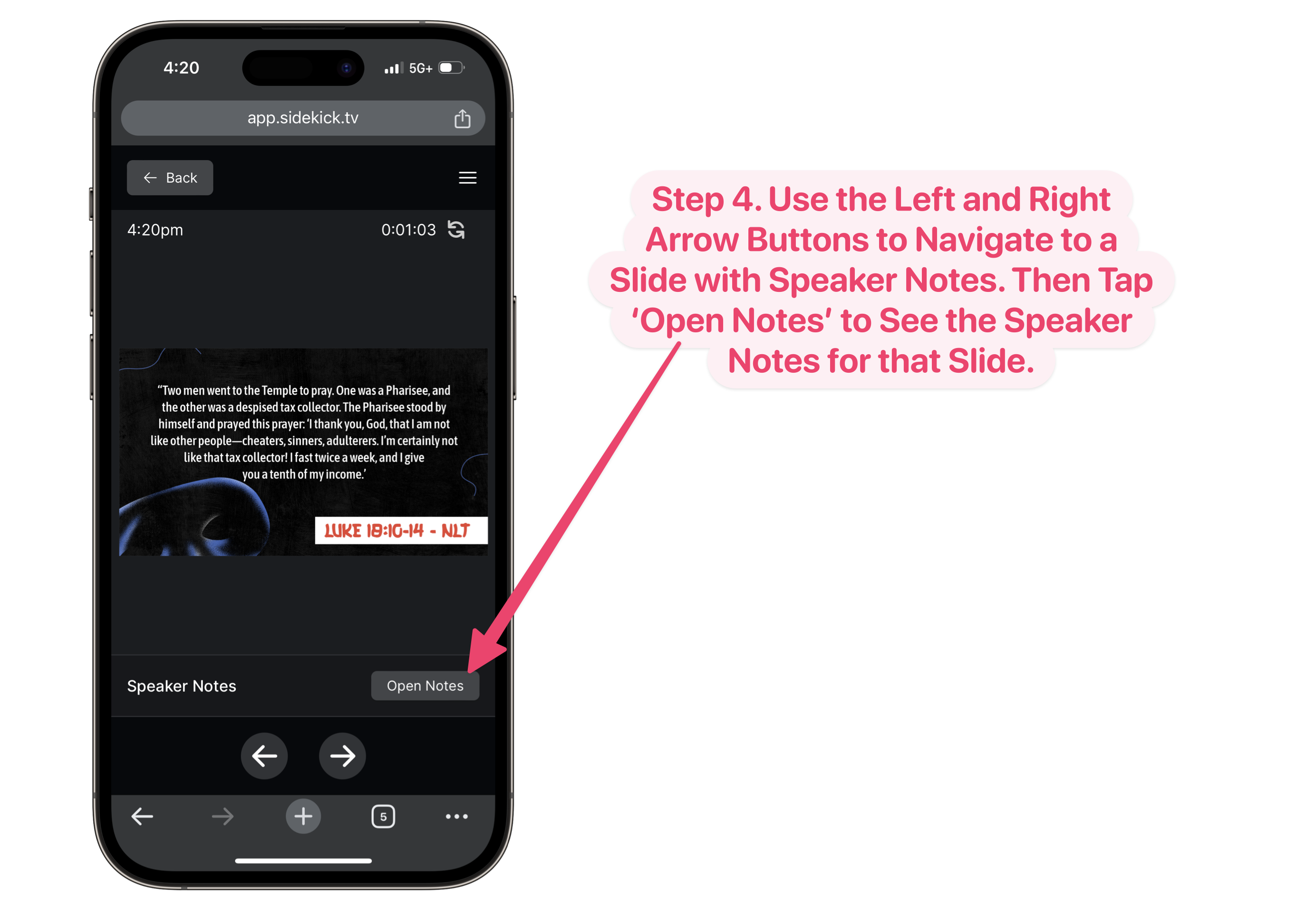
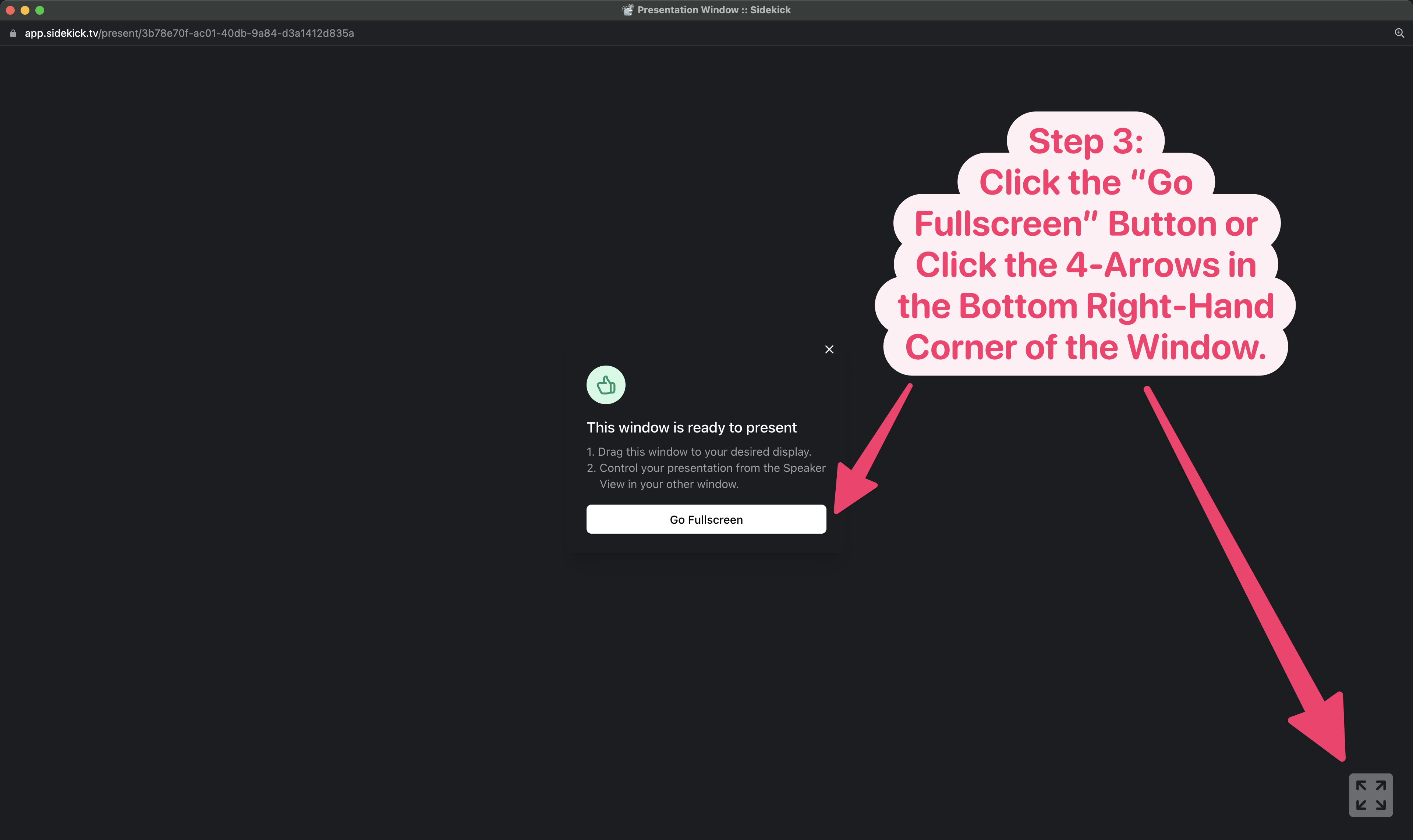
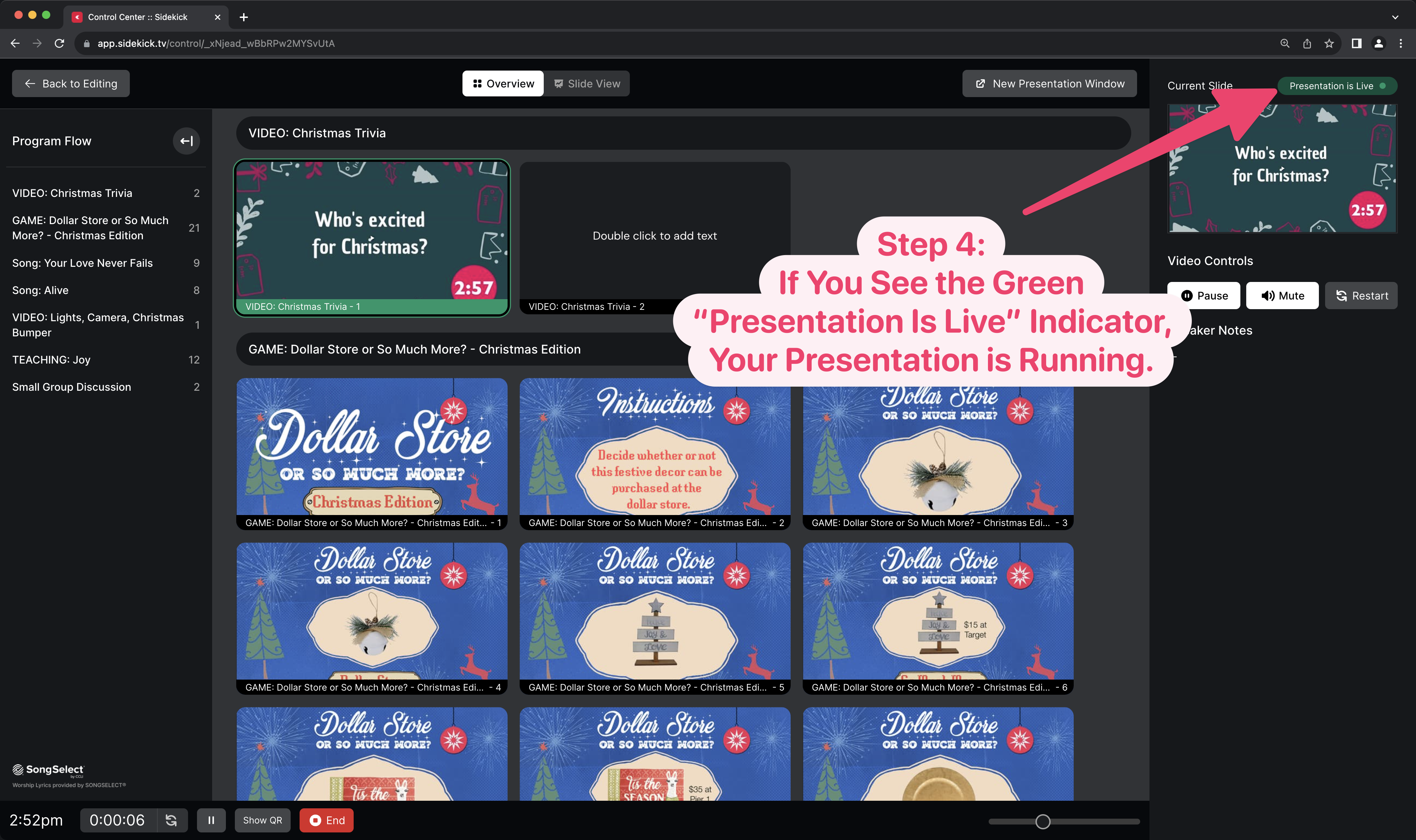
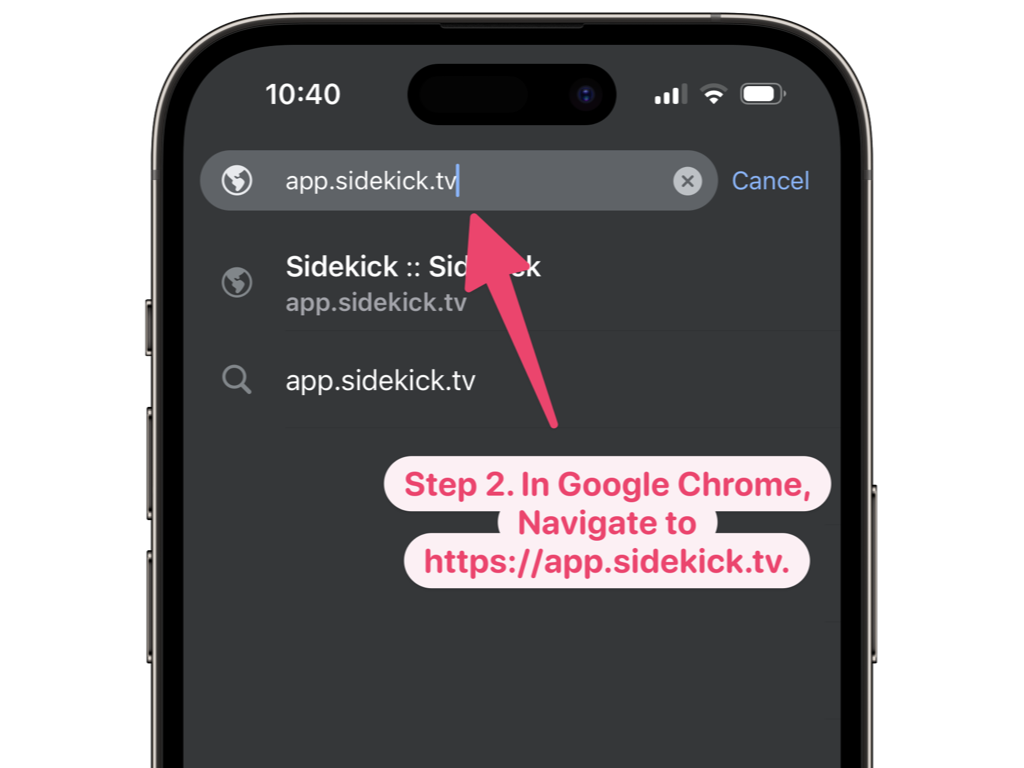
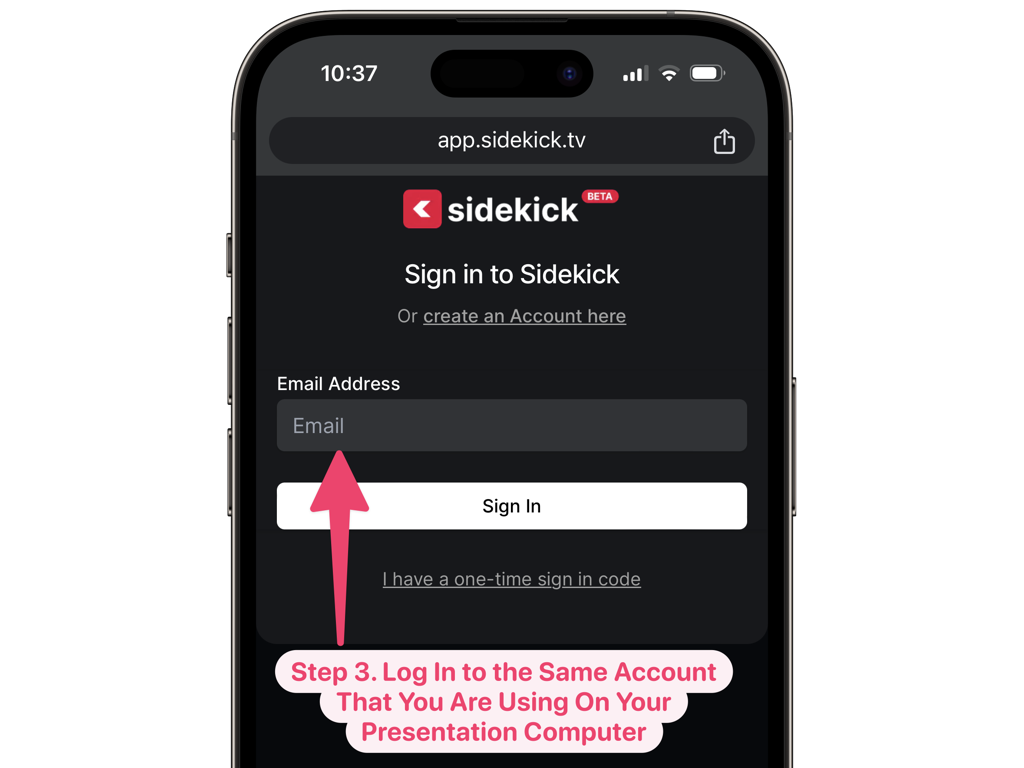
Controlling your  Sidekick presentation from your 📱Phone is super simple! Just watch the video below, or scroll down to see step-by-step instructions.

Step-By-Step Instructions:

To see step-by-step instructions (along with a screenshot of each step) for controlling your Sidekick presentation with your phone, just click the plus (+) button next to each step below:

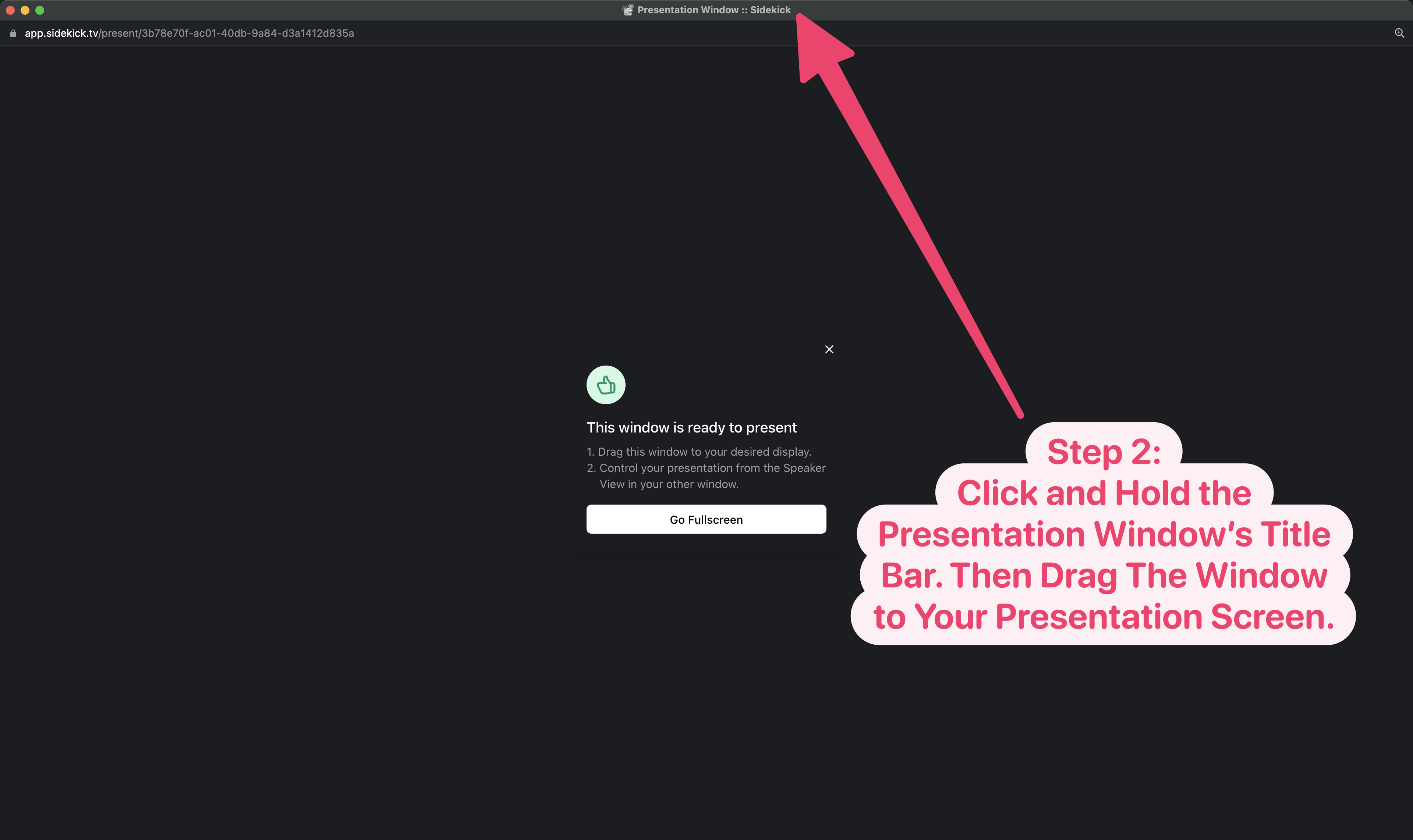
First, you’ll need to start your presentation and go full screen by following this first set of instructions below:

Then, once your presentation is running, follow the instructions below to control your presentation from your phone:

It’s really that easy! And, of course, once you add any element to a slide, you can use your mouse to move and resize that element so you can place it exactly where you want it on your slide.

Be on the lookout for upcoming posts on how to do the following:

  • 🎵 Adding Songs to Sidekick via SongSelect
  • 🔀 Moving Sections and Slides in Sidekick
  • 📙 Adding Speaker Notes in Sidekick
  • 🖐️ Adding Additional Users to Your Workspace
  • ‼️ And more!

If you’d like to see the other blog posts in the “How Do I…?” series, you can do so here: How Do I…?

If you’re using Sidekick and you run into any issues, or if you just have a question, please feel free to reach out to our support team at: [email protected]. Or you can check out other helpful articles and walkthroughs at the Sidekick Help Desk by visiting https://help.sidekick.tv.

Finally, if you choose to use the new Sidekick… let us know how you do it and what types of polls you do because we want to highlight you. Our goal is to highlight a youth worker every week with different ways they’ve used Sidekick to help their students engage. If you’re interested in being recognized as a Sidekick Hero, just click the big red button below:
If you’re using Sidekick and you run into any issues, or if you just have a question, please feel free to reach out to our support team at: [email protected]. Or you can check out other helpful articles and walkthroughs at the Sidekick Help Desk by visiting https://help.sidekick.tv.

Finally, if you choose to use the new Sidekick… let us know how you do it and what types of polls you do because we want to highlight you. Our goal is to highlight a youth worker every week with different ways they’ve used Sidekick to help their students engage. If you’re interested in being recognized as a Sidekick Hero, just click the big red button below:
Go to Top