The Download Youth Ministry Blog/
16 Feb 2024

Training Your Volunteers Has Never Been This Easy!

By |2024-02-16T09:49:35-08:00February 16th, 2024|Training, Volunteers|3 Comments

The amazing event continues this year with DYM’s 6th Annual National Day of Volunteer Youth Ministry Training. A customizable, video-driven, fun, and momentum building event, with practical youth ministry training from Doug Fields, Josh Griffin and other youth ministry veterans and thought-leaders!

After 5 incredible years, we’ve decided to change things up to make this training work even better for you and your community! The “National DAY of Volunteer Youth Ministry Training” to “DAYS”.

Basically, you play it on a single day of your choice this Fall all at once, divide it up into 2-3 lunch gatherings, whatever is best for your people. This youth ministry training day “in a box” can be adapted to suit your specific needs and passions. Be as creative as you want to be or just press play!

You set the date(s) and invite youth ministry volunteers, we provide the complete training… it’s that easy!

Learn More!

Train your team exclusively OR host your team and other churches. You choose!

SINGLE CHURCH USE
HOST THE EVENT

Register now, prices go up soon!

16 Feb 2024

Youth Min Roundup – 02/16/2024

By |2024-02-16T08:59:17-08:00February 16th, 2024|Youth Ministry Roundup|15 Comments

Here are just a few interesting finds this week from around the Youth Min Multiverse:

😬 Having The Talk…

Check out this Conversation Kit on Dating from axis.org that you can forward to the parents in your ministry. This two-part video series is designed to be watched together and then discussed as you work through the big questions about falling in love while pursuing Christ.

👀 Observing Lent This Year?

This is NOT what it means…

🌷😵SURVIVE THE SPRING SLUMP!

Where did everybody go?! Sports, graduation, school…Showing up for youth group becomes less and less of a priority, but Ronald Long has 4 tips that will see you through…

🤳YIKES!

Are you subconsciously telling people they don’t matter?

Check back next week to see what else the intrepid DYM Team stumbles upon…

14 Feb 2024

How To Never Log In EVER AGAIN!

By |2024-02-14T08:43:45-08:00February 14th, 2024|Sidekick, Sidekick Hero Blog|4 Comments

Gather ’round, friends! I’d like to tell you a story.

About 237 years ago (this may be a slight exaggeration, but there’s really no way to know for sure), the world was forever changed when Download Youth Ministry introduced a game-changing presentation software called Sidekick (around the DYM Offices, we lovingly refer to this as O.G. Sidekick).

With the introduction of O.G. Sidekick, youth workers everywhere could suddenly create Spinnng Wheels, Pick Me, and more. It was truly revolutionary, especially since there were very few other presentation software options for youth workers to use (and NONE of them had the same features). It was a game-changer in every sense of the word.

However, as revolutionary as it was, O.G. Sidekick came with an unwelcome but necessary evil:

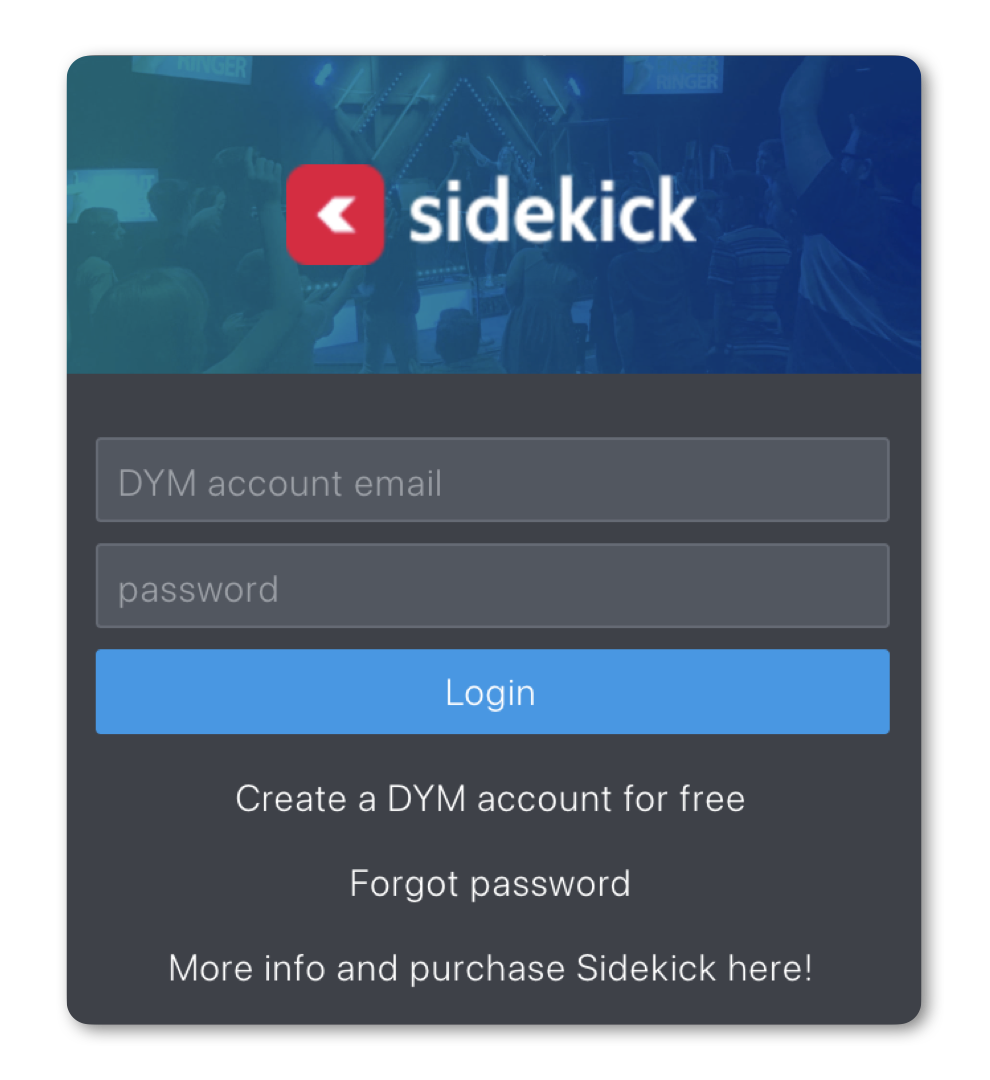
Yes, the dreaded login screen popped up EVERY SINGLE TIME the software was launched.

And this meant that the user had to type in their username and password EVERY SINGLE TIME.

Recently, I sat down with a youth worker who had used O.G. Sidekick from the very first day it launched. I asked them if it was ok to share their story, and they agreed with the one caveat that we keep them anonymous, to protect the innocent (of course):

I’ve always loved having students run our tech booth. From sound, to lights, to presentations, I’ve always viewed the tech booth as a place where students can learn valuable skills that they’ll hopefully continue to use well into adulthood.

However… we had a sixth grader who didn’t quite grasp the difference between minimizing a window and closing a window…

It was his first night running the presentation when, right in the middle of our service, boom… he’d accidentally close the O.G. Sidekick window. And when he reopened it, he was met with the dreaded login screen. I didn’t even realize there was a problem until I heard his voice from the back of the room:

“Hey ______, what’s the password?”

The only problem was… I was the only one who knew the password… and it was the same password I used for everything… like literally everything.

So there I was, in front of a crowd of students, saying my password into the microphone…

It was not great.

A Youth Worker that Would Prefer to Stay Anonymous

So when we started developing the New Sidekick, we knew that we had to make sure this never happened again. Thus, the decision was made to utilize one-time codes instead of passwords.

The concept of a one-time code is fairly simple. If you have a Sidekick account, you just type in your email address, and it will email you a code that only works once. That way, users don’t have to tell anyone their password. However, we’ve been getting reports from a few users that every time they open the New Sidekick, they just keep seeing this screen:

Thankfully, we believe we have a fix.

It appears that the majority of users who have experienced this problem had bookmarked the actual one-time code request screen instead of their Sidekick dashboard. So, if you’re experiencing this problem, try these easy-to-follow steps:

  1. Open the Chrome browser on a computer where you have previously entered a Sidekick one-time code (within the last 60 days)
  2. In the Address Bar, type this URL: https://app.sidekick.tv/dashboard
  3. And boom. You should be all set.

If this works, then be sure to bookmark this link: https://app.sidekick.tv/dashboard, so you can always get right back to your Sidekick Dashboard without having to enter another one-time code.

If you are still prompted to enter a one-time code, try this:

  1. Type your email address in the text box and click “Sign In.”
  2. Check your email and click the login link.
  3. Once you’re logged in, close Chrome.
  4. Then try the above steps again. This time, everything should work perfectly.

You’ll need to do this for each device (for example: your presentation computer, your tablet, and your phone) that you use with your account, but once you do, this should keep you logged in for the next 60 days. And even better, every time you open Sidekick, that 60 days starts over.

So, long story short…

As long as you open Sidekick once every 60 days, you should NEVER HAVE TO LOG IN EVER AGAIN! 

Hooray!!

P.S. If you’re still having trouble, feel free to reach out to [email protected]. They’d be more than happy to help!

If you’re using Sidekick and you run into any issues, or if you just have a question, please feel free to reach out to our support team at: [email protected]. Or you can check out other helpful articles and walkthroughs at the Sidekick Help Desk by visiting https://help.sidekick.tv.

Finally, if you choose to use the new Sidekick… let us know how you do it and what types of polls you do because we want to highlight you. Our goal is to highlight a youth worker every week with different ways they’ve used Sidekick to help their students engage. If you’re interested in being recognized as a Sidekick Hero, just click the big red button below:

If you’re using Sidekick and you run into any issues, or if you just have a question, please feel free to reach out to our support team at: [email protected]. Or you can check out other helpful articles and walkthroughs at the Sidekick Help Desk by visiting https://help.sidekick.tv.

Finally, if you choose to use the new Sidekick… let us know how you do it and what types of polls you do because we want to highlight you. Our goal is to highlight a youth worker every week with different ways they’ve used Sidekick to help their students engage. If you’re interested in being recognized as a Sidekick Hero, just click the big red button below:

13 Feb 2024

New Feature Alert: PICK ME Is Back!! Plus, Introducing BULK ADD!!

By |2024-02-13T10:32:55-08:00February 13th, 2024|Sidekick Hero Blog|7 Comments

Everyday for the past few months, the Sidekick Customer Service Team (who absolutely ROCK, by the way) have received roughly 372 emails like this:

Well, you asked…

🚨 AND TODAY, WE ANSWERED!! 🚨

Introducing Sidekick‘s latest feature… PICK ME!

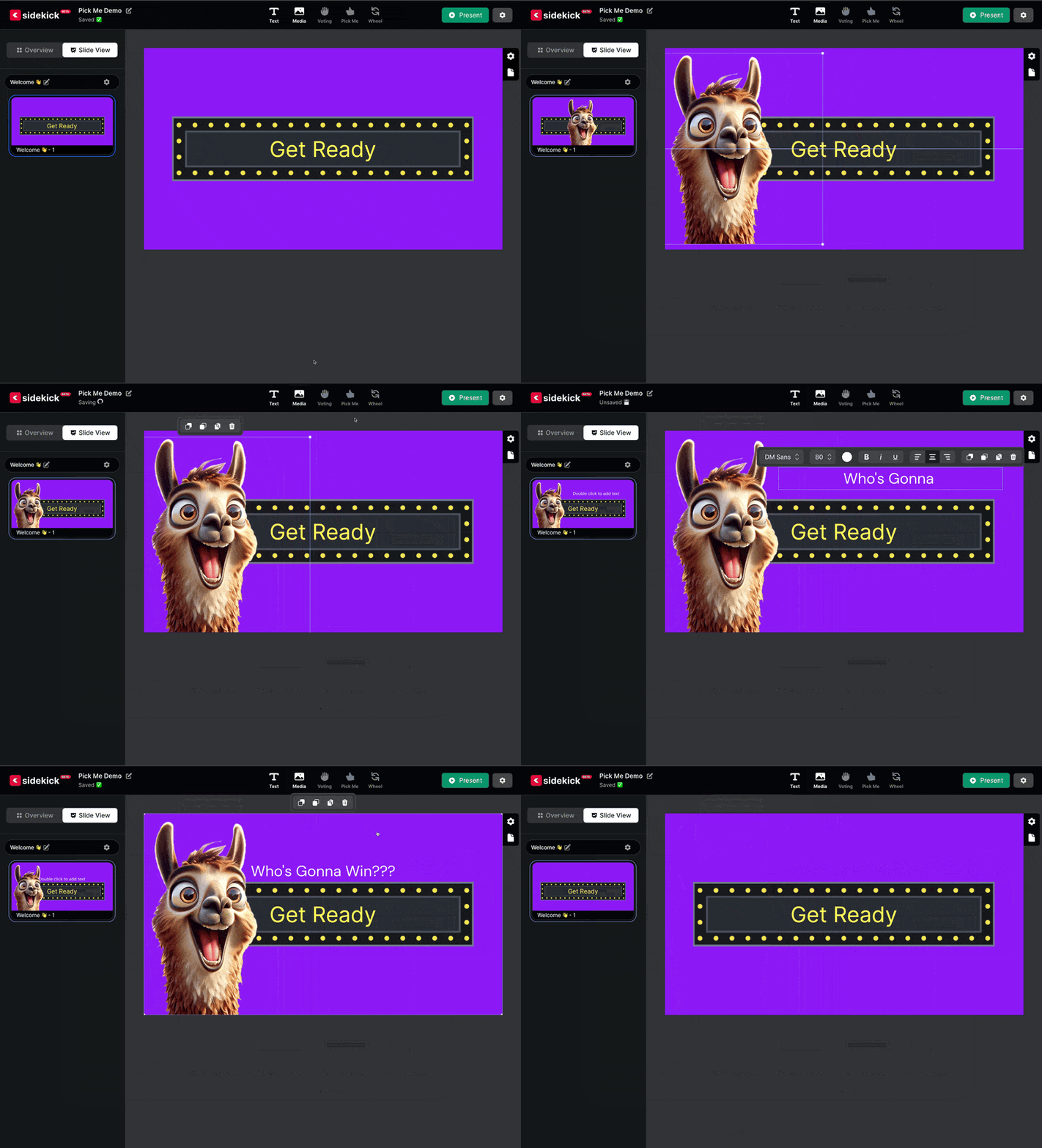
That’s right, thanks to today’s big update, it’s never been easier to pick a student for a game, for a prize, or for… well… just about anything! Check it out:

Starting today, all Sidekick users can now add a PICK ME to any slide in their Sidekick presentation! Plus, because the new Sidekick is absolutely incredible, you can now customize PICK ME in ways you never could before, like:

Starting today, all Sidekick users can now add a PICK ME to any slide in their Sidekick presentation! Plus, because the new Sidekick is absolutely incredible, you can now customize PICK ME in ways you never could before, like:

  • You can resize the PICK ME text box and move it to any part of the slide (even off the edge of the slide!)
  • You can change the background to any IMAGE, VIDEO, or COLOR you want
  • You can add IMAGES like your youth group logo (or an AI-generated llama) and TEXT to your PICK ME slide.
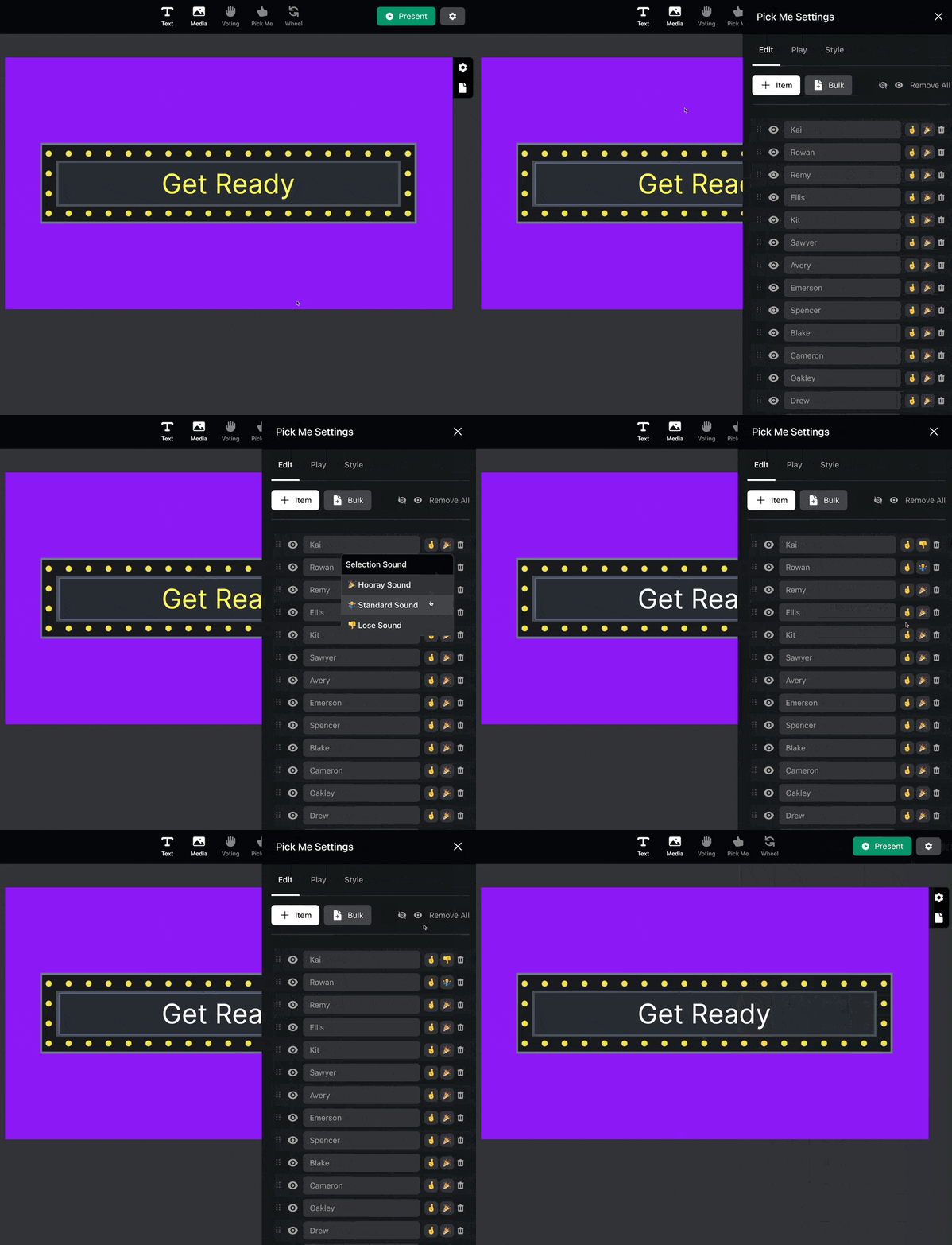
  • You can assign a positive, neutral, or negative SOUND to each name
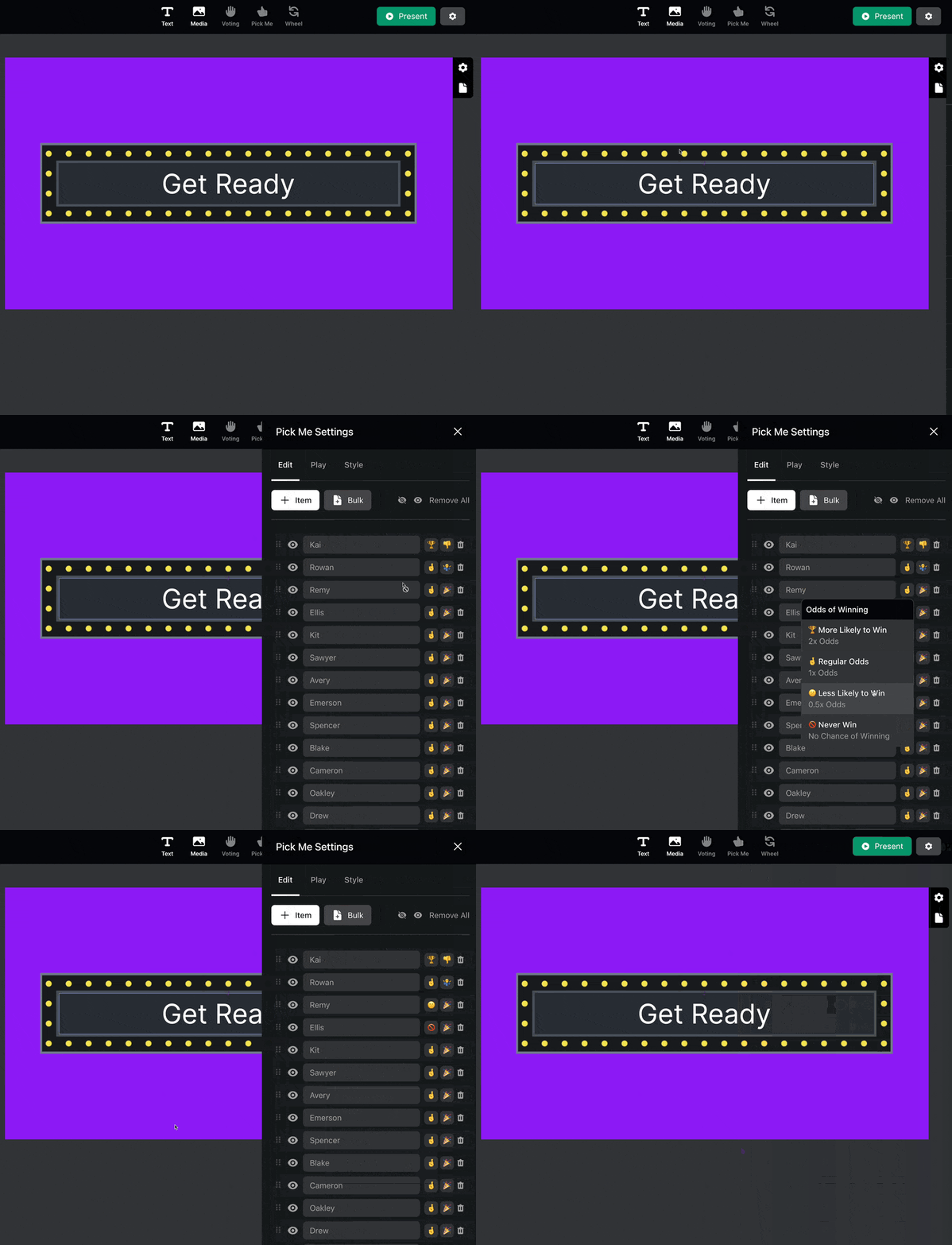
  • You can choose the ODDS OF WINNING for each name (2x, 1x, 0.5x, or 0)
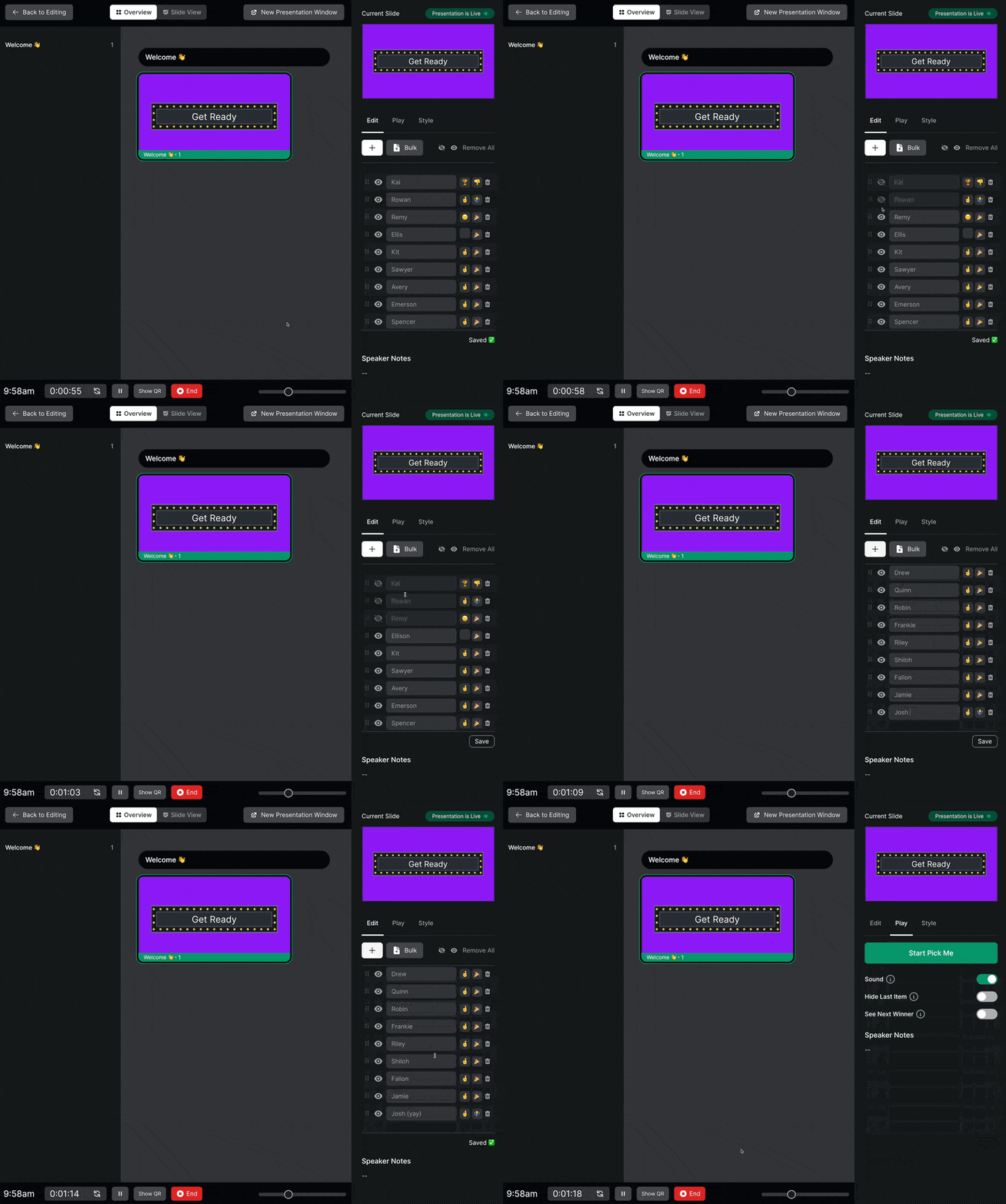
  • You can ADD/EDIT/REMOVE names from the list DURING your presentation!

But that’s not all!!

Along with adding PICK ME, today’s Sidekick update includes a MAJOR new feature that works for PICK ME and SPINNING WHEEL:

That’s right! You can now copy and paste a list of names from a text file, Word Document, Google Sheet, Excel Spreadsheet, or pretty much anything else! And, yep! This works in PICK ME and SPINNING WHEEL!

Wanna see PICK ME and BULK ADD in action?

Then check out the video below for a detailed walkthrough:

It’s really that easy! Thanks to the most recent Sidekick update, you can now add PICK ME to any slide in your presentation, and thanks to BULK ADD, it’s never been easier to add tons of names at once!

We’ll be posting more about other new features in the coming days, but in the meantime, feel free to keep exploring Sidekick! And if you have any ideas for features that you think we should work on next, you should head over to our Feature Suggestion Page by clicking the button below:

Request a New Sidekick Feature!

That’s all for today, but if you’d like to see the other blog posts in the “How Do I…?” series, you can do so here: How Do I…?

If you’re using Sidekick and you run into any issues, or if you just have a question, please feel free to reach out to our support team at: [email protected]. Or you can check out other helpful articles and walkthroughs at the Sidekick Help Desk by visiting https://help.sidekick.tv.

Finally, if you choose to use the new Sidekick… let us know how you do it and what types of polls you do because we want to highlight you. Our goal is to highlight a youth worker every week with different ways they’ve used Sidekick to help their students engage. If you’re interested in being recognized as a Sidekick Hero, just click the big red button below:

If you’re using Sidekick and you run into any issues, or if you just have a question, please feel free to reach out to our support team at: [email protected]. Or you can check out other helpful articles and walkthroughs at the Sidekick Help Desk by visiting https://help.sidekick.tv.

Finally, if you choose to use the new Sidekick… let us know how you do it and what types of polls you do because we want to highlight you. Our goal is to highlight a youth worker every week with different ways they’ve used Sidekick to help their students engage. If you’re interested in being recognized as a Sidekick Hero, just click the big red button below:

12 Feb 2024

Surviving the Spring Slump

By |2024-02-12T07:52:10-08:00February 12th, 2024|Leadership|27 Comments

Springtime is usually tough for youth pastors and student ministry. Somewhere in between the hectic schedule of spring sports and seniors getting ready to graduate, it seems like showing up for youth group becomes less and less of a priority.

So, as a Youth Pastor, how can you get through the slump and stay encouraged? I’ve got four tips!

Focus on who is there.

A big pet peeve of mine is hearing students ask “where is everybody?” or even worse, “nobody’s here!” Both of those statements signal that everyone who made the time to actually show up and be invested in youth group today isn’t worthwhile. I know that’s probably not how you feel as the pastor, but it’s an important thing to remember. The students who showed up are there! Minister to the students you have!

I would have small group leaders who only had three kids show up for a meeting. Instead of moaning that their regulars couldn’t come, they loaded up the car and went to Sonic! What a great way to encourage the students who made the effort to come!

Stay in touch!

Just because a student isn’t there doesn’t mean that they don’t wish they could be. Getting reminders from you or messages of encouragement for the big game they’ve got coming up can be really helpful. Make sure you stay in contact with students even when they’re not there. This way, you can let them know that they matter to you even when they don’t show up to youth group. It’ll give you something great to talk about when you do finally get to connect with them in person again!

Ask them for their sports schedule and put their games on your calendar so you can send them a text the day of and let them know you’re praying for them. It can be a really game-changing opportunity!

Go to where they are.

If students are really focused on getting ready for the spring musical, then you can show them how much they mean to you by going to watch their play. We ask students to come hang out with us at church all the time. If, in the spring, they find themselves really busy with their extracurricular activities, we can return the favor and go to where they are! When you show up at the student sport event or band concert, you let them know how much they mean to you! It’ll go a long way in the future.

Take care of yourself.

The spring can be a really tough time. You can feel discouraged and beat down. Take a moment to plan some self-care into your spring routine. Schedule a day where you get away from the office and pray for your students and your next season of ministry. Invite your leaders out for coffee and hang out. Spend some time cleaning out the youth room so you’ll be ready for the wild Summer months. Take some moments to read scripture and reflect on what God has done in your own life. Spring can be tough! But, if you work on these four things, by the grace of God, you’ll make it through!

Need an easy win for youth group this spring? Check out these games:

10 Feb 2024

SIDEKICK: Choose Your Own Adventure Game

By |2024-02-10T13:35:50-08:00February 10th, 2024|Sidekick Hero Blog, Youth Ministry Ideas|16 Comments

We played an INCREDIBLE game this week at church. It’s the combination of all things Sidekick – it uses ALL of the bells and whistles that make this new presenter great – Live Voting, The Wheel, Pick Me & MORE. It’s so fun … and in a couple weeks, it’ll be FREE in Sidekick. That’s right … FREE.

Pretty soon, we’ll have a button that says, “FREE STUFF,” and in one click, it’ll be yours.

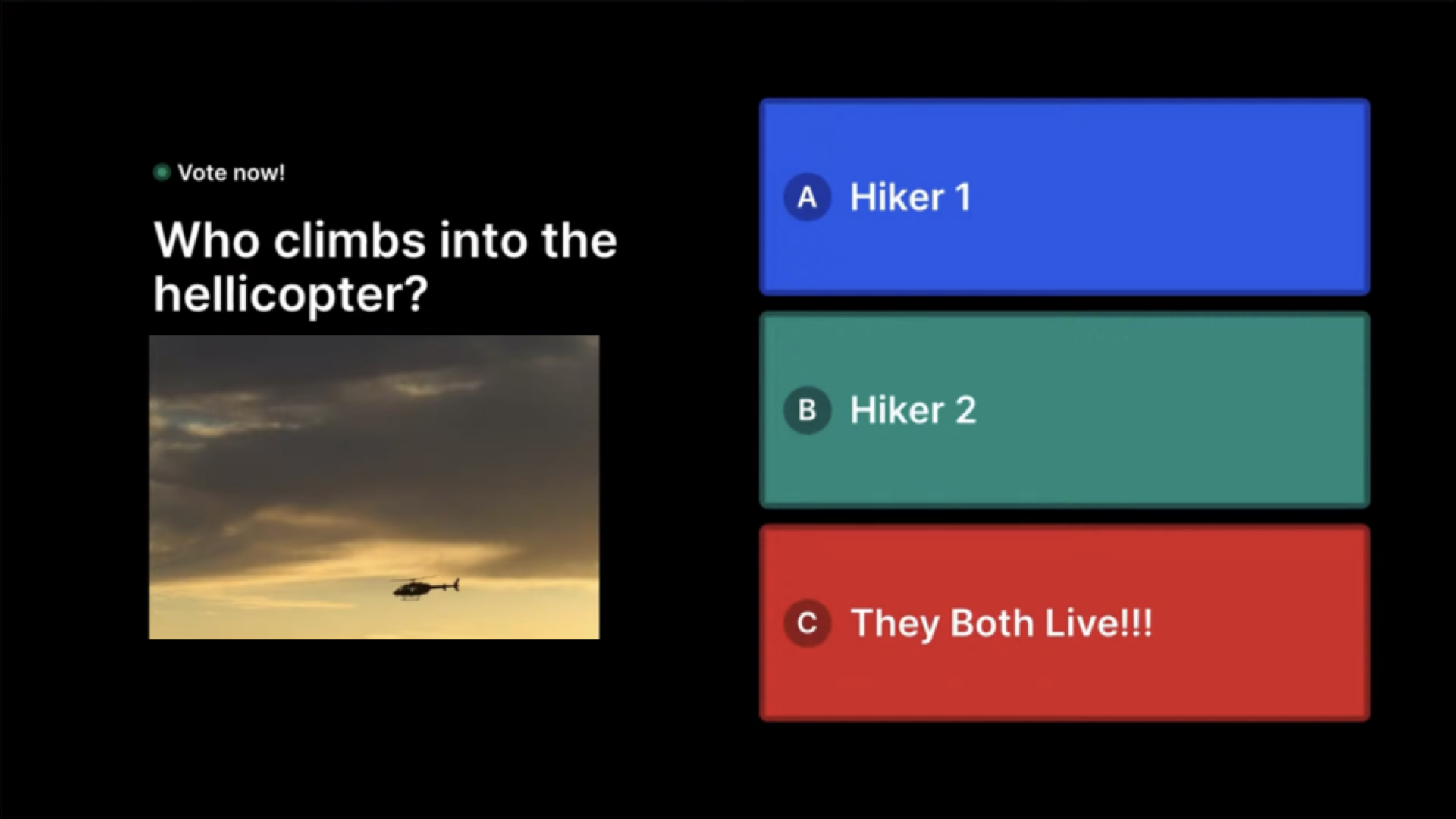
The game was so fun – we pulled up 5 kids on stage and put them on stools to “go for a hike” and then suddenly, they discovered that they were lost in the woods. All sorts of crazy things happen – bees attack, so do bears, snakes show up, even a volcano erupts at one point. One by one, through the fate of the wheel or picker, or the vote of the crowd, the hikers get riddled away one by one until … the final 2 hear a helicopter. They flag it down, and then in a hilarious twist of fate – think of those old Oregon Trail games – everyone dies.

(click image to enlarge)

(click image to enlarge)

Our junior high students loved it – silly fun, easy to run, and definitely next level compared to just a regular screen game. Your students will love it, and it’ll show off the power of Sidekick for interaction, for sure. And … you can’t beat the price tag. And don’t worry, we’ll let you know as soon as it’s available to grab for FREE inside the new Sidekick in a few weeks!

JG

If you’re using Sidekick and you run into any issues, or if you just have a question, please feel free to reach out to our support team at: [email protected]. Or you can check out other helpful articles and walkthroughs at the Sidekick Help Desk by visiting https://help.sidekick.tv.

Finally, if you choose to use the new Sidekick… let us know how you do it and what types of polls you do because we want to highlight you. Our goal is to highlight a youth worker every week with different ways they’ve used Sidekick to help their students engage. If you’re interested in being recognized as a Sidekick Hero, just click the big red button below:

If you’re using Sidekick and you run into any issues, or if you just have a question, please feel free to reach out to our support team at: [email protected]. Or you can check out other helpful articles and walkthroughs at the Sidekick Help Desk by visiting https://help.sidekick.tv.

Finally, if you choose to use the new Sidekick… let us know how you do it and what types of polls you do because we want to highlight you. Our goal is to highlight a youth worker every week with different ways they’ve used Sidekick to help their students engage. If you’re interested in being recognized as a Sidekick Hero, just click the big red button below:

7 Feb 2024

Using Sidekick for the Big Game!

By |2024-02-07T12:01:22-08:00February 7th, 2024|Sidekick, Sidekick Hero Blog|6 Comments

This will be short & sweet. I was talking with Cooper M. (an awesome High School Pastor in Lancaster, PA), and he showed me how he’s using Sidekick during their group’s Big Game Party this Sunday. You’ve gotta see this:

(click image to enlarge)

Now, in all fairness, Cooper is pretty darn good (actually, he’s kind of amazing) at graphic editing, so it was no surprise that his image overlay is one of the best we’ve seen yet. Hopefully this might spark a few ideas for you and your ministry!

P.S. Sidekick has a few features coming really soon, so keep an eye on the blog for updates!

If you’re using Sidekick and you run into any issues, or if you just have a question, please feel free to reach out to our support team at: [email protected]. Or you can check out other helpful articles and walkthroughs at the Sidekick Help Desk by visiting https://help.sidekick.tv.

Finally, if you choose to use the new Sidekick… let us know how you do it and what types of polls you do because we want to highlight you. Our goal is to highlight a youth worker every week with different ways they’ve used Sidekick to help their students engage. If you’re interested in being recognized as a Sidekick Hero, just click the big red button below:

If you’re using Sidekick and you run into any issues, or if you just have a question, please feel free to reach out to our support team at: [email protected]. Or you can check out other helpful articles and walkthroughs at the Sidekick Help Desk by visiting https://help.sidekick.tv.

Finally, if you choose to use the new Sidekick… let us know how you do it and what types of polls you do because we want to highlight you. Our goal is to highlight a youth worker every week with different ways they’ve used Sidekick to help their students engage. If you’re interested in being recognized as a Sidekick Hero, just click the big red button below:

5 Feb 2024

How Do I Recruit Volunteers?

By |2024-02-05T08:34:06-08:00February 5th, 2024|Leadership, Volunteers|2 Comments

We can’t do this ministry by ourselves! While it might be possible to take a group of students on a trip in the church van alone, there’s always a high likelihood that you misplaced a receipt, got lost on the way, or somehow lost a kid!

And I know I’m not the only one who really wishes there were someone else in the audience to help keep students focused and on task when I’m teaching a message or leading a game. For crowd control and to prevent receiving as many angry parent emails, volunteers are an integral part of any Youth Ministry! So how do you get them? Speaking from the Sunday morning pulpit might not be your best bet. Instead, try these four tips:

  1. Ask parents to help make student ministry better: Some youth pastors don’t like asking parents to serve in ministry. Maybe it’s because they feel like students can’t be themselves if mom or dad is hanging around. Sometimes it’s because a Youth Pastor might feel intimidated by parents. Odds are, they’re older than you, and it might feel weird having volunteers around who are twice your age or could legitimately be your parent.The real reality is that they are invested in Youth Ministry going well! These are their kids we’re talking about! Parents can make the best volunteers because they have an inside track on what’s going on in their students’ lives, and they want the ministry to thrive.
  2. Ask students who want to help lead the youth group: You might be surprised about how perceptive students are. Or maybe you know that students can tell who they would like to be around. If you were to ask a couple of students in your youth group who they would like to see volunteering in the student ministry, odds are that they have some names from your church.They may not be the people you would’ve chosen first, but if you ask them to serve because students mentioned them by name, you might find yourself a really helpful ally in your ministry journey!
  3. See who naturally hangs around: When you have a youth group, is there somebody who is hanging out with the kids throwing a football in the parking lot? Is there someone who pops in just to help set up chairs or ask if you need any more snacks? Are there people who ask to be involved in Youth Ministry? This might seem like an easy win, but the reality is people might not volunteer if they’re not asked.When you see people at church naturally gravitating towards students, they might be worth getting to know a little bit better, and seeing if they would be a good fit for serving in the student ministry! Make sure to watch out for older church members as well who take time out of their day to stop and talk to students. Don’t ever discount a volunteer because they might be too old! If they love Jesus and like kids, they might be a great volunteer!
  4. Ask those already serving: Does your church have people who already like to help, maybe they cook in the kitchen or hand out coffee or open doors before service. People who like to serve usually are looking for more ways to serve! There might be some church members who do too much and need to take a break, but don’t discount people or try to be the Holy Spirit for them. Ask if they would be willing to serve in student ministry and let them pray about it!

Have I missed any ways that you’ve recruited volunteers at your church? I’d love to hear them!

And need some resources getting these new volunteers on board? Check these out:

30 Jan 2024

Numbers don’t matter. Until they really do.

By |2024-01-30T06:41:24-08:00January 30th, 2024|Youth Ministry Ideas|8 Comments


When I started in Youth Ministry 16 years ago, I had a really big aversion to counting the number of heads in the room. Some of that involved my senior pastor calling me into his office every Monday morning. When I was just starting out, I envisioned doing devotionals with my pastor. Maybe we would spend time praying for each other and our church congregation.

But that wasn’t ever the reason for the Monday morning meeting. He wanted to know how many students I had on Sunday morning. 

I dreaded that meeting because I didn’t enjoy letting him know how many bodies were in the room.

The amount of students I had didn’t speak to how many of them were reading their Bible throughout the week! Or how many of them had shared Jesus with a friend. Or how many of them were beginning to pray And begin their own spiritual journeys!

But I kept on going to those Monday morning meetings and telling my senior pastor how many kids had showed up. 

Maybe you’ve got a similar aversion to talking about numbers in your youth group. You don’t wanna brag about how many kids are coming or, just as likely, maybe your number of regular students seems pretty low when you compare it to the church down the street or the really active youth group on Instagram.

I would agree with my younger and much less mature self. The number of students inside the building doesn’t say how spiritually mature they are, or whether or not, they are actually doing something with their faith beyond youth group programming.

But do play a role in helping you Assess some parts of your Youth Ministry.

And can even be a small part of determining health in your ministry.

Let’s look at a couple ways numbers can actually help you out.

Percentage of your church that’s student ministry

Let’s say you have a student ministry of 20 kids. But you have a regular church attendance of 150 in your church. You have a little over 13% of your church attending student ministry. A stat that gets thrown around that comes from Tony Morgan is that a healthy church should have about 10% of regular church attendance (that’s adults, kids, and students all combined). It holds water. It’s USUALLY a good stat. But take into context a few things: Is your church primarily young families or all retirees? If so, your pool of students may be low. Give yourself some grace. If your church is LOTS of middle-aged families with teens, but you’re just running 8% of the attendance, there may be something you need to look into.

Decrease or Increase Year Over Year

Again, let’s say you have a youth group of 20 kids. And you’ve had 20 kids on average for the last two years. If, during the spring, your weekly average drops to 15 and stays there for a couple months, it’s time to see what’s going on. If it doesn’t jump back up in the fall, when students normally dial back into involvement, you REALLY need to ask what has changed and what needs to happen.

On the other hand, if you start averaging 25 or 30 and the church continues to run 150 to even 200, that’s a BIG reason to celebrate! Be excited and ask for a bigger pizza budget.

Hey, we can all dream.

Volunteer to Student Ratio

For you personally, it’s good to have a team around you. It will increase your longevity, your joy, and your ministry!

Do you have one leader for every ten students? In your youth group of 20, that’s you PLUS one volunteer. I would encourage you to get some help! Having at least two to four OTHER volunteers in your ministry is such a good idea. It helps your accountability, allows people to have life come at them, and does not rock the ministry. I would encourage you to keep getting volunteers until you have at

Students Attending vs Students on the Role

I grew up Southern Baptist. We were BIG on keeping people on the “role,” meaning the list of students who have visited the church, attended at any time, or lived close to the church.

It could get out of hand, honestly.

We had students on the role who had attended VBS in 3rd grade and just got moved up each year, but really, they had no connection to the church. If you’ve got a role, clean it up and get it down to the students attending regularly or are at least really connected to your church.

Then, see how many of them are coming to the youth group! If it’s a healthy percentage, maybe 75% to 100%, awesome! Keep at it! If it’s less healthy, maybe 50% to 25%, it’s time to see what keeps those students away from the youth group.

Numbers are a resource. Not THE resource.

Really. Numbers can be helpful. If you use them well. Don’t get discouraged when numbers don’t match what you’ve hoped and prayed for. Use them as a tool to see what could change and what has worked in the past.

God gave you THESE students at THIS church for a reason. Lean into it! Learn your community and your church culture and reach who God has put in front of you!

You’ve got this!

29 Jan 2024

New Feature Alert: (Re)Introducing the Spinning Wheel!!!

By |2024-03-06T08:27:18-08:00January 29th, 2024|Sidekick Hero Blog|10 Comments

🚨 This is not a drill! I repeat, this is not a drill! 🚨

The Sidekick update we’ve all been waiting for is finally here!!

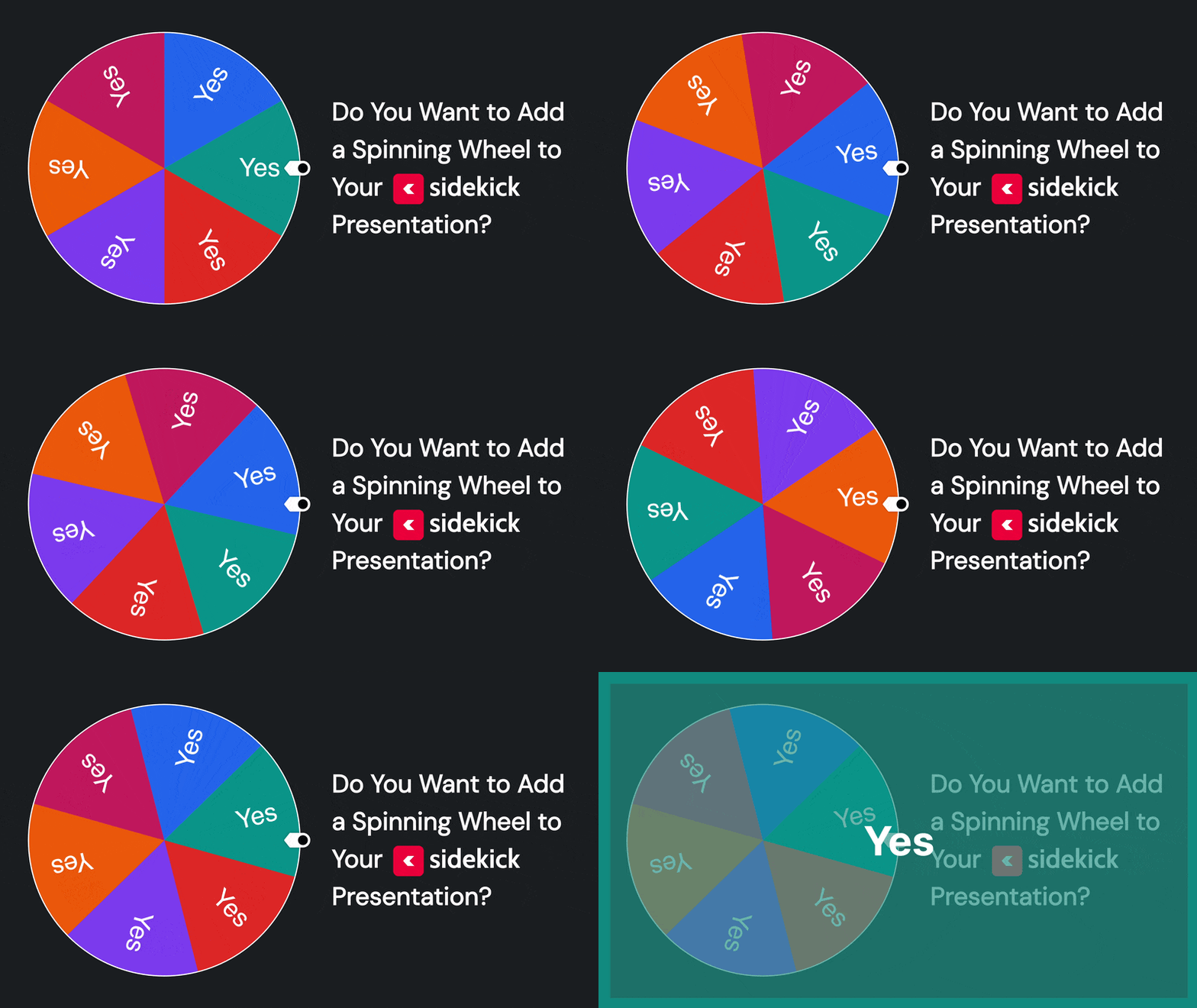
Starting today, all Sidekick users can now add a Spinning Wheel to any slide in their Sidekick presentation! Plus, because the new Sidekick is absolutely incredible, you can now customize the wheel in ways you never could before, like:

  • You can resize the wheel and move it to any part of the slide (even off the edge of the slide!)
  • You can assign a positive, neutral, or negative sound to each wedge on the wheel
  • You can choose the odds of winning for each wedge on the wheel (2x, 1x, 0.5x, or 0)
  • You can add/edit/remove wheel items DURING your presentation!
  • And a lot more!

Check out the video below for a detailed walkthrough:

It’s really that easy! Thanks to the most recent Sidekick update, you can now add a Spinning Wheel to any slide in your presentation!

We’ll be posting more about other new features in the coming days, but in the meantime, feel free to keep exploring Sidekick! And if you have any ideas for features that you think we should work on next, you should head over to our Feature Suggestion Page by clicking the button below:

Request a New Sidekick Feature!

That’s all for today, but if you’d like to see the other blog posts in the “How Do I…?” series, you can do so here: How Do I…?

If you’re using Sidekick and you run into any issues, or if you just have a question, please feel free to reach out to our support team at: [email protected]. Or you can check out other helpful articles and walkthroughs at the Sidekick Help Desk by visiting https://help.sidekick.tv.

Finally, if you choose to use the new Sidekick… let us know how you do it and what types of polls you do because we want to highlight you. Our goal is to highlight a youth worker every week with different ways they’ve used Sidekick to help their students engage. If you’re interested in being recognized as a Sidekick Hero, just click the big red button below:

If you’re using Sidekick and you run into any issues, or if you just have a question, please feel free to reach out to our support team at: [email protected]. Or you can check out other helpful articles and walkthroughs at the Sidekick Help Desk by visiting https://help.sidekick.tv.

Finally, if you choose to use the new Sidekick… let us know how you do it and what types of polls you do because we want to highlight you. Our goal is to highlight a youth worker every week with different ways they’ve used Sidekick to help their students engage. If you’re interested in being recognized as a Sidekick Hero, just click the big red button below:

Go to Top