Home/Posts/Sidekick Hero Blog
7 Feb 2024

Using Sidekick for the Big Game!

By |2024-02-07T12:01:22-08:00February 7th, 2024|Sidekick, Sidekick Hero Blog|6 Comments

This will be short & sweet. I was talking with Cooper M. (an awesome High School Pastor in Lancaster, PA), and he showed me how he’s using Sidekick during their group’s Big Game Party this Sunday. You’ve gotta see this:

(click image to enlarge)

Now, in all fairness, Cooper is pretty darn good (actually, he’s kind of amazing) at graphic editing, so it was no surprise that his image overlay is one of the best we’ve seen yet. Hopefully this might spark a few ideas for you and your ministry!

P.S. Sidekick has a few features coming really soon, so keep an eye on the blog for updates!

If you’re using Sidekick and you run into any issues, or if you just have a question, please feel free to reach out to our support team at: [email protected]. Or you can check out other helpful articles and walkthroughs at the Sidekick Help Desk by visiting https://help.sidekick.tv.

Finally, if you choose to use the new Sidekick… let us know how you do it and what types of polls you do because we want to highlight you. Our goal is to highlight a youth worker every week with different ways they’ve used Sidekick to help their students engage. If you’re interested in being recognized as a Sidekick Hero, just click the big red button below:
If you’re using Sidekick and you run into any issues, or if you just have a question, please feel free to reach out to our support team at: [email protected]. Or you can check out other helpful articles and walkthroughs at the Sidekick Help Desk by visiting https://help.sidekick.tv.

Finally, if you choose to use the new Sidekick… let us know how you do it and what types of polls you do because we want to highlight you. Our goal is to highlight a youth worker every week with different ways they’ve used Sidekick to help their students engage. If you’re interested in being recognized as a Sidekick Hero, just click the big red button below:

29 Jan 2024

New Feature Alert: (Re)Introducing the Spinning Wheel!!!

By |2024-03-06T08:27:18-08:00January 29th, 2024|Sidekick Hero Blog|10 Comments

🚨 This is not a drill! I repeat, this is not a drill! 🚨

The Sidekick update we’ve all been waiting for is finally here!!

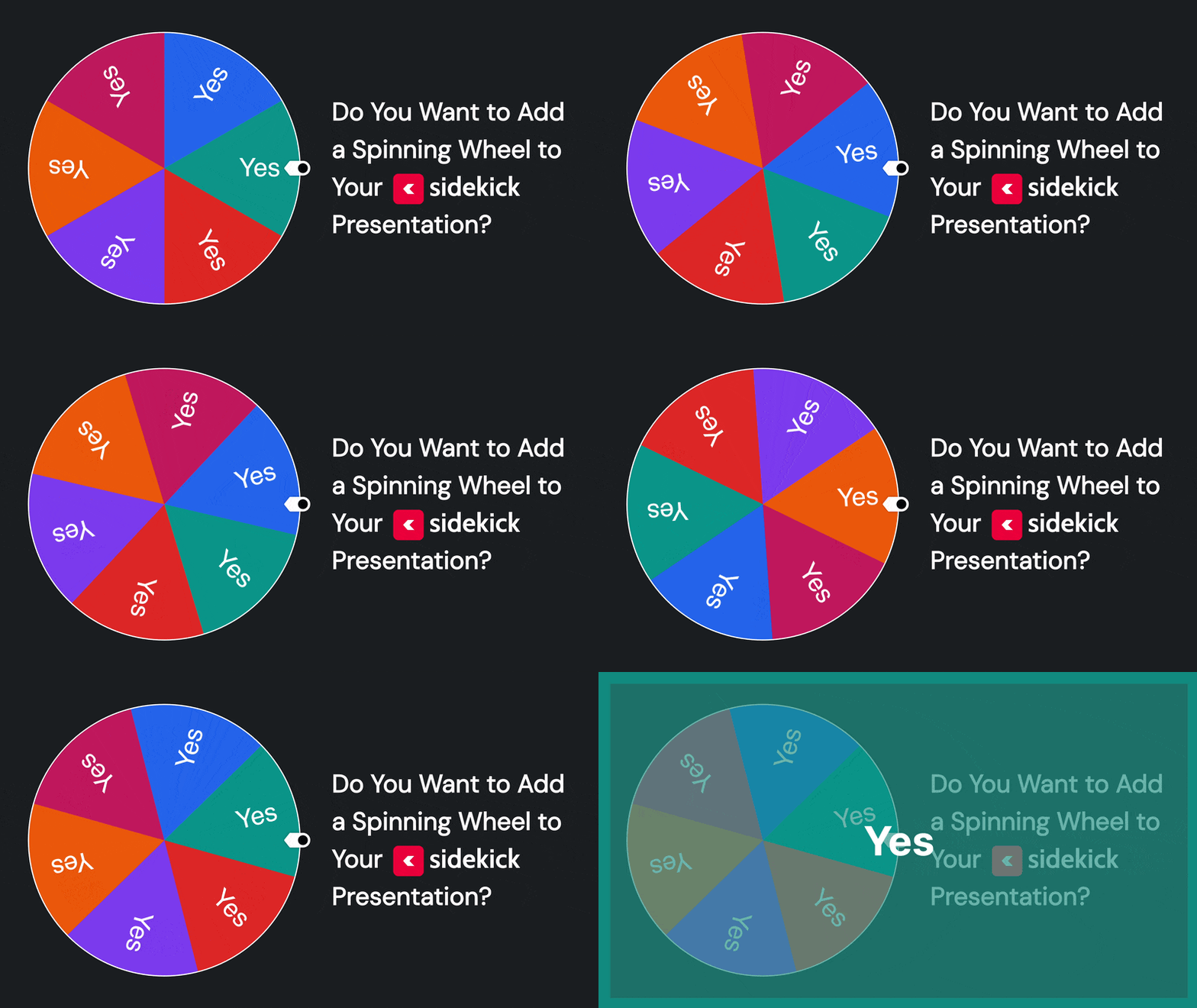
Starting today, all Sidekick users can now add a Spinning Wheel to any slide in their Sidekick presentation! Plus, because the new Sidekick is absolutely incredible, you can now customize the wheel in ways you never could before, like:

  • You can resize the wheel and move it to any part of the slide (even off the edge of the slide!)
  • You can assign a positive, neutral, or negative sound to each wedge on the wheel
  • You can choose the odds of winning for each wedge on the wheel (2x, 1x, 0.5x, or 0)
  • You can add/edit/remove wheel items DURING your presentation!
  • And a lot more!

Check out the video below for a detailed walkthrough:

It’s really that easy! Thanks to the most recent Sidekick update, you can now add a Spinning Wheel to any slide in your presentation!

We’ll be posting more about other new features in the coming days, but in the meantime, feel free to keep exploring Sidekick! And if you have any ideas for features that you think we should work on next, you should head over to our Feature Suggestion Page by clicking the button below:

Request a New Sidekick Feature!

That’s all for today, but if you’d like to see the other blog posts in the “How Do I…?” series, you can do so here: How Do I…?

If you’re using Sidekick and you run into any issues, or if you just have a question, please feel free to reach out to our support team at: [email protected]. Or you can check out other helpful articles and walkthroughs at the Sidekick Help Desk by visiting https://help.sidekick.tv.

Finally, if you choose to use the new Sidekick… let us know how you do it and what types of polls you do because we want to highlight you. Our goal is to highlight a youth worker every week with different ways they’ve used Sidekick to help their students engage. If you’re interested in being recognized as a Sidekick Hero, just click the big red button below:
If you’re using Sidekick and you run into any issues, or if you just have a question, please feel free to reach out to our support team at: [email protected]. Or you can check out other helpful articles and walkthroughs at the Sidekick Help Desk by visiting https://help.sidekick.tv.

Finally, if you choose to use the new Sidekick… let us know how you do it and what types of polls you do because we want to highlight you. Our goal is to highlight a youth worker every week with different ways they’ve used Sidekick to help their students engage. If you’re interested in being recognized as a Sidekick Hero, just click the big red button below:

25 Jan 2024

How We Used Sidekick Polls at Our Mid-Year Training

By |2024-01-24T07:55:21-08:00January 25th, 2024|josh griffin, Mariners Youth Ministry, Sidekick Hero Blog|15 Comments

What a fun night! We just kicked off our 2024 Life Group session with a leader training night, and of course … incorporated Sidekick and it’s killer new live polling option.

We asked several questions, but this is the one that had the most buzz:

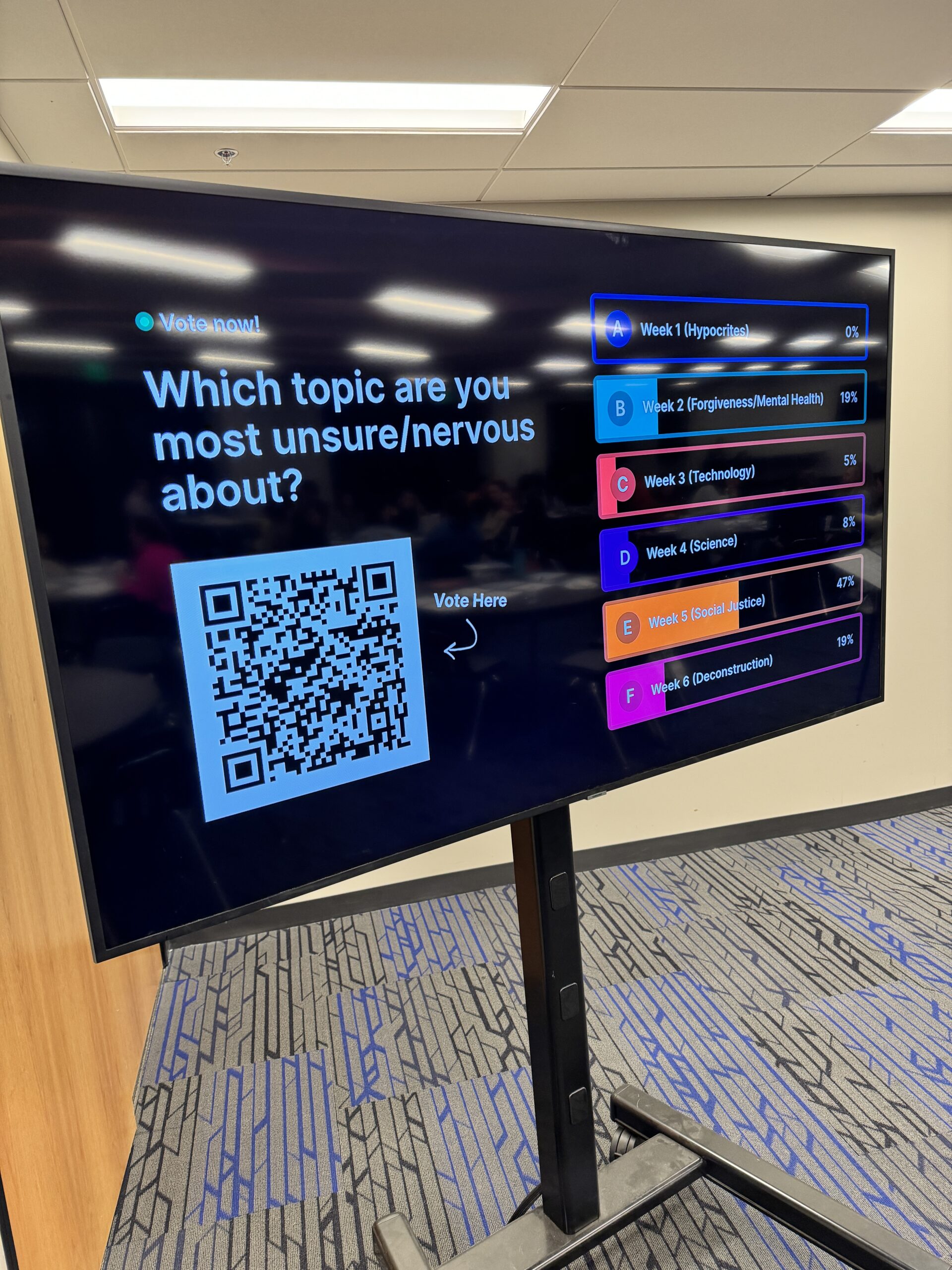
After we’d given an overview of our upcoming Asking for a Friend series, we asked which of the topics they were most nervous to cover or teach. The answer wasn’t surprising – in fact, it confirmed what we had guessed which ones they would be apprehensive about.

(click image to enlarge)

(click image to enlarge)

And here’ the killer twist … the poll results helped us knew where to spend our time during the training. The top 2 results got the rest of the time in the training. It was incredible … all made possible by a simple phone poll (using Sidekick, naturally). Just another way to use the incredible Gold+ membership presentation software!

Josh

24 Jan 2024

Great Idea: Pre-Service Polls

By |2024-01-24T07:16:48-08:00January 24th, 2024|Sidekick Hero Blog|3 Comments

Yesterday, we received a comment from @Joshua-sb1cb on the most recent episode of This Week with Doug & Josh on our YouTube channel, and we just had to share it:

When I shared it with the rest of the Sidekick team, it immediately sparked a bunch of ideas that we just had to share:

1. Using Sidekick to Engage Parents During Check-In

Depending on your group’s process, check-in can be long and tedious… especially for the parents of younger students. That’s why we love @Joshua-sd1cb‘s  idea so much. Because Sidekick is so portable, you could easily hook up a laptop to a TV cart and place a “Parent Poll” next to your check-in stations. And if you set the poll to “Show Live Results,” parents could see the results in real-time!

You could even use the results to start off your parent email each week!

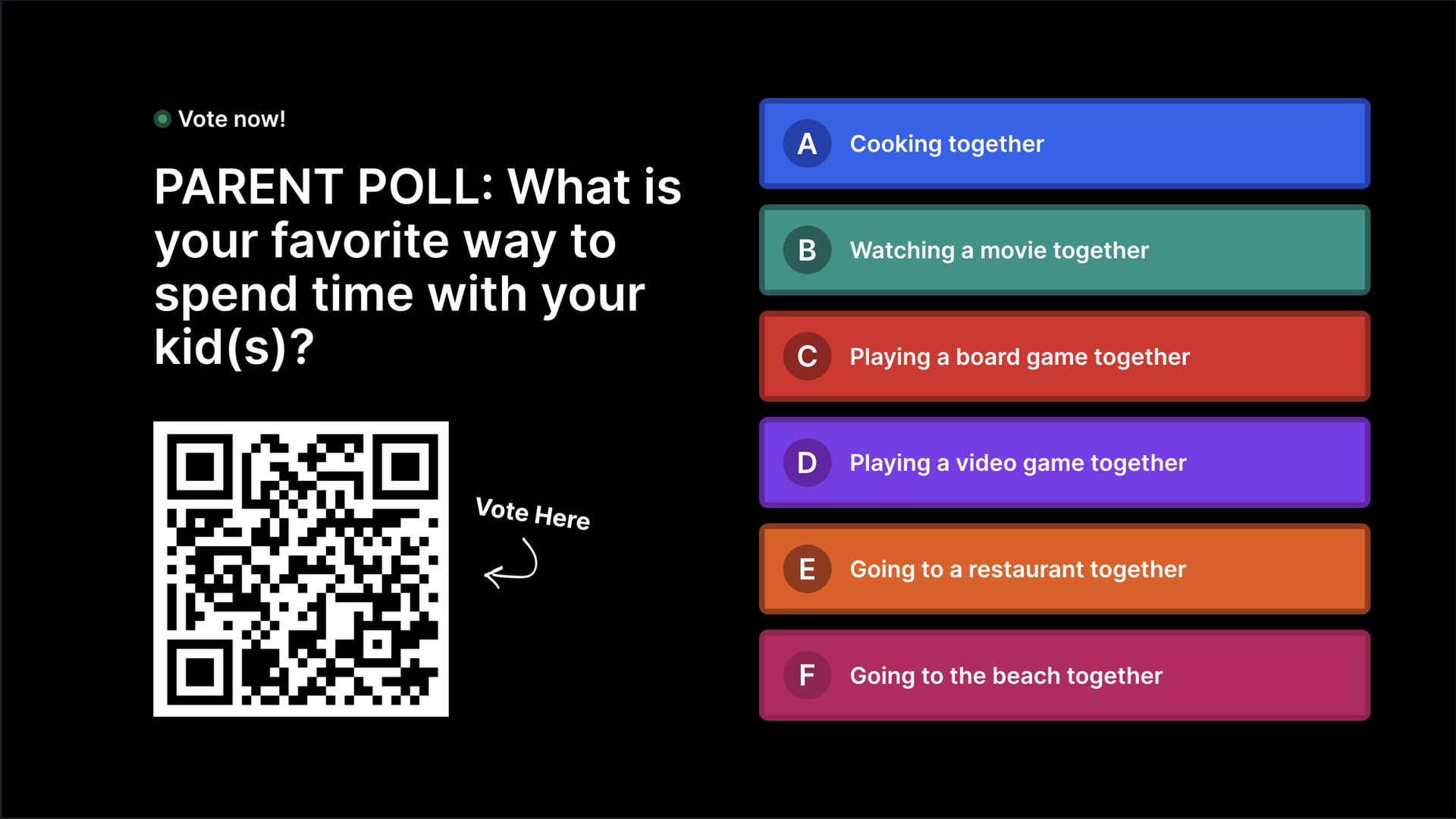
Here are a few ideas for “Parent Polls” that our team came up with:

(click image to enlarge)

(click image to enlarge)

2. Using Sidekick to Engage Students Before The Service Starts

This one is pretty similar to the first idea, but this one is aimed at a different audience. If your group is anything like the groups I’ve worked with, you know that “youth group starts at 7pm” means the first student will show up at about 5:32pm, right? Right. 😂

What better way to engage students who show up early than by featuring a few live polls on the screens in the space where students hang out before your service starts? Not only does this give them a little something extra that they can do, but they can also see the results continue to change as more and more students arrive.

Plus, since the QR code for Sidekick Live Polls stays the same throughout the entire presentation, if you decide to use more polls during your service, any student who voted in a “Pre-Service Poll” won’t even have to re-scan the QR code!

Here are a few ideas for “Pre-Service Polls” that our team came up with to get you started:

(click image to enlarge)

(click image to enlarge)

So, how are you using Sidekick Live Polls to help keep your students (and parents!) engaged? Let us know in the comments!

If you’re using Sidekick and you run into any issues, or if you just have a question, please feel free to reach out to our support team at: [email protected]. Or you can check out other helpful articles and walkthroughs at the Sidekick Help Desk by visiting https://help.sidekick.tv.

Finally, if you choose to use the new Sidekick… let us know how you do it and what types of polls you do because we want to highlight you. Our goal is to highlight a youth worker every week with different ways they’ve used Sidekick to help their students engage. If you’re interested in being recognized as a Sidekick Hero, just click the big red button below:

If you’re using Sidekick and you run into any issues, or if you just have a question, please feel free to reach out to our support team at: [email protected]. Or you can check out other helpful articles and walkthroughs at the Sidekick Help Desk by visiting https://help.sidekick.tv.

Finally, if you choose to use the new Sidekick… let us know how you do it and what types of polls you do because we want to highlight you. Our goal is to highlight a youth worker every week with different ways they’ve used Sidekick to help their students engage. If you’re interested in being recognized as a Sidekick Hero, just click the big red button below:

22 Jan 2024

Coming Soon: Spinning Wheels!!!

By |2024-01-22T07:21:02-08:00January 22nd, 2024|Sidekick Hero Blog|1 Comment

Ok, so… I just made a video for our Sidekick Beta Crew about a feature that is going to be dropping VERY soon for everyone, but I’m just too excited to keep this a secret. Sure, I’ll post a full walkthrough after the feature is officially released, but I just want you to see what you can expect to see on your Sidekick dashboard in a few days…

Oh, and one more thing… I’m not 100% sure that I’m actually supposed to post this… so let’s just call this an instance of asking for forgiveness instead of permission… 😂

If you can’t tell by the video, I’m just a tad bit (ok, maybe that’s a slight understatement) excited about this new feature… and I can’t wait until we can make it available to everyone!

In the meantime, just don’t tell anyone that I posted this, ok? Thanks.

If you’re using Sidekick and you run into any issues, or if you just have a question, please feel free to reach out to our support team at: [email protected]. Or you can check out other helpful articles and walkthroughs at the Sidekick Help Desk by visiting https://help.sidekick.tv.

Finally, if you choose to use the new Sidekick… let us know how you do it and what types of polls you do because we want to highlight you. Our goal is to highlight a youth worker every week with different ways they’ve used Sidekick to help their students engage. If you’re interested in being recognized as a Sidekick Hero, just click the big red button below:

If you’re using Sidekick and you run into any issues, or if you just have a question, please feel free to reach out to our support team at: [email protected]. Or you can check out other helpful articles and walkthroughs at the Sidekick Help Desk by visiting https://help.sidekick.tv.

Finally, if you choose to use the new Sidekick… let us know how you do it and what types of polls you do because we want to highlight you. Our goal is to highlight a youth worker every week with different ways they’ve used Sidekick to help their students engage. If you’re interested in being recognized as a Sidekick Hero, just click the big red button below:
19 Jan 2024

Sidekick: Adults Love It Too!

By |2024-01-19T08:36:57-08:00January 19th, 2024|communication, Sidekick, Sidekick Hero Blog, Teaching, Teaching/Programming, Technology|3 Comments

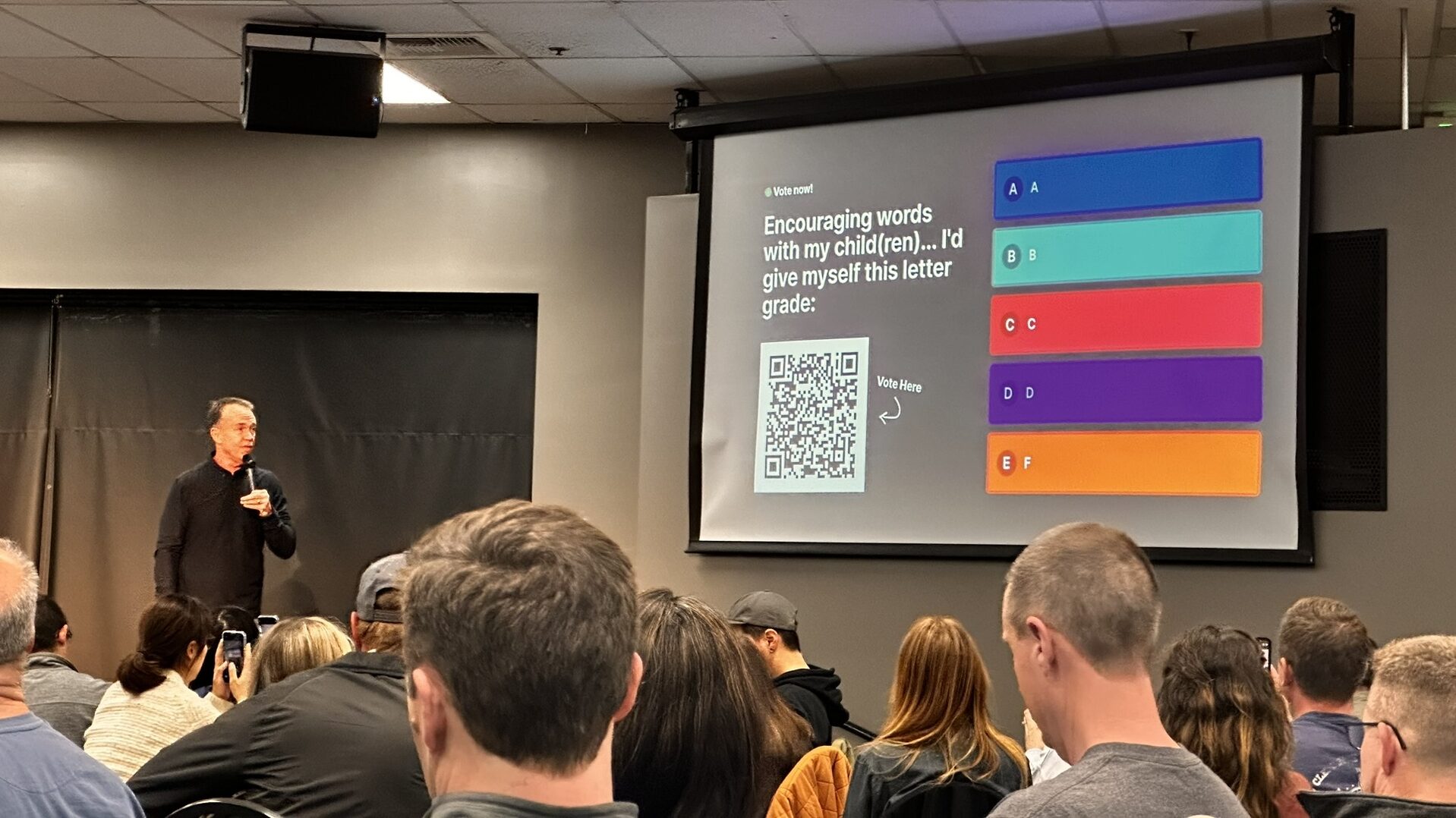
It’s no secret that when we created Sidekick, we had youth workers in mind (they are our favorite, of course!), but recently, my wife (Cathy) and I were asked to teach a course at our church called Intentional Parenting (based off a book by the same name we wrote back in 2018). We had an idea that the course would be popular, but we had no idea we’d have hundreds of parents seeking advice each month! It’s been a whirlwind, to say the very least!

After seeing how much students love the new interactive features (such as live voting) in Sidekick, we decided to see if adults would feel the same way, and—spoiler alert—THEY ABSOLUTELY DID!

For the past few sessions, throughout the teaching, we’ve been sprinkling in questions like this:

(click image to enlarge)

(click image to enlarge)

(click image to enlarge)

(click image to enlarge)

And, even though we knew it would be a hit, we were BLOWN AWAY by the response! Cathy and I have taught this curriculum in many different settings over the years, and I’m not exaggerating when I say that this is the most engagement we’ve ever seen with a group of parents!

Here are a few things I’ve noticed about the parents in our course since we started integrating Sidekick Live Polls throughout our teaching content:

  1. They are more attentive – Since they know I might ask another question at any time, I genuinely think they pay more attention to the material we are presenting.
  2. They’re having more fun – I can’t even tell you how much I love their response when the “Show Live Results” feature is enabled. It’s not uncommon for people to cheer as the results come rolling in!
  3. They’re more likely to come back – I don’t need a lot of research (although it certainly is out there!) to tell me that people who enjoy an experience are more likely to come back a second, third, or even fourth time. That’s EXACTLY what we’re seeing right now with Intentional Parenting.
  4. They’re more likely to bring their friends – I’ve seen this in youth ministry over and over again, but this is one of the clearest examples of this happening with adults I’ve ever seen. Couples who attend one session are inviting their neighbors. Plain and simple: People want to attend engaging events.

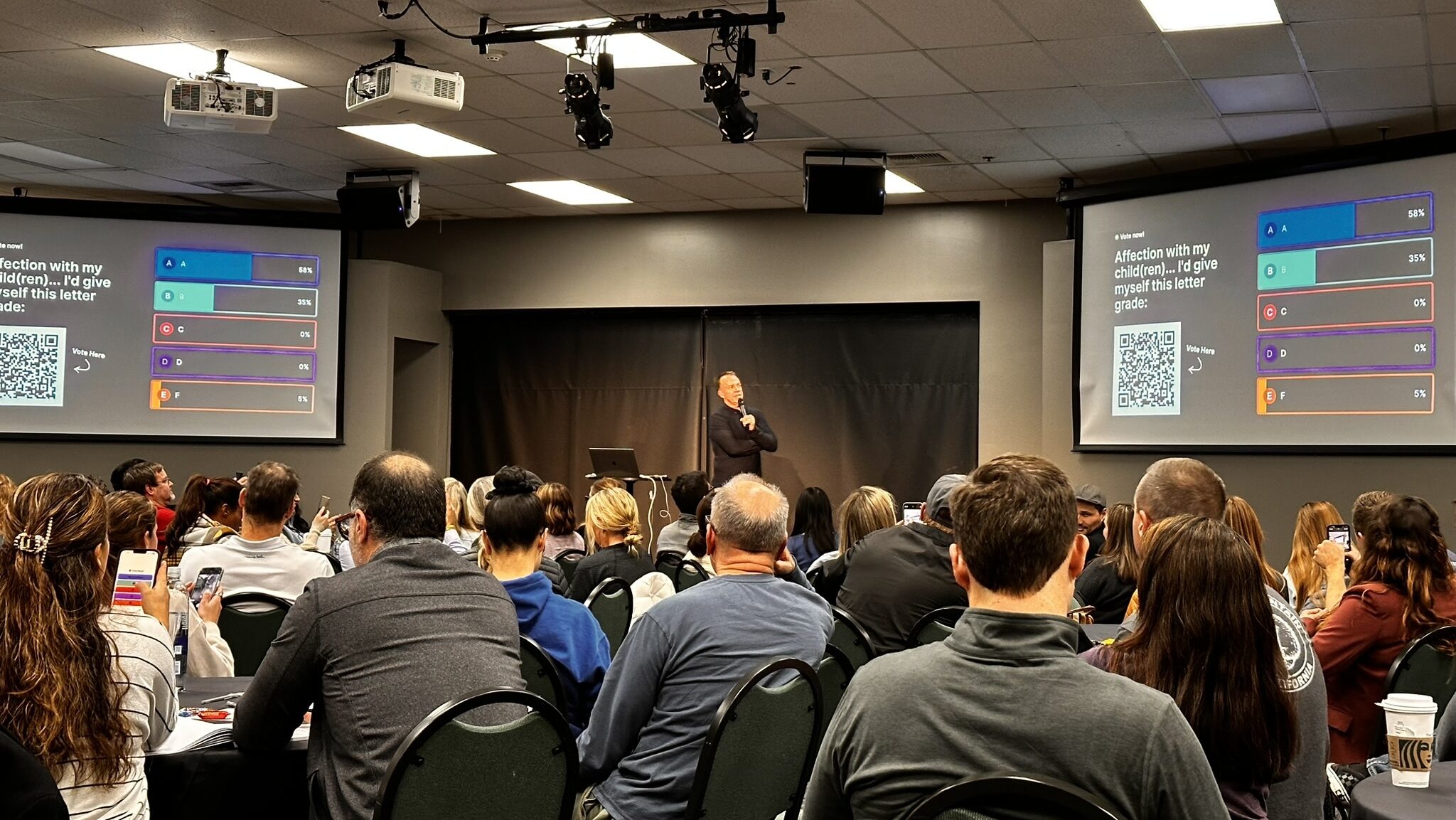
Now, before I close out, there’s one more really important thing that I realized during our most recent course. It’s in the picture below. See if you can figure out what I’m talking about:

(click image to enlarge)

It’s right there at the bottom of the screen. I’ll zoom in to help:

(click image to enlarge)

During the session, I asked what grade parents would give themselves based on how well they show affection to their children. And 5% answered that they would give themselves a big ole F. I can say with 100% confidence that most of those parents would never have admitted this if they weren’t able to answer anonymously.

You see, Sidekick doesn’t just promote engagement, it gives people the chance to be honest without facing immediate judgment. You can absolutely be sure that the next words out of my mouth after this poll were different than they would have been had we not done the poll. Because of what we learned with this poll, I was able to pause and tell those parents that they aren’t alone and that simply by attending the Intentional Parenting course, they were already taking steps in the right direction. I’m not going to say it solved all of their problems, but you could actually feel the sense of relief in the room.

And none of this would have been possible without Sidekick.

Blessings,

Doug

If you’re using Sidekick and you run into any issues, or if you just have a question, please feel free to reach out to our support team at: [email protected]. Or you can check out other helpful articles and walkthroughs at the Sidekick Help Desk by visiting https://help.sidekick.tv.

Finally, if you choose to use the new Sidekick… let us know how you do it and what types of polls you do because we want to highlight you. Our goal is to highlight a youth worker every week with different ways they’ve used Sidekick to help their students engage. If you’re interested in being recognized as a Sidekick Hero, just click the big red button below:

If you’re using Sidekick and you run into any issues, or if you just have a question, please feel free to reach out to our support team at: [email protected]. Or you can check out other helpful articles and walkthroughs at the Sidekick Help Desk by visiting https://help.sidekick.tv.

Finally, if you choose to use the new Sidekick… let us know how you do it and what types of polls you do because we want to highlight you. Our goal is to highlight a youth worker every week with different ways they’ve used Sidekick to help their students engage. If you’re interested in being recognized as a Sidekick Hero, just click the big red button below:

9 Jan 2024

Sidekick Poll to Kickoff our “So You Got a Phone for Christmas” Junior High Series

By |2024-01-12T14:31:48-08:00January 9th, 2024|Sidekick Hero Blog, Youth Ministry Ideas|9 Comments

This week, we kicked off a brand new series in my junior high ministry – So You Got a Phone for Christmas – a series to help students think through a biblical lens about the newfound technology in their pocket. The point was that the whole world—every thought, every person, good, bad, and UGLY—are now just a tap away. It was fun to kickoff the series, and in the coming weeks, we’ll cover what we listen to, what we watch/stream, and what we post/comment/share.

(click image to enlarge)

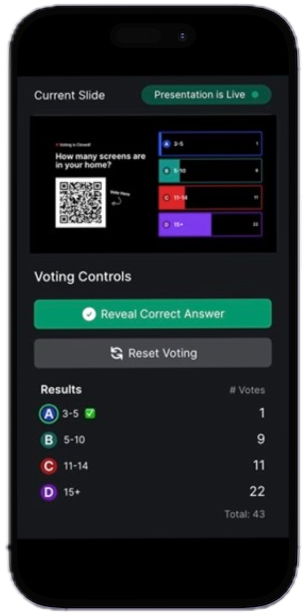
To kickoff the series, in my first message called Screens Are Everywhere, I started things off with a Sidekick poll so we could put all of the new iPhones to the test. Just how many screens do you have in your house/world? The answer may shock you!

It sure did for me! We have 5 services, so the answers were slightly different in each service, and of course not everyone in JH has a phone, so it’s not scientific, but it sure was fun!

I can’t believe I did this, but I also showed my “Screen Time” to be honest with students about how adults deal with these same issues as well.

Sidekick makes it so easy to takes phones … remember, our students digital natives and have never known life without them 😳 … and embrace them to help students engage with the message even more. Already excited for next week!

Josh

If you’re using Sidekick and you run into any issues, or if you just have a question, please feel free to reach out to our support team at: [email protected]. Or you can check out other helpful articles and walkthroughs at the Sidekick Help Desk by visiting https://help.sidekick.tv.

Finally, if you choose to use the new Sidekick… let us know how you do it and what types of polls you do because we want to highlight you. Our goal is to highlight a youth worker every week with different ways they’ve used Sidekick to help their students engage. If you’re interested in being recognized as a Sidekick Hero, just click the big red button below:

If you’re using Sidekick and you run into any issues, or if you just have a question, please feel free to reach out to our support team at: [email protected]. Or you can check out other helpful articles and walkthroughs at the Sidekick Help Desk by visiting https://help.sidekick.tv.

Finally, if you choose to use the new Sidekick… let us know how you do it and what types of polls you do because we want to highlight you. Our goal is to highlight a youth worker every week with different ways they’ve used Sidekick to help their students engage. If you’re interested in being recognized as a Sidekick Hero, just click the big red button below:

3 Jan 2024

New Feature Alert: Uploading Your Own Videos to the Sidekick Servers

By |2024-01-03T15:01:53-08:00January 3rd, 2024|Sidekick Hero Blog|5 Comments

I know Christmas was only 2 weeks ago, but it feels like Christmas 2024 has arrived a little early!!

The Sidekick team is THRILLED to announce a MAJOR NEW UPDATE to the way you add all kinds of media (and specifically VIDEO!!) to slides in your Sidekick presentations.

First, we’ve introduced a much more user-friendly way to add Text, Media, and Voting to your slides:

(click image to enlarge)

Second, we’ve added the ability to add your most recently-uploaded images to new slides:

(click image to enlarge)

We’ll be posting more about these two features in the coming days, but for right now, I want to focus on the update that I’m most excited about:

YOU CAN NOW UPLOAD YOUR OWN VIDEO TO THE SIDEKICK SERVERS!!!

(click image to enlarge)

That’s right! In addition to being able to add videos from Youtube and Vimeo, you can now upload your own videos directly to the Sidekick servers! That means it’s easier than ever to add videos for countdowns, announcements, worship lyrics, worship backgrounds, bumpers, and message illustrations!

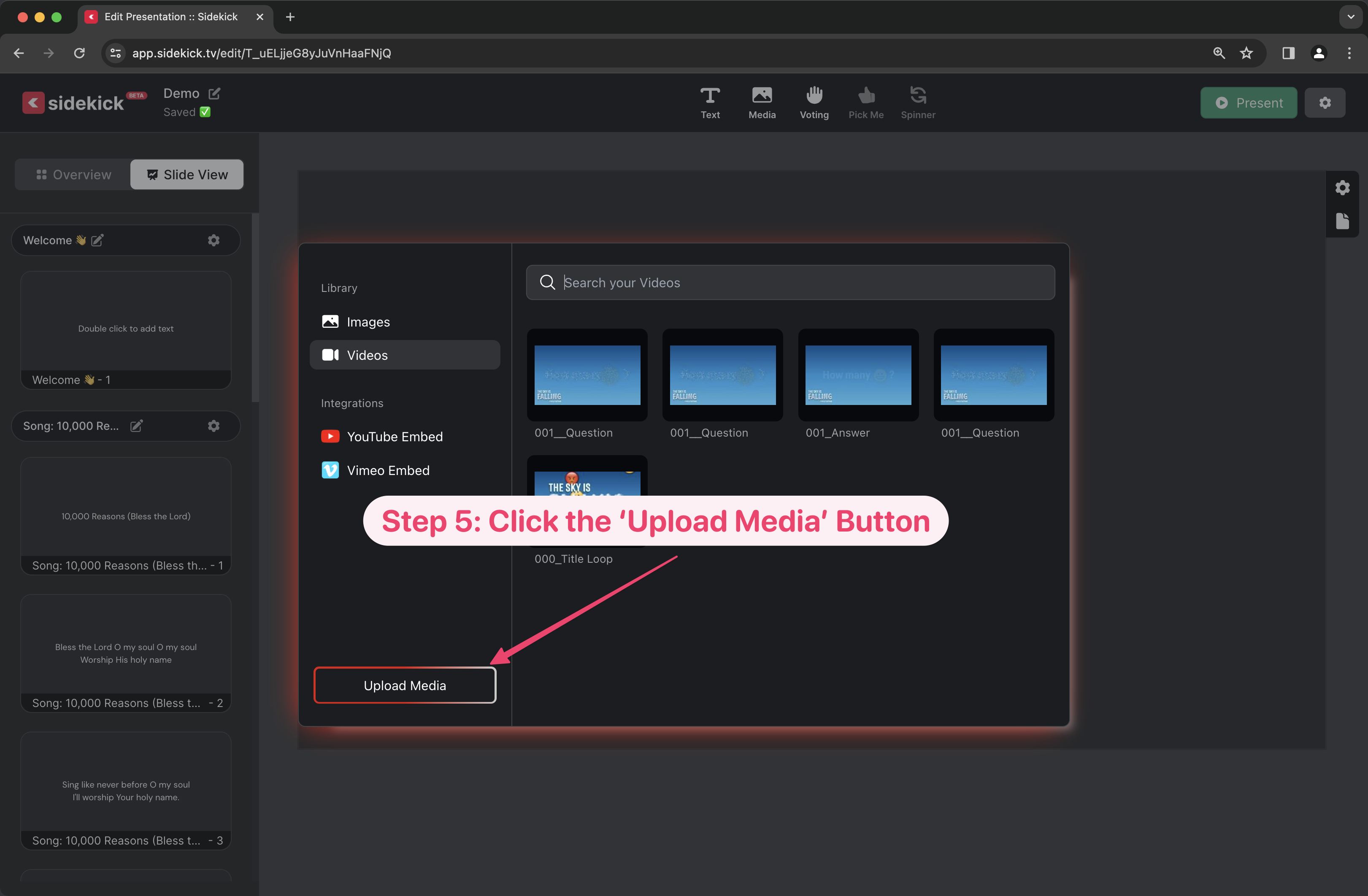
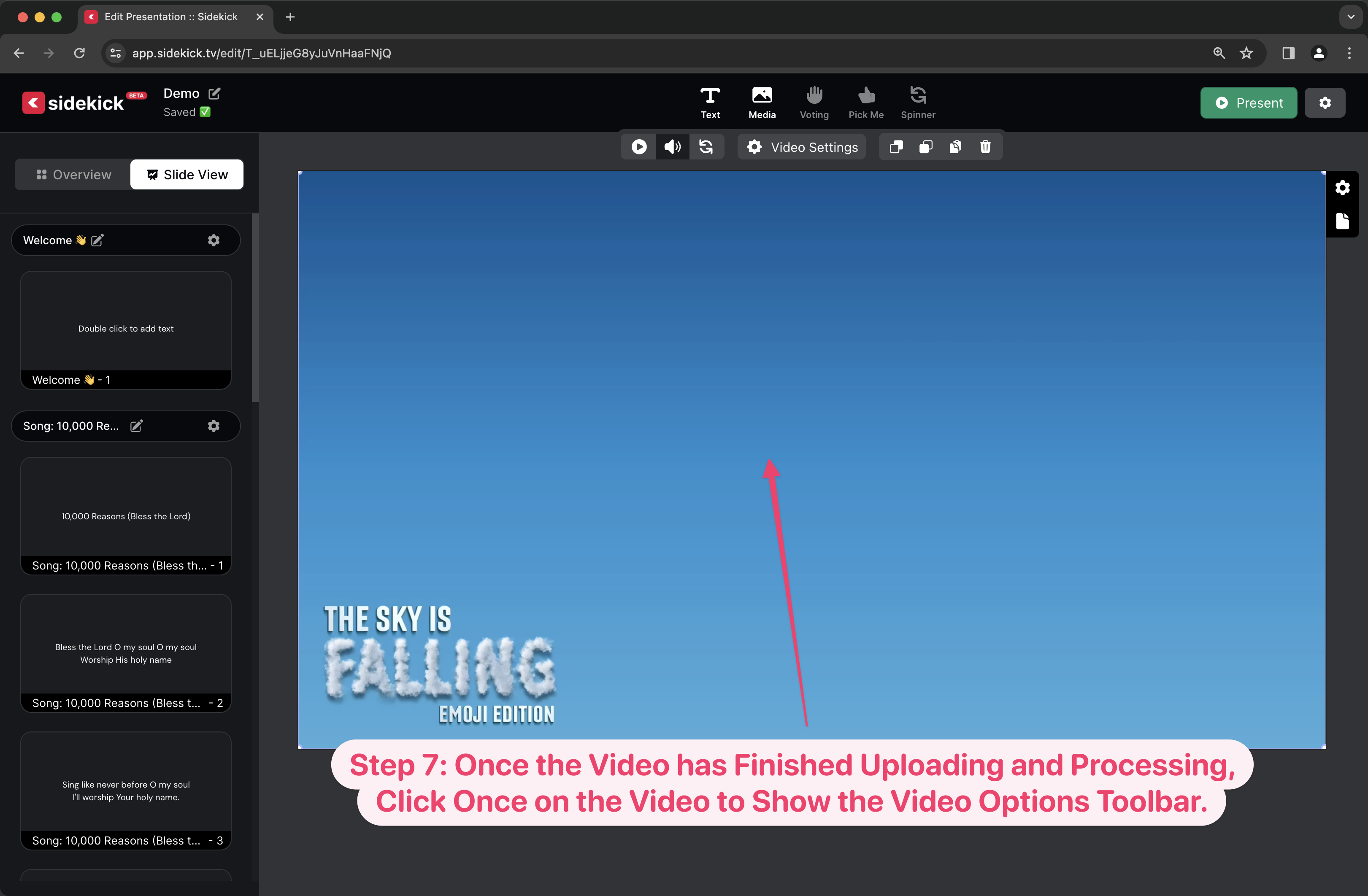
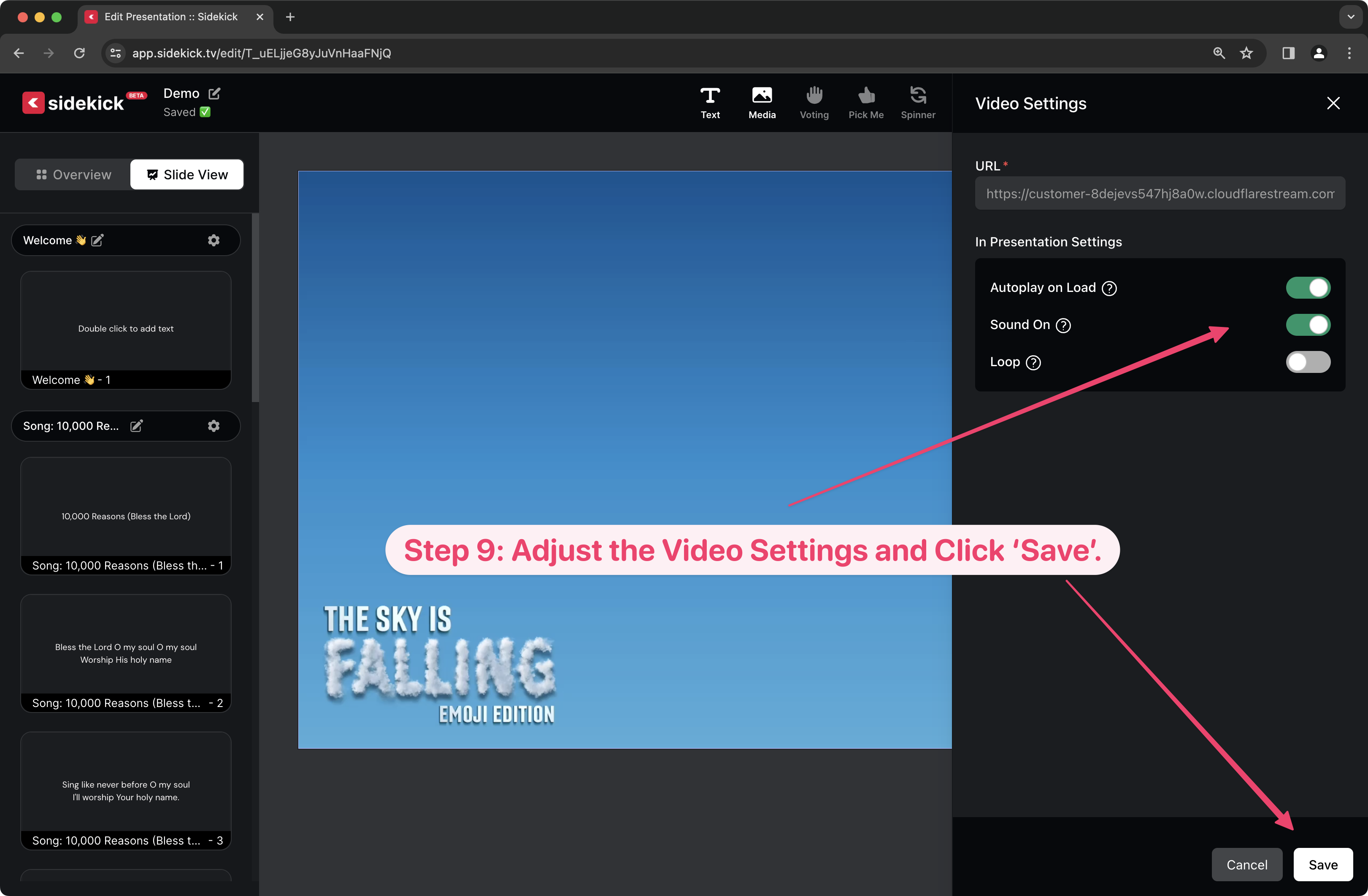
Check out the video below to see it in action, or keep scrolling to see step-by-step instructions.

Uploading Your Own Videos to the Sidekick Servers

As far as the amount of image and video storage available for each account, there are different levels based on your subscription. Here’s a handy table to help:

Sidekick Essential

  • Included with DYM Gold Membership or Coleader Premium Subscription
  • 50 GB Image File Storage
  • 5 Minutes Max Video Length (per video)
  • 250 Minutes Total Video Storage

Sidekick + Phones (50 Connections)

  • Included with DYM Gold+ Membership or Coleader Premium+ Subscription
  • 100 GB Image File Storage
  • 60 Minutes Max video Length (per video)
  • 1000 Minutes Total Video Storage

It’s really that easy! Thanks to the most recent Sidekick update, you can now upload your own videos directly to the Sidekick servers. That means that you no longer have to worry about video files not syncing between computers or losing that thumb drive that you (almost 🤦‍♂️) always carry around in your backpack (…don’t act like this only happens to me.).

We’ll be posting more about some other new features in the coming days, but in the meantime, feel free to keep exploring Sidekick! And if you have any ideas for features that you think we should work on next, you should head over to our Feature Suggestion Page by clicking the button below:

Request a New Sidekick Feature!

That’s all for today, but if you’d like to see the other blog posts in the “How Do I…?” series, you can do so here: How Do I…?

If you’re using Sidekick and you run into any issues, or if you just have a question, please feel free to reach out to our support team at: [email protected]. Or you can check out other helpful articles and walkthroughs at the Sidekick Help Desk by visiting https://help.sidekick.tv.

Finally, if you choose to use the new Sidekick… let us know how you do it and what types of polls you do because we want to highlight you. Our goal is to highlight a youth worker every week with different ways they’ve used Sidekick to help their students engage. If you’re interested in being recognized as a Sidekick Hero, just click the big red button below:

If you’re using Sidekick and you run into any issues, or if you just have a question, please feel free to reach out to our support team at: [email protected]. Or you can check out other helpful articles and walkthroughs at the Sidekick Help Desk by visiting https://help.sidekick.tv.

Finally, if you choose to use the new Sidekick… let us know how you do it and what types of polls you do because we want to highlight you. Our goal is to highlight a youth worker every week with different ways they’ve used Sidekick to help their students engage. If you’re interested in being recognized as a Sidekick Hero, just click the big red button below:
3 Jan 2024

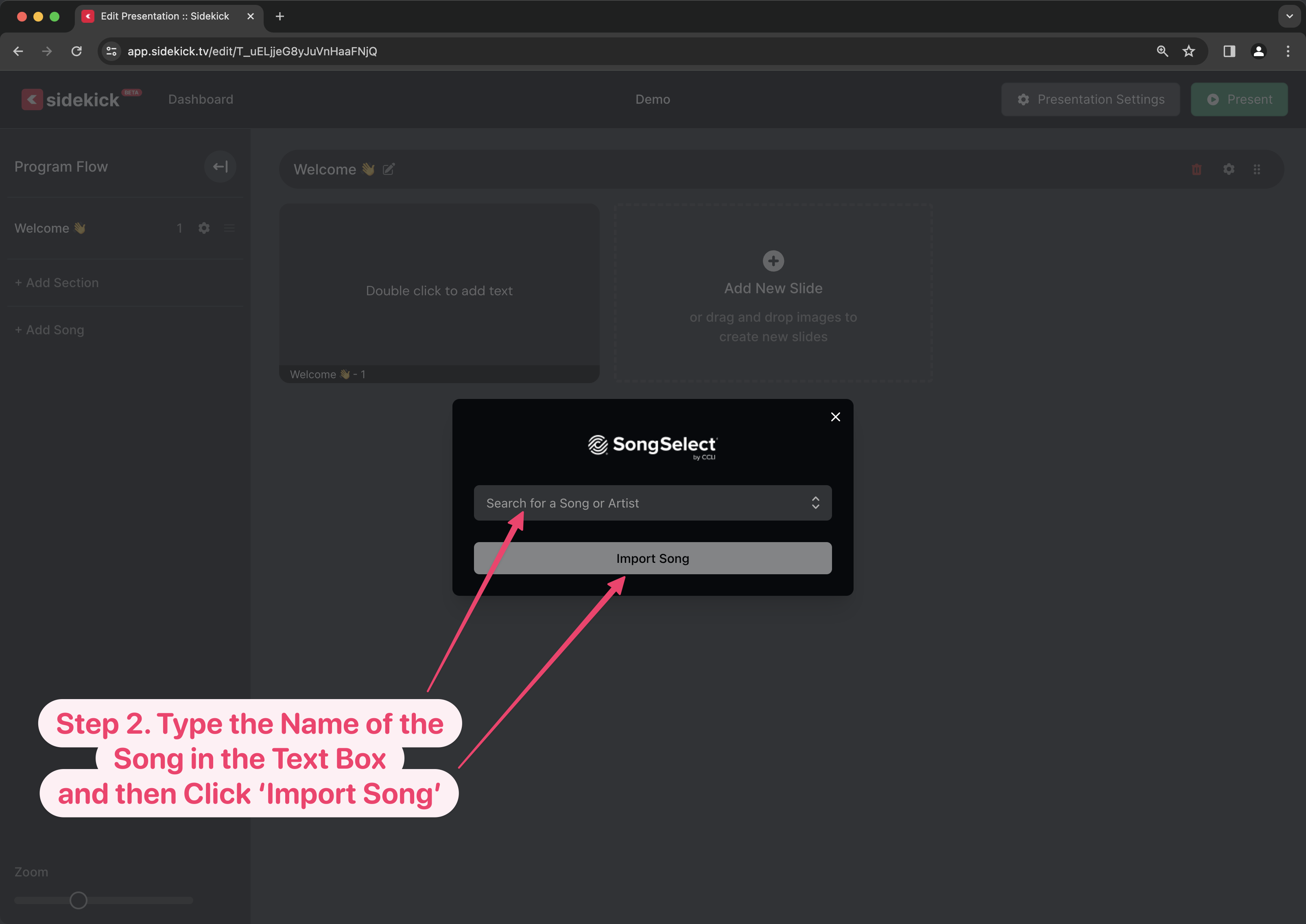
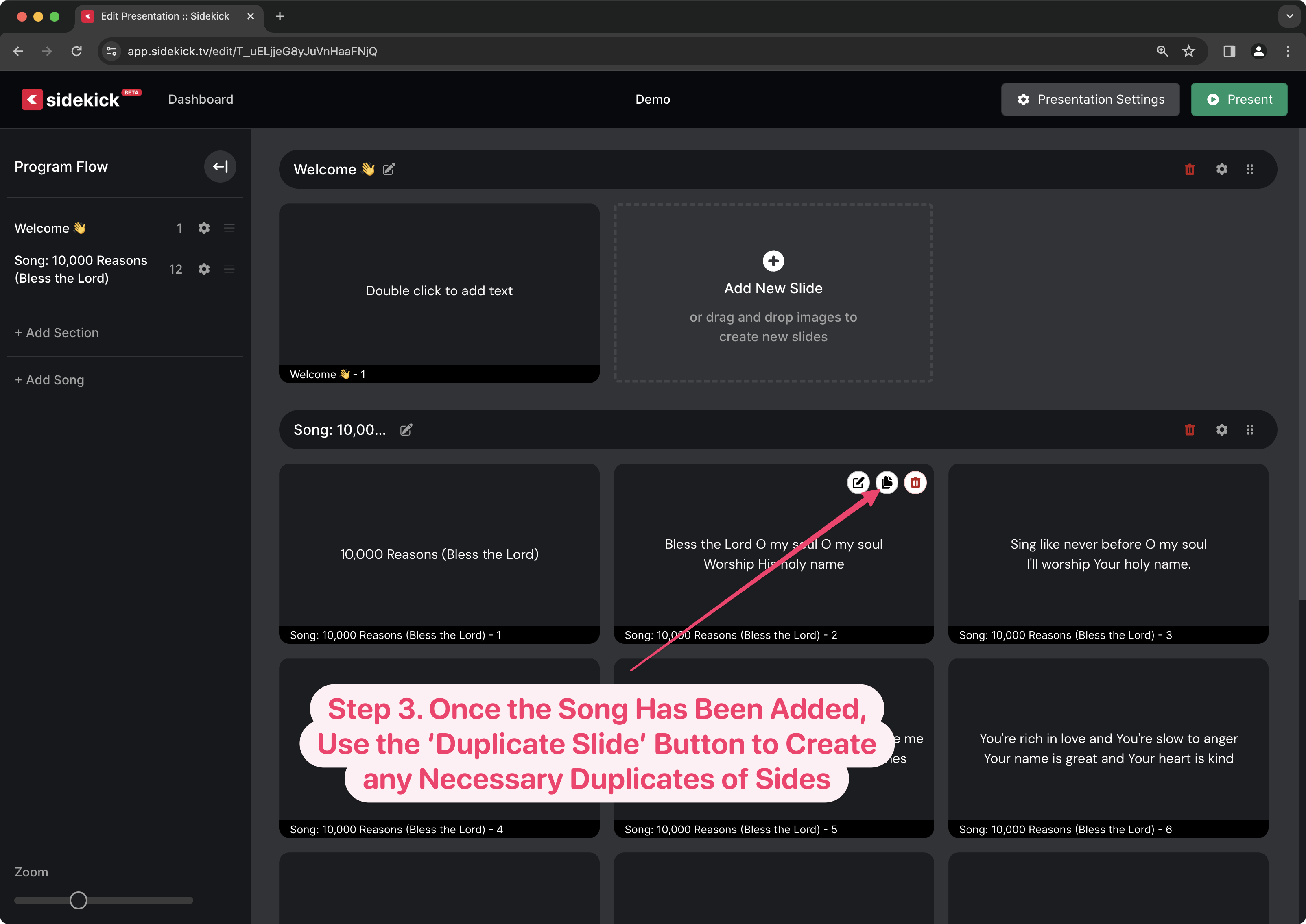
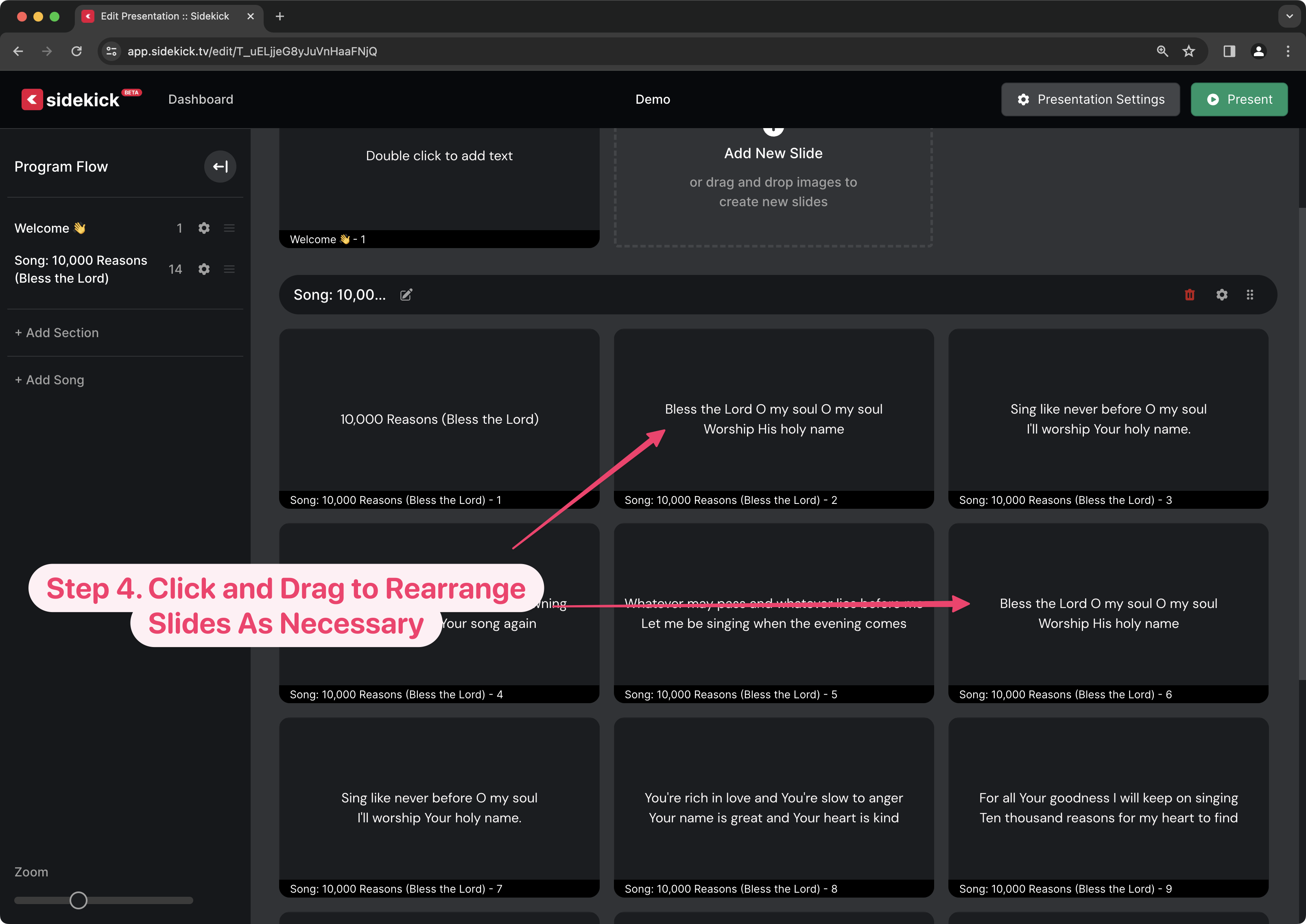
Adding Songs to Sidekick via SongSelect

By |2024-01-02T09:54:05-08:00January 3rd, 2024|Sidekick Hero Blog|2 Comments

One of the things I have always dreaded about making the slides for youth group each week was typing in the lyrics for songs. Not only did I not enjoy typing out every word of a song, but without fail, I always ended up with at least one typo (even though I double and triple-checked!).

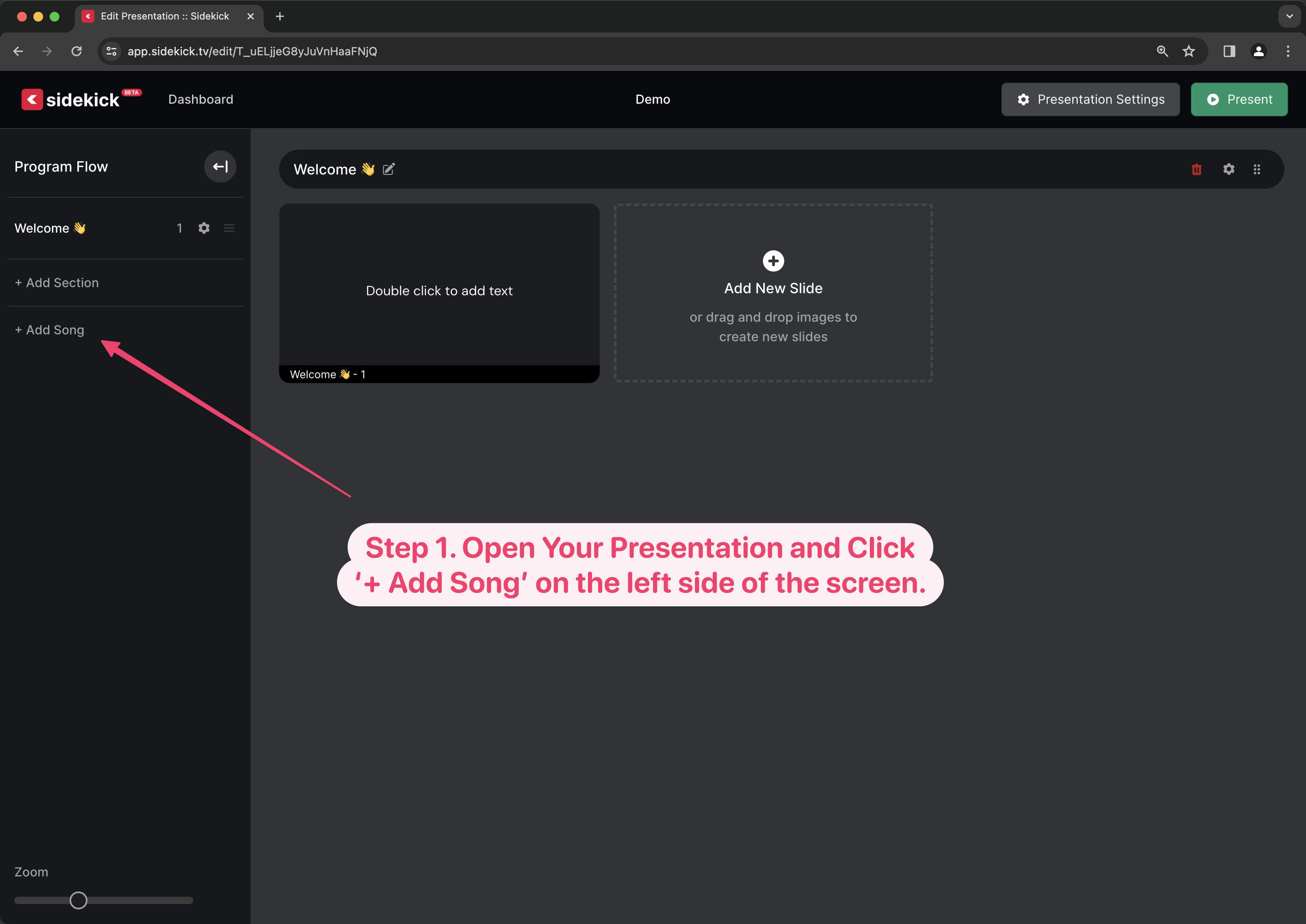
Thankfully, those worries are now a thing of the past, thanks to CCLI SongSelect integration in Sidekick! Now, with just a search and a few clicks, I can add the lyrics for any of CCLI’s 100,000+ songs to my presentation!

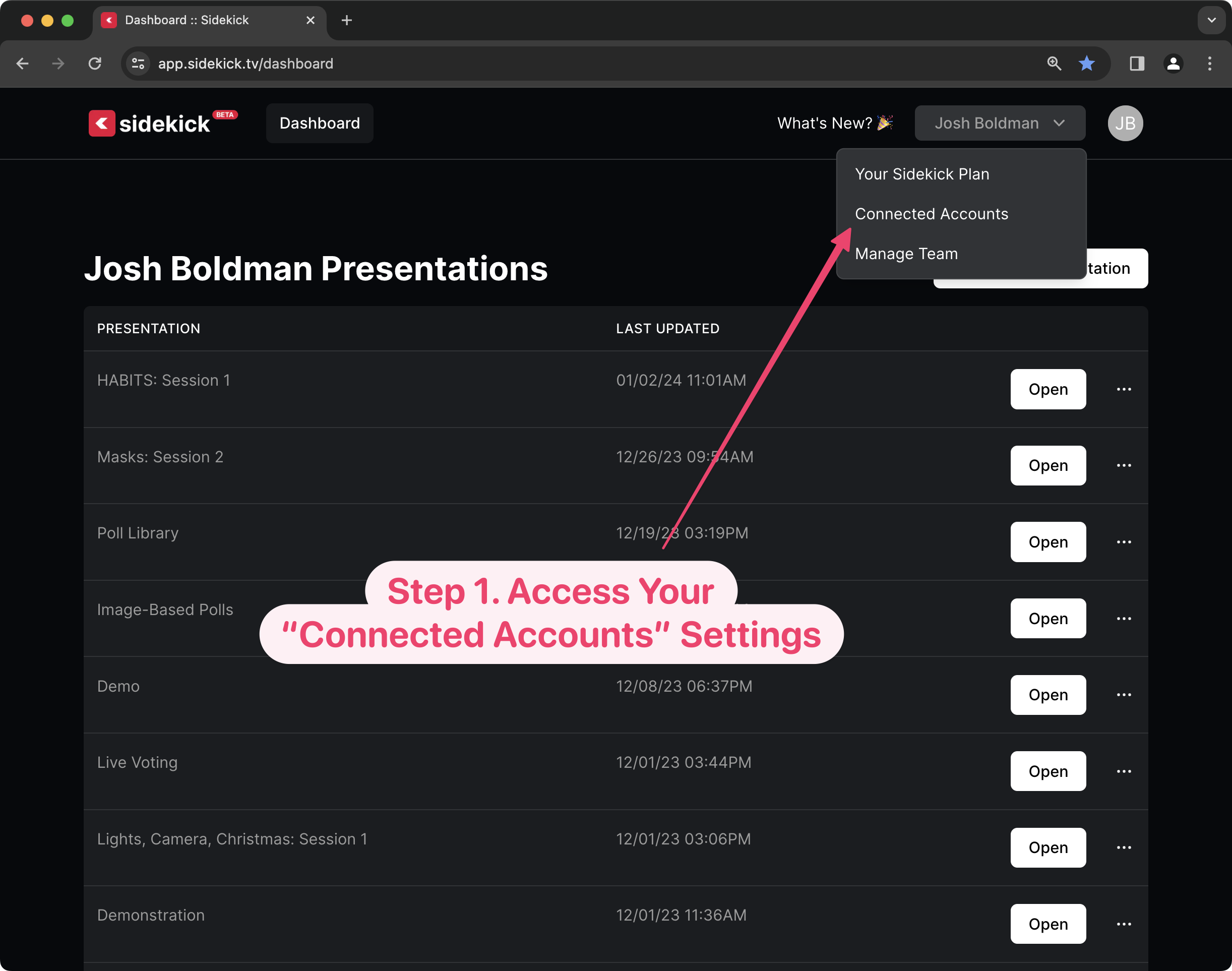
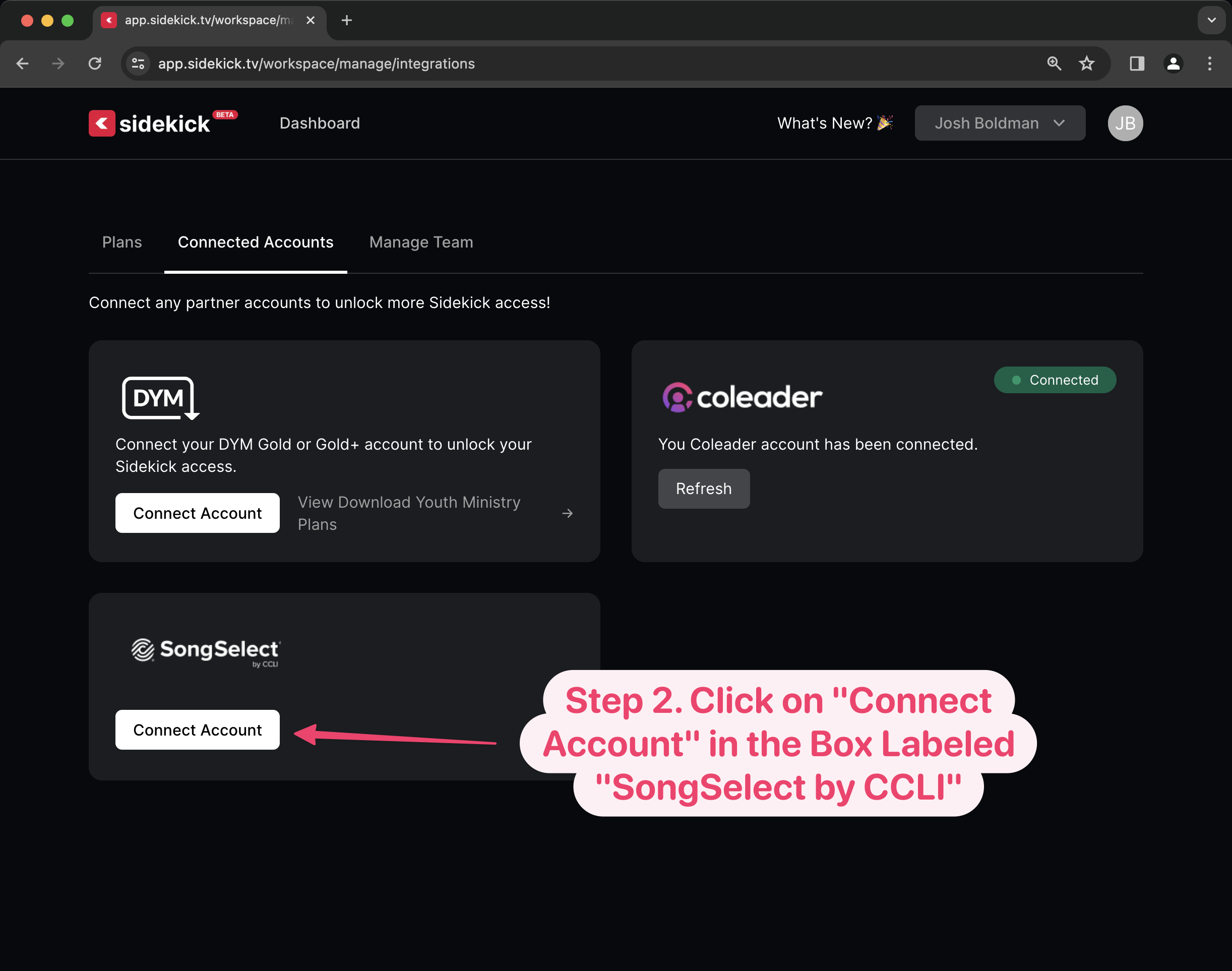
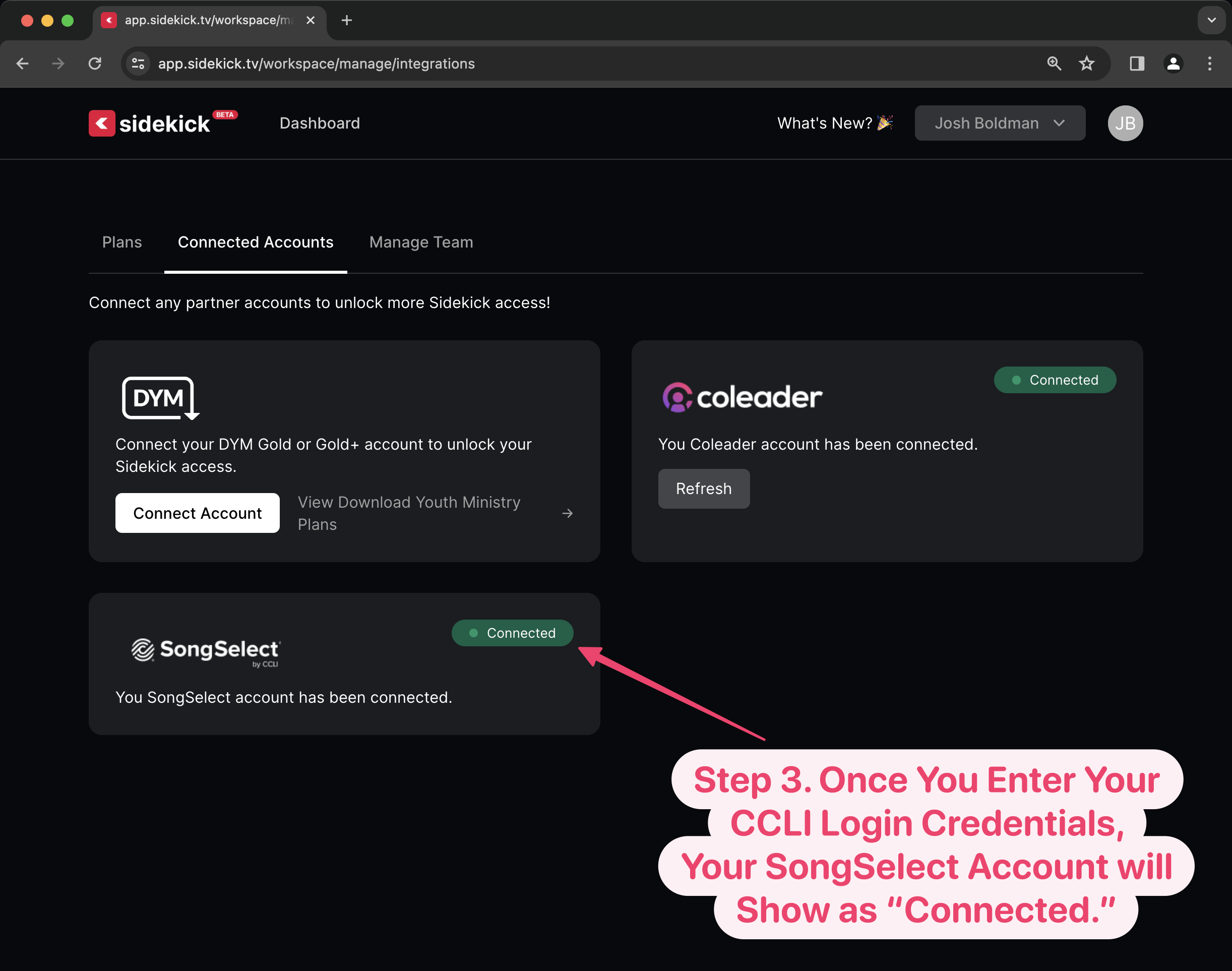
Connecting your Sidekick account to your CCLI SongSelect account is super simple! To find out how, just watch the video below, or scroll down to see step-by-step instructions.

Connecting Your CCLI SongSelect Account to Sidekick

Adding a Song to Your Sidekick Presentation

It’s really that easy! Thanks to Sidekick, you’ll save yourself countless hours of typing. Plus, you’ll keep all of those accidental typos from causing a distraction during your worship services (wait… other people do make typos, right? Please tell me that it’s not just me?!? 😄).

If you’d like to see the other blog posts in the “How Do I…?” series, you can do so here: How Do I…?

If you’re using Sidekick and you run into any issues, or if you just have a question, please feel free to reach out to our support team at: [email protected]. Or you can check out other helpful articles and walkthroughs at the Sidekick Help Desk by visiting https://help.sidekick.tv.

Finally, if you choose to use the new Sidekick… let us know how you do it and what types of polls you do because we want to highlight you. Our goal is to highlight a youth worker every week with different ways they’ve used Sidekick to help their students engage. If you’re interested in being recognized as a Sidekick Hero, just click the big red button below:

If you’re using Sidekick and you run into any issues, or if you just have a question, please feel free to reach out to our support team at: [email protected]. Or you can check out other helpful articles and walkthroughs at the Sidekick Help Desk by visiting https://help.sidekick.tv.

Finally, if you choose to use the new Sidekick… let us know how you do it and what types of polls you do because we want to highlight you. Our goal is to highlight a youth worker every week with different ways they’ve used Sidekick to help their students engage. If you’re interested in being recognized as a Sidekick Hero, just click the big red button below:

29 Dec 2023

Meet A Sidekick Hero: Jim Purtle

By |2023-12-29T08:21:01-08:00December 29th, 2023|Sidekick Hero Blog|1 Comment

From Doug:

Jim has been a loyal friend of DYM for years! He’s got a pastoral heart that comes alongside DYM for our events and also has editing chops and helps us with our DYM pipeline. He’s continually voted as one of the DYM-staff-favorites (although we don’t really vote). He is the Youth Pastor at El Dorado Springs Church of God (Holiness) in El Dorado Springs, MO, where he has served for 21 years (dang, that’s hero status). He and his wonderful wife Cindy have 4 children and their hands full.

(click image to enlarge)

Jim Purtle here, I’ve loved the new Sidekick Live Voting feature, but realized it would be even more fun with a big audience. For our little church, one of the biggest crowds of the year is at our Christmas Eve service (which is attended by around 500 people), so at this year’s Christmas Eve service, we used Sidekick to help with the pre-show before the service started. It was so much fun!

Here’s the setup:
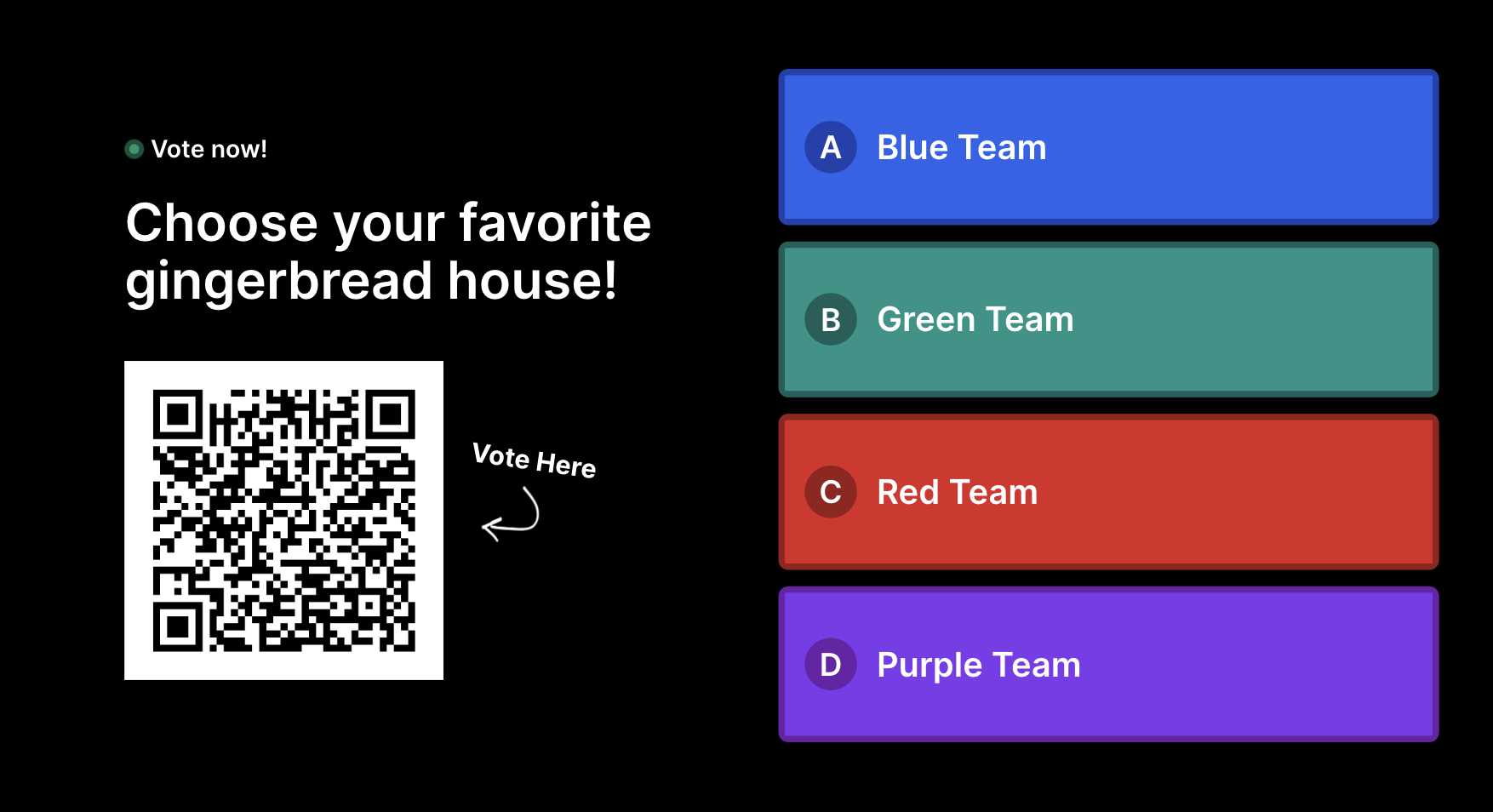
We had a gingerbread-house-decorating contest on the stage, with four pre-selected couples competing for the top prize. We bought the gingerbread houses premade with no decorations, and then we put all the decorating stuff on a table off the stage. The contestants had to run to the table, grab the decorations, and decorate their house the best they could in under three minutes (It was hilarious!)

(click image to enlarge)

We put cheap colored plastic tablecloths on the four tables and matched them to Sidekick’s first four default voting colors: blue, green, red, and purple. (It was handy that those default colors were pretty Christmas-compatible!) Then we put another matching tablecloth under each table as a drop cloth for easy cleanup of any mess at the end of the game.

Note From Doug:
JIM YOU ARE AN ABSOLUTE GENIUS! I LOVE THIS CREATIVITY!

My wife Cindy was hosting the game with Ryan, a guy who graduated from our youth ministry last year. Ryan always hosted games when he was a high school student, so we drafted him when he came home from college to host our pre-show. As always, the hosts and their interaction with the contestants is so important!

We were running a game timer countdown just on a laptop sitting on a table where they could all see, and then we used up our big screens in the room for other stuff! (I used DYM’s Candy Cane Snowflakes countdown, starting at 3:00, because the numbers were huge enough to make up for the small screen we were playing it on.)

On that note, here’s how we did screens and voting:

We have a screen setup that seems to be pretty common to a lot of churches: three large front screens, with separate content on the two side screens vs. the center screen.

So we did…

  • Live camera shots of the teams decorating their gingerbread houses on the two side screens, and…
  • The Sidekick Live Voting graphic on the main center screen.

(click image to enlarge)

Since our church is primarily senior-citizens, when the hosts introduced Sidekick’s QR code and the concept of Live Voting, I ran up, pulled out my phone, and showed people exactly how to do it.

Here’s what I actually said (while demonstrating):

“Open your camera, and zoom in on that black and white symbol thingy. DON’T take a photo. Instead, wait until a little link pops up on the screen by the QR code, and tap that. If you’re having trouble, ask a teenager to help you.”

And our hosts made sure to emphasize:

“You only get to vote once, so make sure you’re happy with your vote before you send it!”

We counted down, kicked off the chaos, and took votes. It was so much fun! I can’t wait to find other creative uses for Sidekick in 2024!

Here Are A Few Quick Notes That Might Help Someone Else Who Wants to Do Something Similar:

  • Even with our elderly crowd, we had a strong voting response, and people LOVED seeing their vote tally before their eyes!
  • The option to show the QR code full-screen was very useful for the larger room.
  • If I had it to do again, I’d make sure the color-coded tables were in the same order as the vote graphic (rookie mistake 🤷‍♂️).
  • I got the new DYM Platinum Membership the week before Christmas. It gave me all the live voting capacity I needed on Sidekick, plus literally everything I need for my program budget, volunteer training, and parent seminars for the entire year. They aren’t paying me to say this, but I highly recommend it.

Happy New Year! If you haven’t poked around on this blog yet, I recommend that too–so much to learn from other youth workers!

Blessings,

Jim

If you’re using Sidekick and you run into any issues, or if you just have a question, please feel free to reach out to our support team at: [email protected]. Or you can check out other helpful articles and walkthroughs at the Sidekick Help Desk by visiting https://help.sidekick.tv.

Finally, if you choose to use the new Sidekick… let us know how you do it and what types of polls you do because we want to highlight you. Our goal is to highlight a youth worker every week with different ways they’ve used Sidekick to help their students engage. If you’re interested in being recognized as a Sidekick Hero, just click the big red button below:

If you’re using Sidekick and you run into any issues, or if you just have a question, please feel free to reach out to our support team at: [email protected]. Or you can check out other helpful articles and walkthroughs at the Sidekick Help Desk by visiting https://help.sidekick.tv.

Finally, if you choose to use the new Sidekick… let us know how you do it and what types of polls you do because we want to highlight you. Our goal is to highlight a youth worker every week with different ways they’ve used Sidekick to help their students engage. If you’re interested in being recognized as a Sidekick Hero, just click the big red button below:
Go to Top